-24-
Revision 2/F3509
Figure 6.2.2
Buzzer
Power Switch
Heating Indicator
Thermostat
Bake Time Up
Indicator
Roast‘n Hold Switch
Roast ‘n Hold Time
Up Indicator
Roast Timer
Steam Switch
Light Switch
Hold Thermostat
Bake Timer
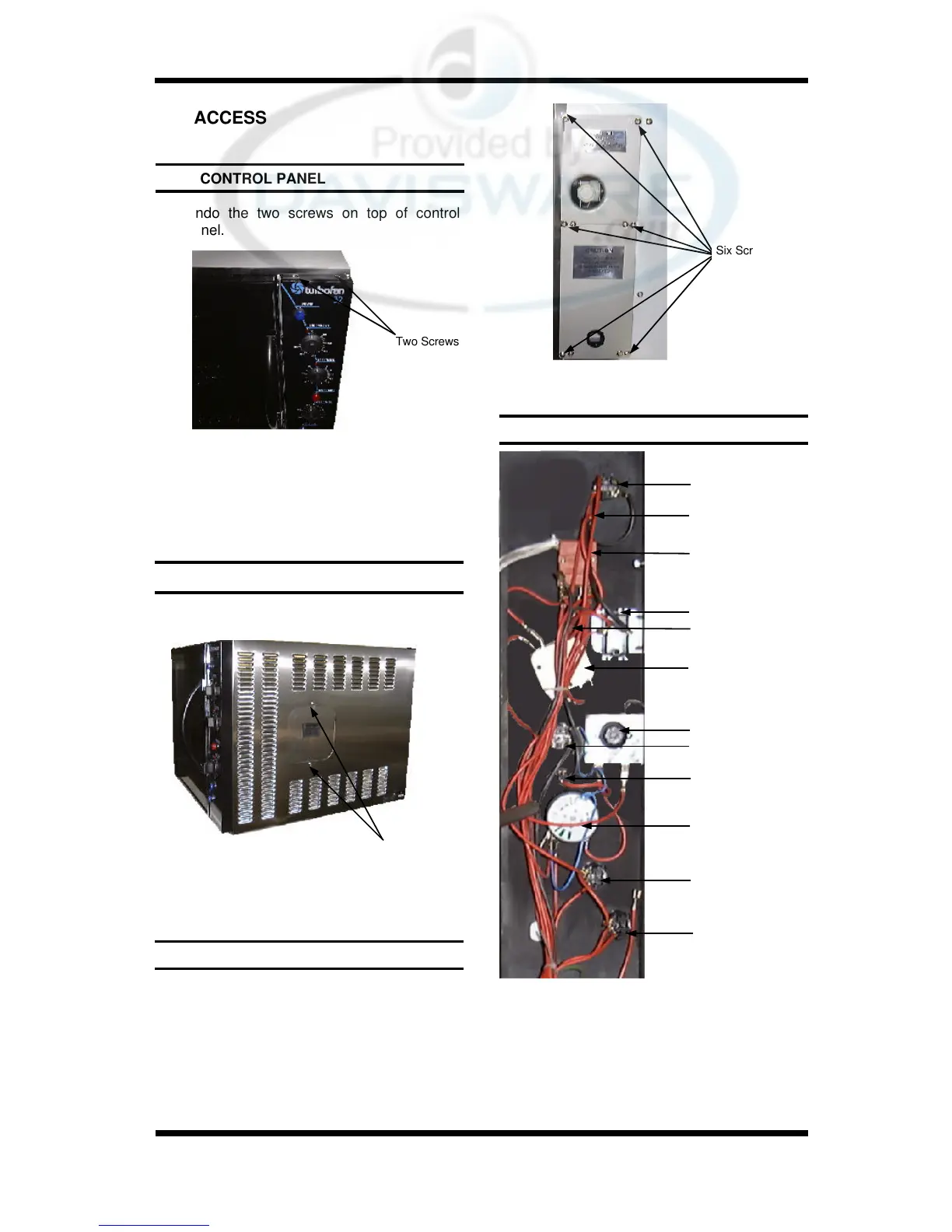
Two Screws
Two Screws
6.2 ACCESS
6.2.1 CONTROL PANEL
1) Undo the two screws on top of control
panel.
1) Undo the two screws holding the panel.
6.2.2 SERVICE (SIDE) PANEL
1) Undo the six screws holding the panels.
2) Remove panels.
6.2.3 SERVICE (REAR) PANELS
2) Panel is now free to hinge at bottom.
When closing the panel ensure wires and
capillary tube are clear of metal or other
terminals.
Figure 6.2.1
2) Remove panel.
Figure 6.2.3
6.2.4 CONTROL PANEL—REAR
Figure 6.2.4
Six Screws


 To Next Page