Transmitted Light Option Operations
5014166 D 67
To align the phase ring
1. Make sure that the phase ring adjustment lens is in place.
On the ImageXpress Micro Standard and XL Systems, the
optics cover is removed and the flip-in lens is manually
placed in position for the phase ring adjustment. See
To use
the flip-in lens on the ImageXpress Micro Standard and XL
Systems on page 61.
On the ImageXpress Micro XLS System, the flip-in lens is
manually placed in position for the phase ring adjustment
without removing the optics cover. See To use the flip-in lens
on the ImageXpress Micro XLS System on page 63.
On the ImageXpress Micro Confocal System, the phase ring
adjustment lens is placed in position for the phase ring
adjustment using the Meta Imaging Series Administrator
Software. See To use the phase ring adjustment lens on the
ImageXpress Micro Confocal System on page 65.
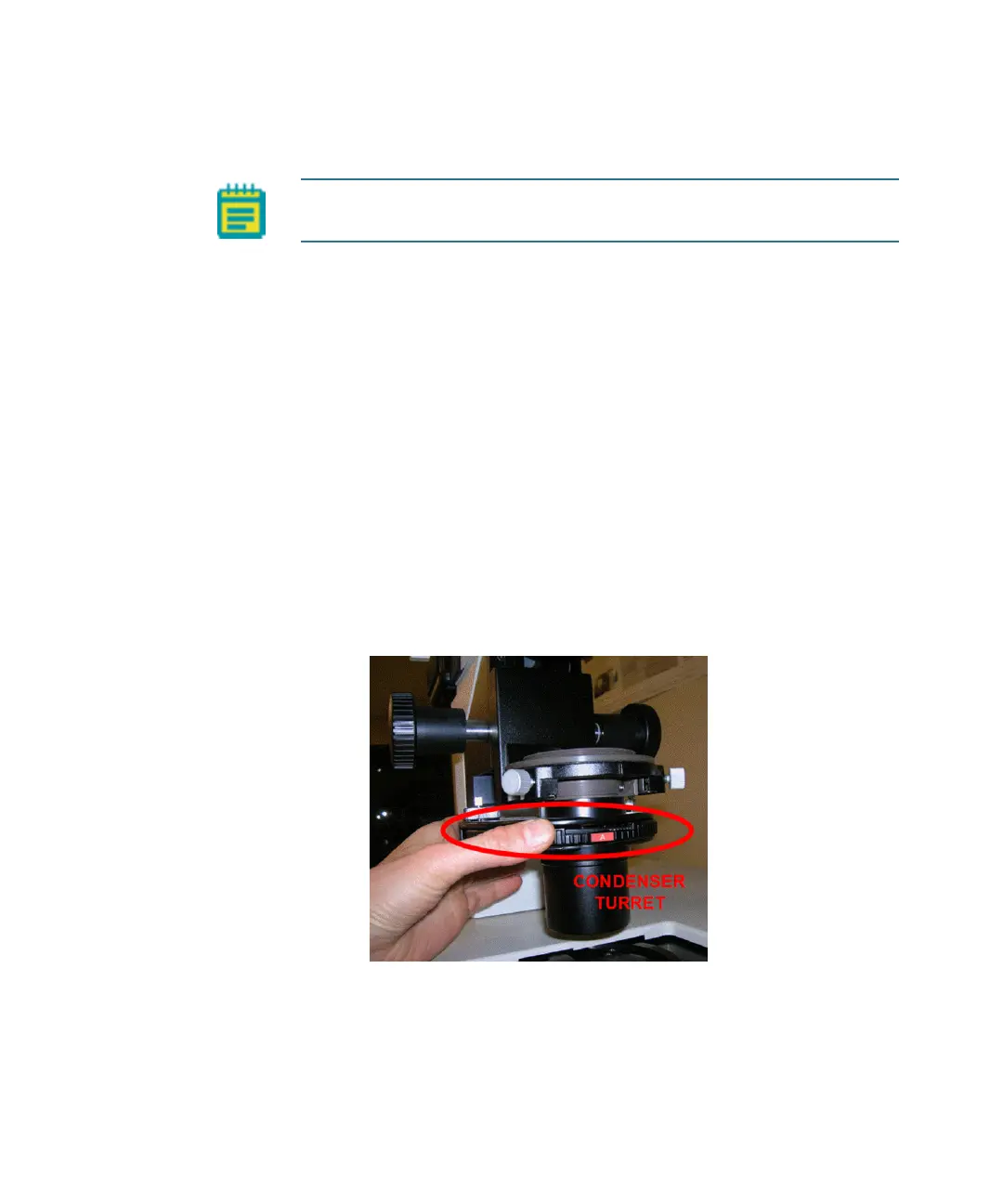
2. Rotate the condenser turret so that the A position is selected (at
the front).
Figure 4-15: Condenser turret with position A at the front
Note: For the ImageXpress Micro Confocal System, make sure that the
instrument is in widefield mode before aligning the phase ring.
ImageXpressOptionsUserGuide.book Page 67 Wednesday, September 9, 2015 3:54 PM



 To Next Page