5
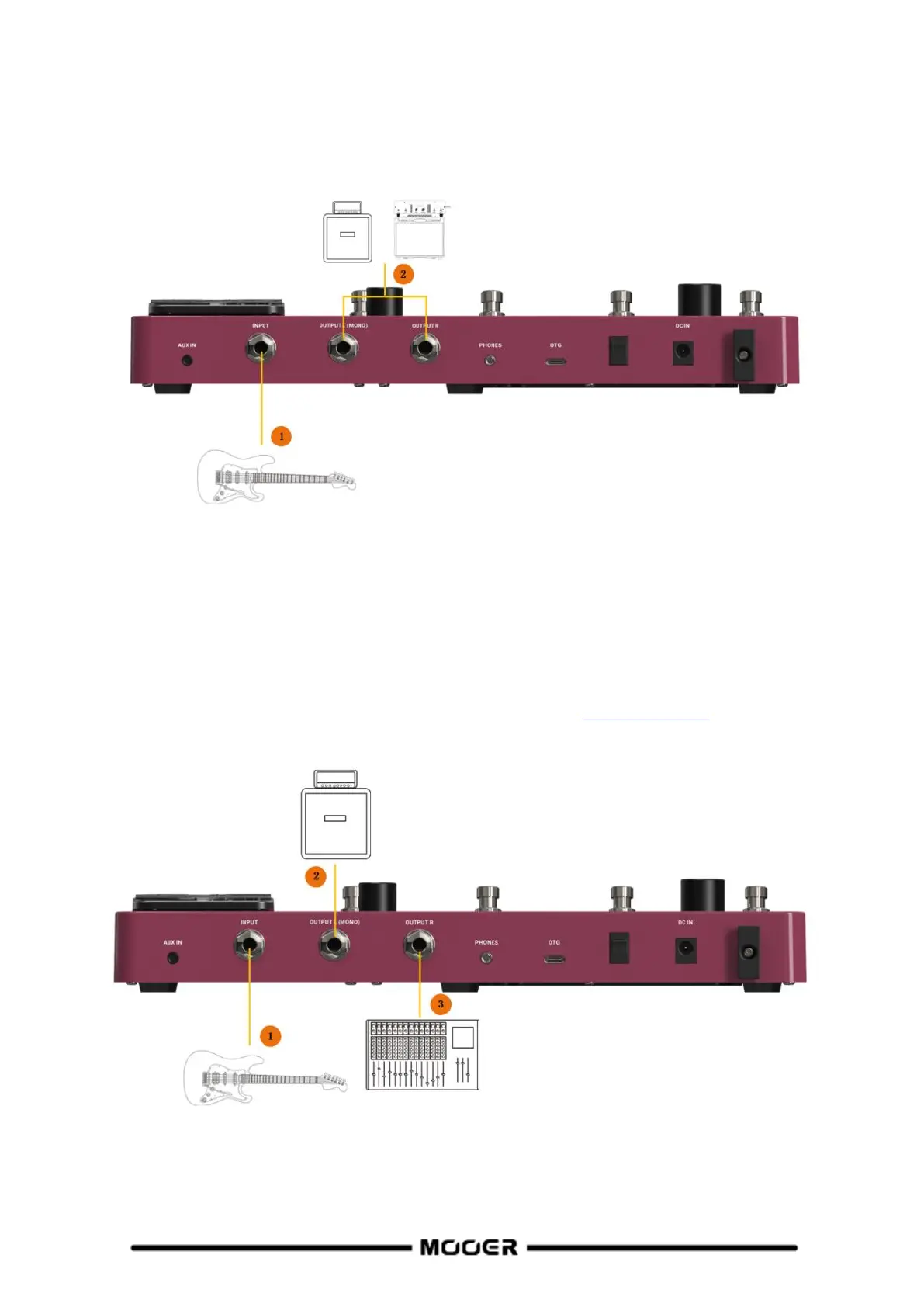
Connection to a guitar power amplifier and cabinet
This connection scenario includes a guitar amplifier with FX LOOP or a pure power amp. It is
recommended to activate the AMP module when you establish connections using this application
scenario. All preamp functions will be performed by the GE150 PRO in this case.
1. Connect an instrument.
2. Connect to the RETURN jack of a guitar amplifier or to the input of a power amp.
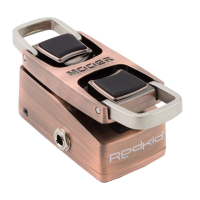
Mixed full-range / non-full-range device connection
This connection combines the two scenarios above, when you need to use full-range equipment (e.g.
mixers) and non-full-range equipment (e.g. guitar amps and cabinets) at the same time. Please refer
to the following diagram for connections and activate CAB SIM THRU (Bypass) in SYSTEM settings for
the left output. Deactivate CAB SIM THRU for the right output. (See SYSTEM SETTINGS).
1. Connect an instrument.
2. Connect your non full-range equipment (CAB module bypassed).
3. Connect you full-range equipment (CAB module active).


 To Next Page