TOUCHSCREEN OPERATION
1. Turn the Emergency Stop button clockwise to switch the power on. After the
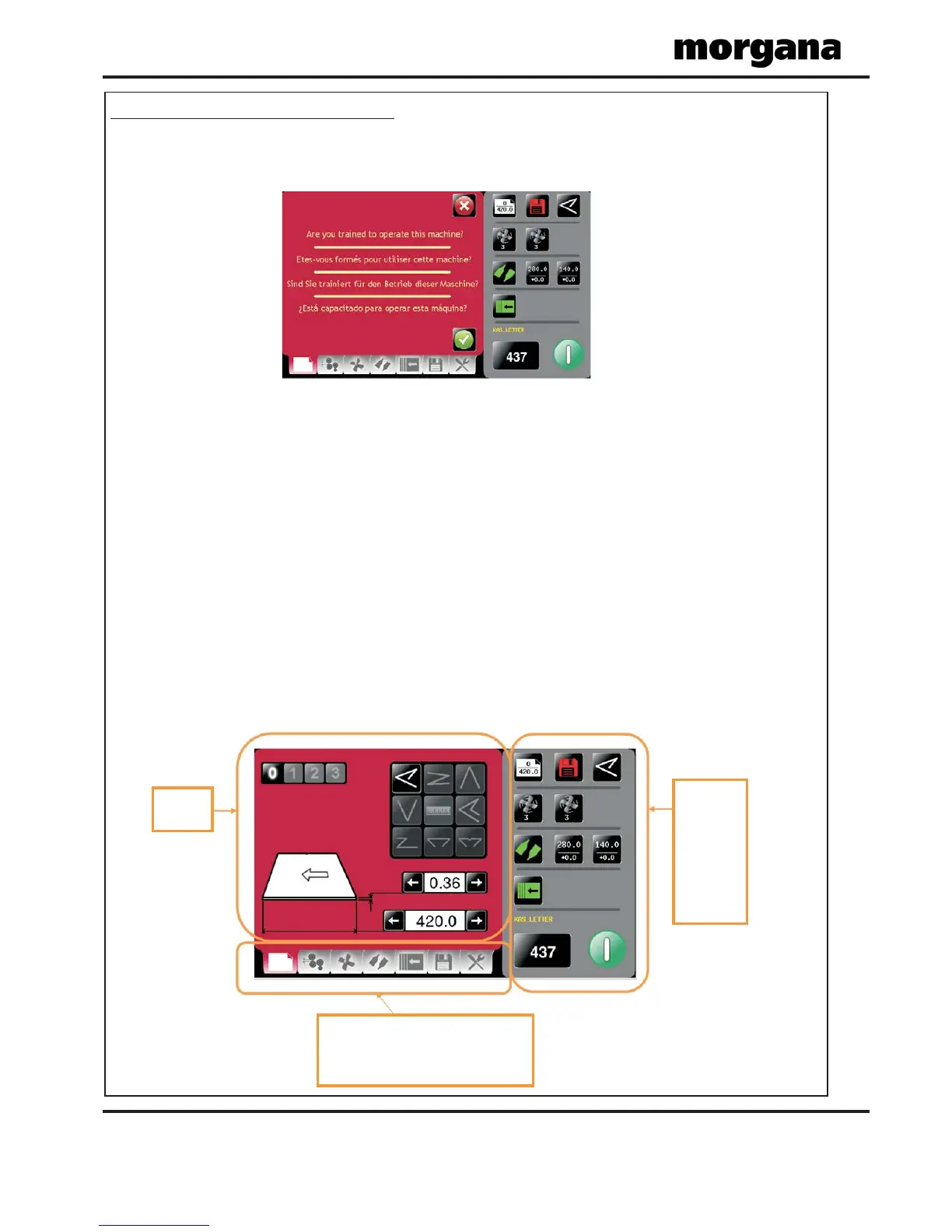
system start up procedure the touch screen will be displayed as shown below.
WARNING:-
Wait at least 10 seconds, after making any selection on the Touchscreen
panel, before switching the machine OFF. Failure to do so could result in the
data storage being corrupted, and the machine not operating.
The touch screen is laid out into 3 main areas as shown below:
Page 10
FOLDING
Setting
page
Status of
machine
&
data entry
area. Also
used for
quick links
to setting
pages.
Tabs to enable switching between setting
pages
-
choose either Paper
Settings, Gap
settings, Feed Fan Setting, Fold settings,
Delivery settings, Store and Tools.
Operating the AutoFold Pro
IMPORTANT.
If you have not been trained to operate this machine, we strongly advise that you select
the red cross icon.
We recommend that you either seek training or ask a trained operator to run the machine
for you.
Select the green tick icon only if you have been trained to operate this machine.
If you have not been trained to operate this machine and you select the green tick icon,
Morgana Systems Ltd accept no responsibility for personal injury, damage to the
machine or damage to materials being processed by the machine.



 To Next Page