28
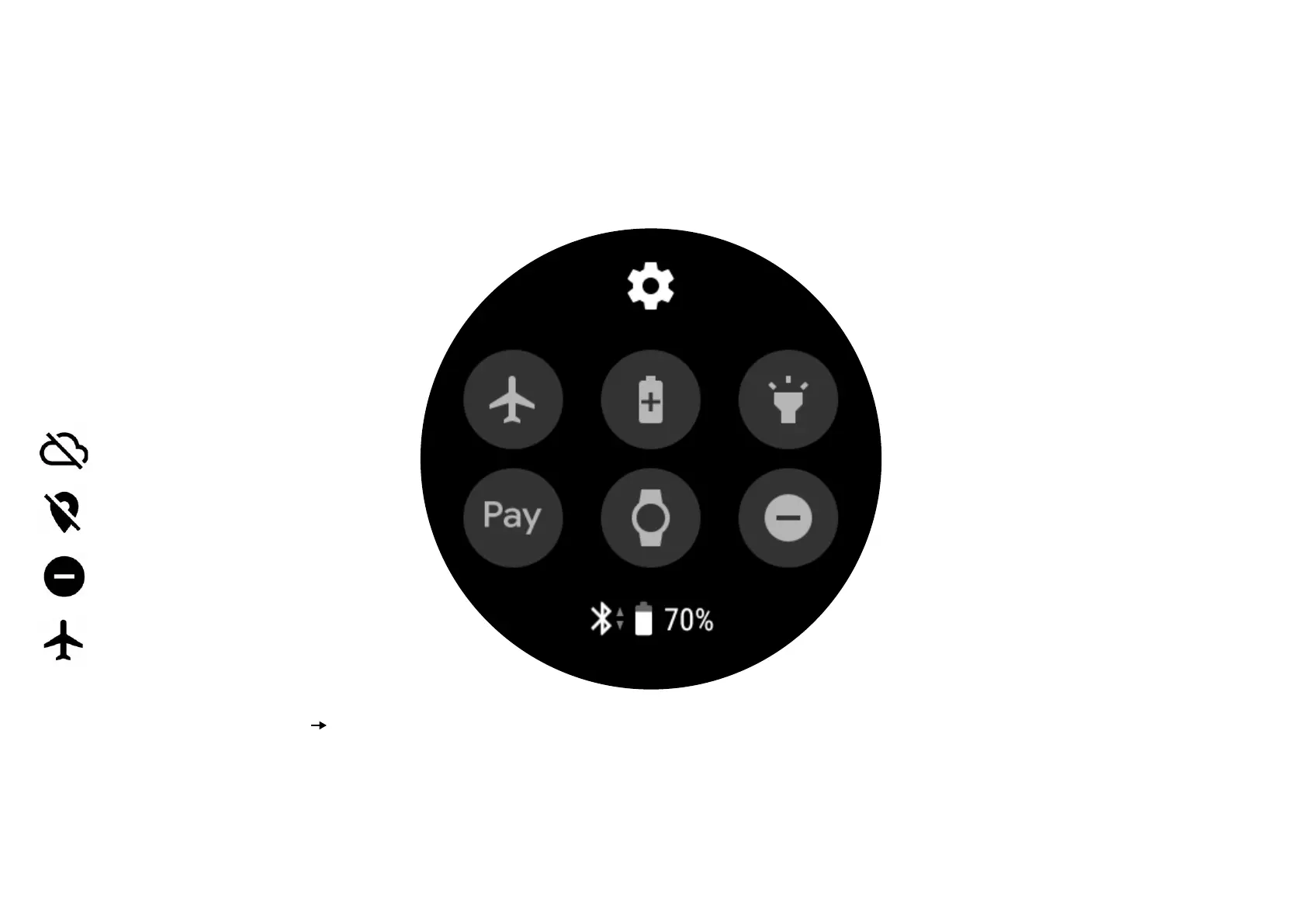
Status Panel
Your Status Panel allows you to access
quick settings and features you might
need on a daily basis.Here’s how you
manage them:
It also shows you the current status of
your smartwatch such as battery and
Wi-Fi connection as well as:
It also shows you the current status of
your smartwatch such as battery and
Wi-Fi connection as well as:
Lost phone connection
GPS location tracking
Do not disturb mode
Airplane mode
To customize your quick settings icons,
simply tap on Settings from your Apps
screen, then go to Advanced
Quick
Settings. Tap − to remove an icon or +
to add a new icon. Touch and hold, then
drag an icon to rearrange their order on
the Status Panel.
Airplane mode turns o your
connectivity and disconnects you from
Wi-Fi network.
Battery saving limits your watch
functions to save your remaining
battery power.
Flashlight maximizes your screen
brightness so you can use the watch as
an illuminating tool
Android Pay lets you use your
smartwatch for mobile payments.
Theatre mode turns o both your
watch’s screen and notifications.
Do not disturb mode turns o
all vibrations and notifications.


 To Next Page