34
Google Assistant
From turning the heat down to listing your up-
coming meetings, you can ask the Google As-
sistant to perform a range of tasks directly from
your watch.
To ask the Google Assistant a question, use the
wake words ‘’OK Google’’ or ‘’Hey Google’’ or
long press the top crown until you feel the watch
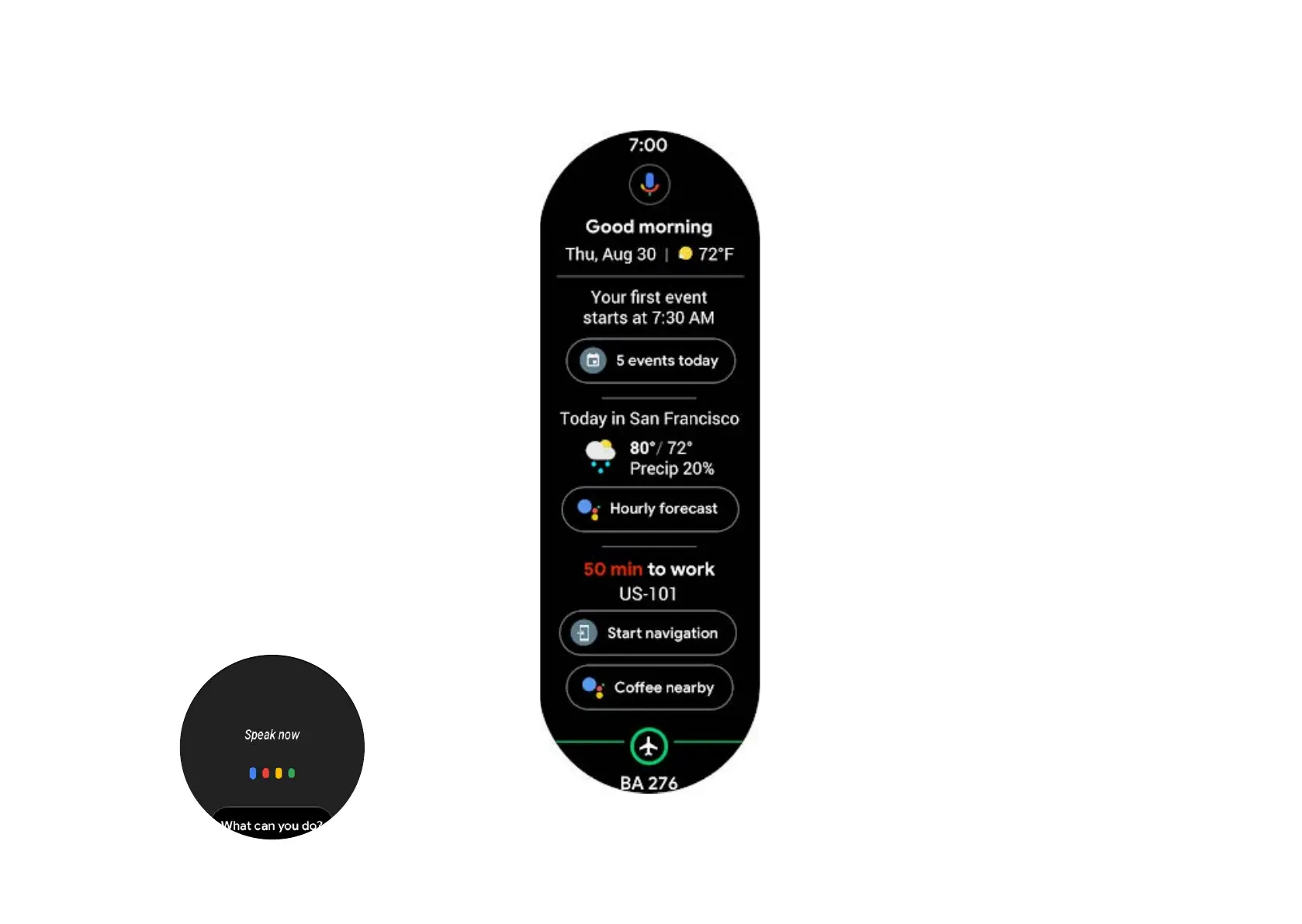
vibrate. Alternatively, swipe right from the left of
your watch to view your dashboard.
From here, you can access important information
such as upcoming reservations and reminders,
trac conditions, weather forecast, and places
nearby.
Tapping the mic icon at the top of the screen
will also activate the assistant so you can ask
a question.
Your Google Assistant can:
• Control timers, alarms, and reminders
• Sync with your calendars, emails, and other
personal tools
• Find and display online information, including
news, directions, and places of interest
• Translate text in real-time
• Read your updates aloud
• Control other devices and operate a smart
home
• Send messages to your contacts or schedule
appointments
• Launch installed apps
To go back from the Google Assistant conver-
sation, press the rotating crown once. Hold it in
place to launch the assistant again.
Tip: Tap the ‘’what can you do’’ button to learn
more about the Google Assistant.


 To Next Page