8
Knowing Your Moto
Your 3rd gen Moto 360 helps you stay in touch with yourself and the world around you. Here’s how to get the most out of it
Customize at will:
Personalize the way your watch looks
by choosing between dierent color
themes and dial configurations.
Map the bottom push-crown to
launch an application of your choice.
Modify the overall appearance of the
watch by easily replacing the strap
(more on this under ‘’Replacing Your
Strap’’ section below).
Make your life easier:
Launch your virtual assistant via a
simple voice command or by swiping
from left to right.
Communicate via the display to
manage every aspect of your life or
simply learn something new.
Stay connected:
Get the notifications you need, when
you need them.
Swipe down from the bottom to view
your notifications. Scroll through
them with your finger or swivel down
the rotating crown.
Stay healthy:
Swipe left from the right of your
watch to access fitness info. The
caseback of the 3rd gen Moto 360
monitors your heart rate and activity
so that you can keep tabs on your
health and general wellbeing.
You can also find a wide range of ex-
ercises in your workout library.
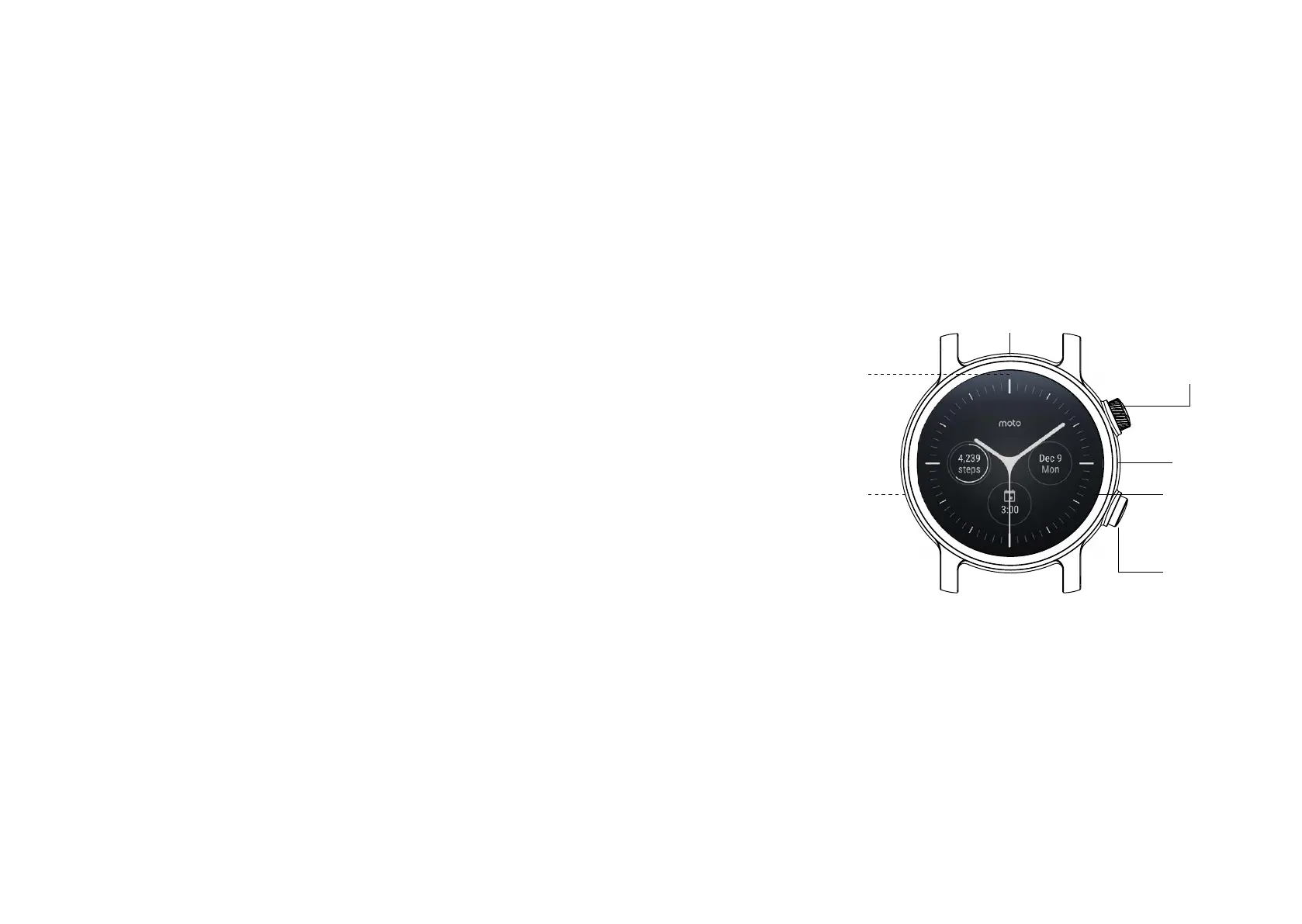
Power Button
Watch Face
Touch and hold to
change it
Mic
Barometer
Heart Rate
Sensor
(on back)
Ambient
Light
Sensor
(behind the
screen)
Custom
Action
Button


 To Next Page