MIDI MACHINE CONTROL
127
Once you have successfully established overall MIDI
communication between your software and your Express
interface, follow these steps to set up your software to serve
as the MMC transport controller:
1 Set up your software to sync to MIDI Time Code as
described in the previous section (“Preparing software for
MMC” on page 125)
2 Tell your MMC software what the MMC Device ID is of
your Express interface.
From the factory, the default MMC device ID for your
Express interface is 19. If you need to, you can change it as
described in “Setting MMC device ID’s” on page 125.
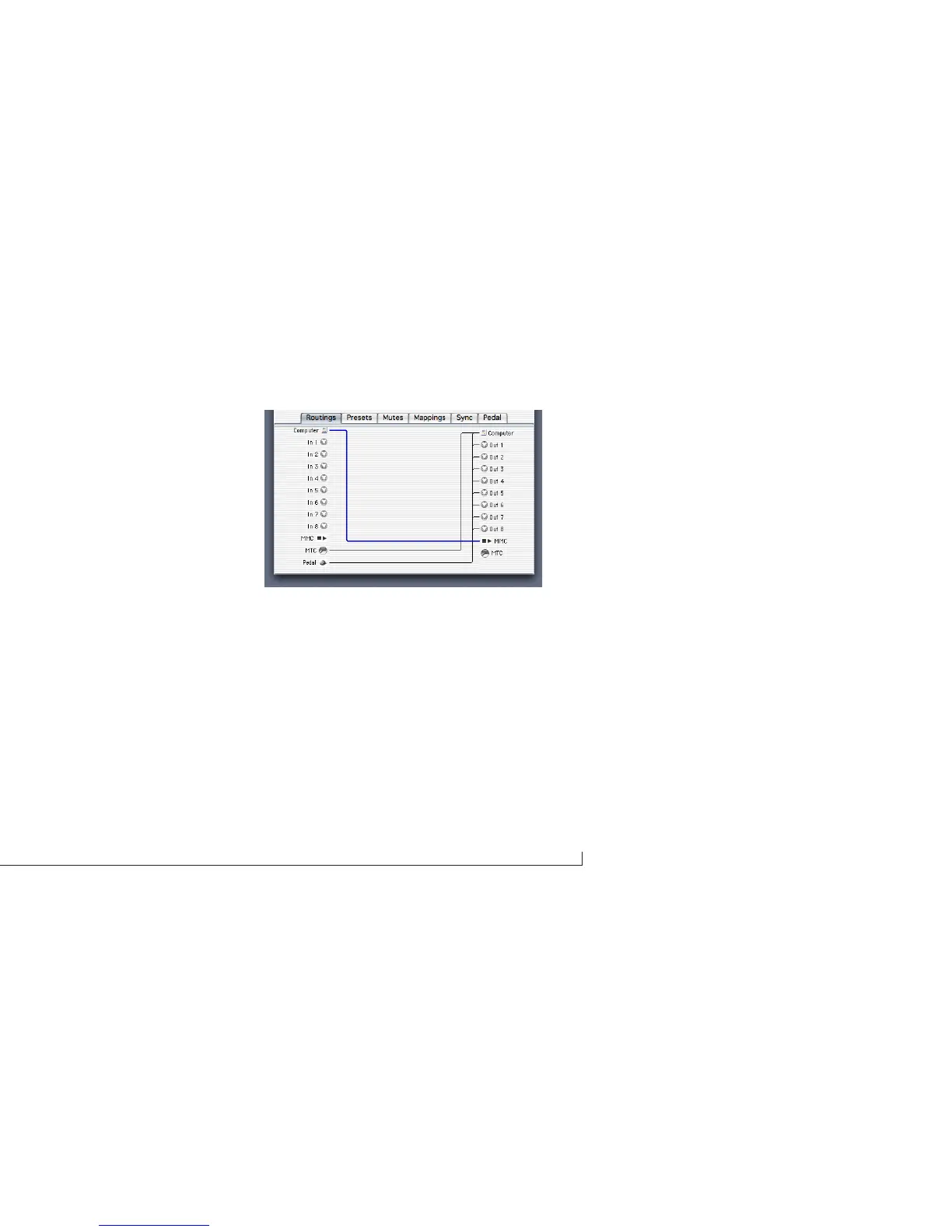
3 Make the MMC routing connection show below (or in
Figure 6-22 on page 72 for Mac OS 9 users) from the
computer to your Express interface.
Figure 9-2: To establish MMC control of the Express interface from your
software, make this connection in the Routings tab.
4 Set the Express interface master sync mode to Internal.
your Express interface will respond to MMC commands
coming from the computer specifying its device ID. It will
start, stop, and locate to any SMPTE location you
designate from your software.
Routing time code to other devices
Once you have successfully established MMC control of
the MOTU Express interface as described in this chapter,
you can route MIDI Time Code (MTC) from the MOTU



 To Next Page