Tacho function
The tacho function is available in configuration 4 & 6.
This function can be used with extrusion when it is necessary that the dosing rate is automatically adjusted
to the extruder speed. In tacho mode an input voltage is coupled to a dosing speed setting. If the extruder
speed changes, the tacho input voltage and speed of the dosing unit will change accordingly.
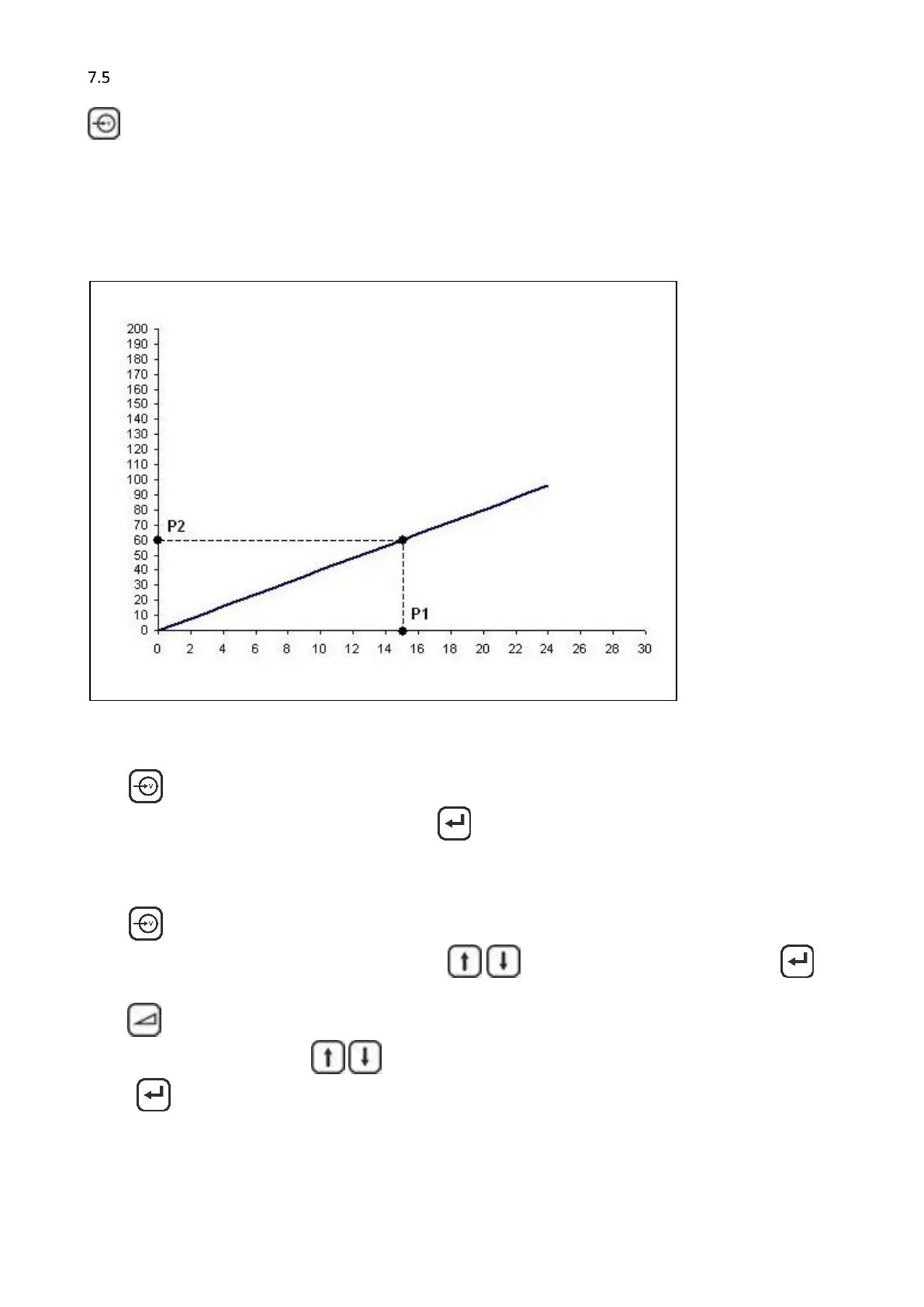
A linear correlation between extruder speed (tacho input signal) and the needed dosing speed is assumed.
See graph.
Method 1, with a running extruder:
Press to make the tacho function active. The display will show a numerical value that represents the
current voltage of the tacho input signal. When is pressed the current voltage (P1 in the graph) is
coupled to the set speed (P2 in the graph).
Method 2, no running extruder (recommended to disconnect the tacho signal)
Press to make the tacho function active. The display will show a numerical value that represents the
current voltage setting of the tacho function. Use to set the required voltage. When is
pressed the set value is stored (P1 in the graph).
Press to enter the speed related to the previous set tacho voltage. The display will show the last entered
set speed (P2 in the graph). Use to set the required speed.
When is pressed the set value is stored (P2 in the graph).
During production, the speed (P2) can be changed. The new speed is coupled to the previous stored voltage
and the graph will change accordingly.



 To Next Page