mr
.
steam
®
steamtherapy
®
eTempo
®
Controls
______________________________________________________________________
26
eTEMPO/PLUS
®
Operating Instructions
The eTEMPO/Plus Control features programmable digital temperature control,
programmable time duration, clock, Aromasteam, ChromaSteam, ON/OFF and
two personal settings.
Set the steambathing temperature according to personal
preference, however it is highly recommended to begin steambathing at a low
temperature setting to gauge comfort and safety levels. Set the duration at 10
minutes max. to gauge comfort and safety levels. This will allow the steam
generator to heat up and begin producing steam.
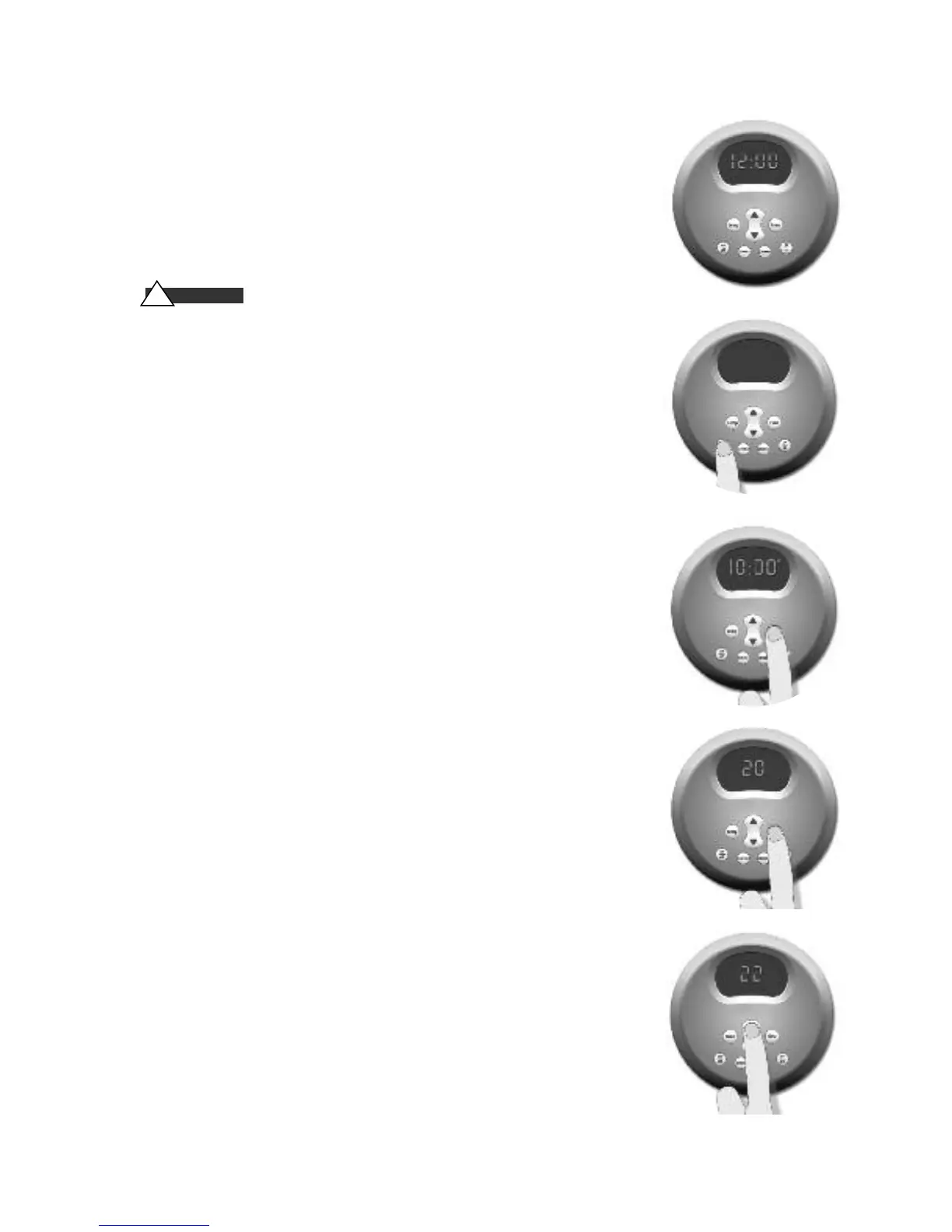
POWERING UP THE UNIT- Diagram 1
When the generator is first powered up or after a power interruption, the
clock display flashes and the clock is ready to be set up.
NOTE: Pressing the ON/OFF will start the generator even if the clock has not
been set.
ON/OFF - Diagram 2
Press the ON/OFF key to start or stop the flow of steam. The Set Point is dis-
played. Steam will begin to flow a few a few minutes after the control is
turned ON. The duration required for the steam room to reach steambathing
temperatures depends on the steam room construction and steam generator
specifications. Steam may continue to flow for a short time after the control
is turned OFF.
Setting the Clock - Diagram 3
When the display is not flashing: Press and hold the TIME key until the dis-
play starts flashing.
Use the UP/DOWN keys to select the desired, at this time the AM/PM logo
will be displayed. Press the TIME key to save changes.
NOTE: The clock can only be set when the generator is off.
Setting the Time Duration/Viewing the Clock
Press TIME key to set or display the remaining relaxation time or the
clock.(
Diagram 4).
The control is pre-set and will display a TIME setting of
20 minutes (default setting).
With the TIME or CLOCK displayed, press the UP or DOWN keys (Diagram 5)
to set the desired duration time (2-60 minutes) in two minute increments.
Set the steambathing duration according to personal preference, however it is
highly recommended to begin steambathing at a shorter duration to gauge
comfort and safety levels.
The control will turn off when the relaxation period times out. Then, the clock
time will be displayed.
DIAGRAM
1
DIAGRAM
2
DIAGRAM
3
DIAGRAM
4
DIAGRAM
5
homeowner
!
WARNING



 To Next Page