RT-14 Quick Start Guide
3
Connecting the cables
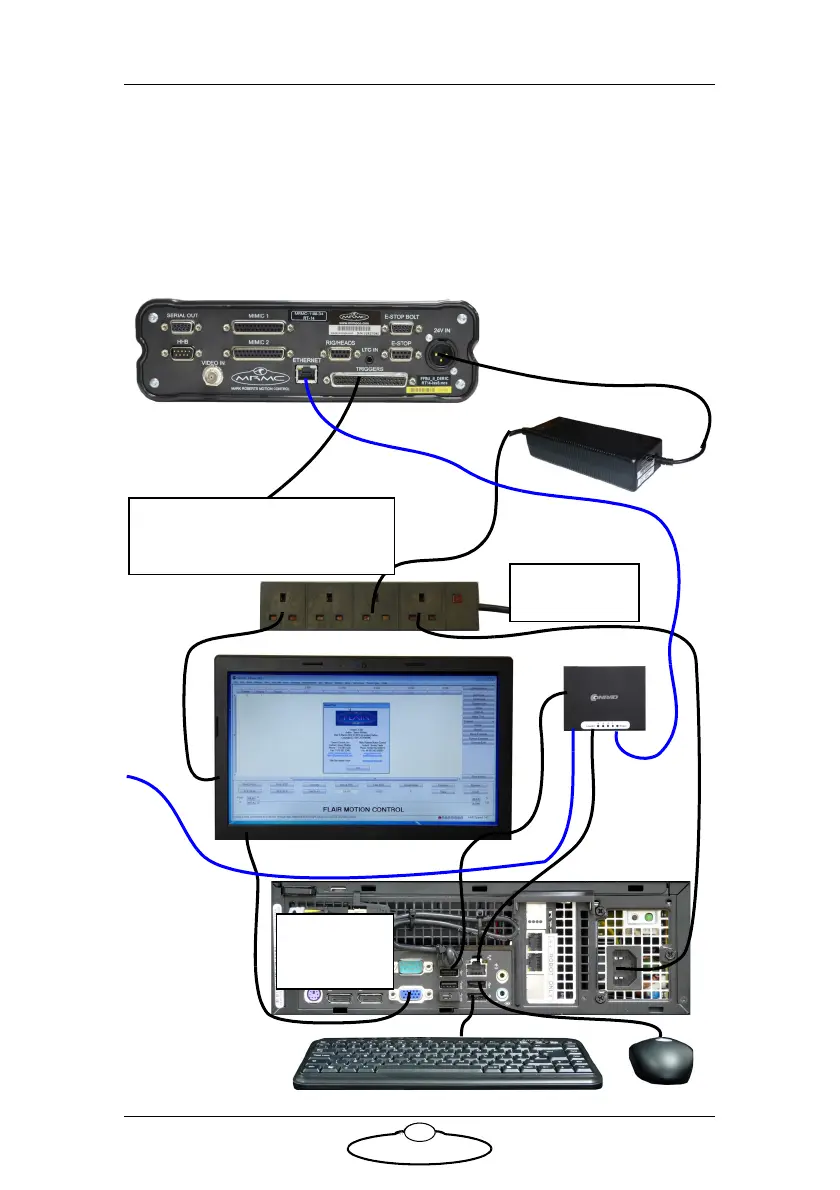
The minimum configuration is 24V power and Ethernet connected to a
PC or laptop. The RT-14 has its own IP address and a successful
connection can be seen in Flair motion control software. You can then
attach the devices that are needed to complete the particular rig
configuration desired. The following is a basic setup using the RT-14.
Ethernet hub
Power Supply:
120-240 Volts
5V
24 V DC
ETHERNET for Camera
Flair dongle
cable in USB
port
ETHERNET
24V IN
Device used to trigger input to
Flair or output from Flair. For
connector pin-outs see page 21.
T
r
i
g
g
e
r
d
e
v
i
c
e


 To Next Page