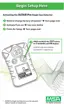
9. User is prompted for a Fresh Air Setup (FAS):
• "SET", "?" icon and FAS display.
If Fresh Air Setup is desired, immediately press the TEST button.
• "HOURGLASS", "SET", and FAS display.
If user does not desire FAS, do NOT press the TEST button:
• The instrument continues the ON sequence.
NOTE: When performing a fresh air setup, the instrument must be
in a known clean air. The fresh air setup has limits.
If a hazardous level of gas is present, the ALTAIR Pro
instrument displays "FAS / ERR".
Press the TEST button to acknowledge the error. and
perform an instrument calibration.
10. If the instrument was configured for Oxygen, it displays:
• Oxygen reading
• % icon
• battery indicator.
If the instrument is configured for a toxic gas, it displays:
• gas reading
• PPM icon
• battery indicator.
Battery Life Indicator (See FIGURE 2-2)
• The battery condition icon continuously displays in the upper right-
hand corner of the display.
• As the battery is depleted, battery icon segments go blank until
only the outline of the battery icon remains.
• Each battery indicator segment represents approximately
1/4 of the total battery capacity.
2-6



 To Next Page