ENGLISH
14 Pro-Source Man. cod. B411107FG MSC
KEY SEARCH
6Key search
6.1.0 Search menu
This function is used when some details of the key to be duplicat-
ed are known, such as the manufacturer of the rough piece, the
cylinder, the car or motorcycle brand, the indirect code or the
card number. Once the machine's database has been searched, it
is possible to input the key code manually, or obtain it through
the decoding process.
How to access the page:
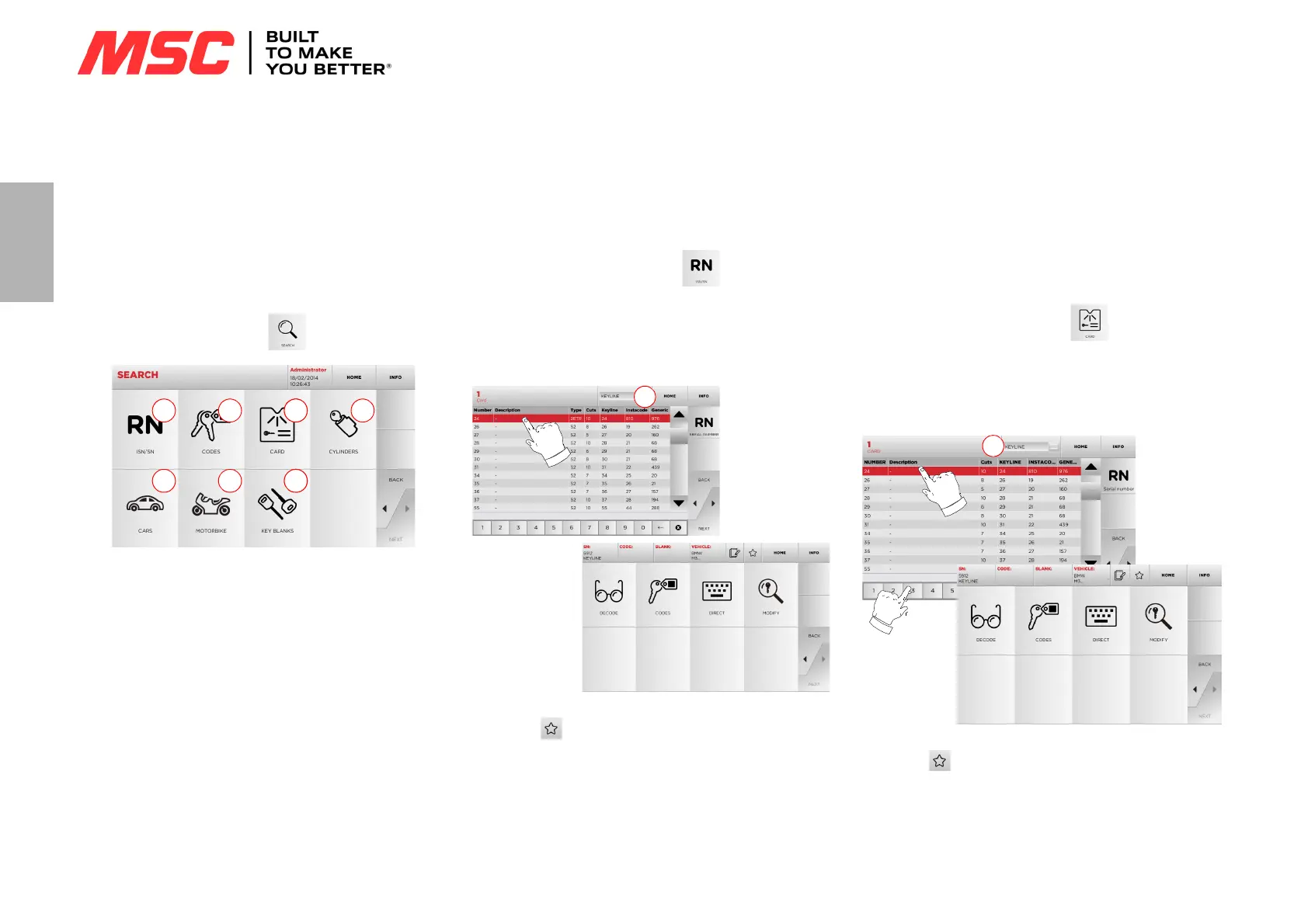
• From the MAIN menu, select:
Options displayed:
1. This allows you to search and quickly select data via the RE-
CORD number attributed by Keyline to a specific series, key
and card.
2. This allows you to search and select data via the original code
(profile and series).
3. This allows you to search and quickly select data through the
card number, according to the Keyline and other manufactur-
ers numbering system.
4. This allows you to search and select data via the lock and/or
cylinder manufacturer’s brand.
5. This allows you to search and select data via the car brand,
model and year of manufacture.
6. This allows you to search and select data via the motorcycle
brand, model and year of manufacture.
7. This allows you to search and select data via the Keyline key
article and similar blank keys made by other manufacturers.
6.1.1 Search by record number
The “RECORD NUMBER” page makes it possible to search for the
type of key to be duplicated by inputting the key's system num-
ber.
How to proceed:
•From the "SEARCH" page, select “ ”.
• Select one of the options in the top drop-down menu (A).
• Input the Record number for the make / model / year / series /
profile to be duplicated, then press “
►”.
• From the operating menu, choose one of the search or key
modification options: DECODE, CODES, DIRECT and MODIFY.
Note: From now on, please refer to chapter 7 on page16.
Note: The “ ” symbol makes it possible to save the selected
key in the list of bookmarks. See paragraph 6.2.0.
• To go back to the previous page, press the “
◄” key.
6.1.2 Search by code
Note: This procedure is described in paragraph5.1.2 on page9
6.1.3 Search by card
This function makes it possible to obtain quick access to a spe-
cific lock system, by choosing the memorised key manufacturer's
card.
How to proceed:
•From the "SEARCH" page, select “ ” button.
• Select one of the options in the top drop-down menu (A).
• Type in the card number attributed to the key to be cut, then
press “
►”.
• From the operating menu, choose one of the search or key
modification options: DECODE, CODES, DIRECT and MODIFY.
Note: From now on, please refer to chapter 7 on page16.
Note: The “ ” symbol makes it possible to save the selected
key in the list of bookmarks. See paragraph 6.2.0.
• To go back to the previous page, press the “
◄” key.


 To Next Page