ENGLISH
18 Pro-Source Man. cod. B411107FG MSC
ARCHIVE, PC AND USER MENU
8Archive, PC and user menu
8.1.0 Archive Menu
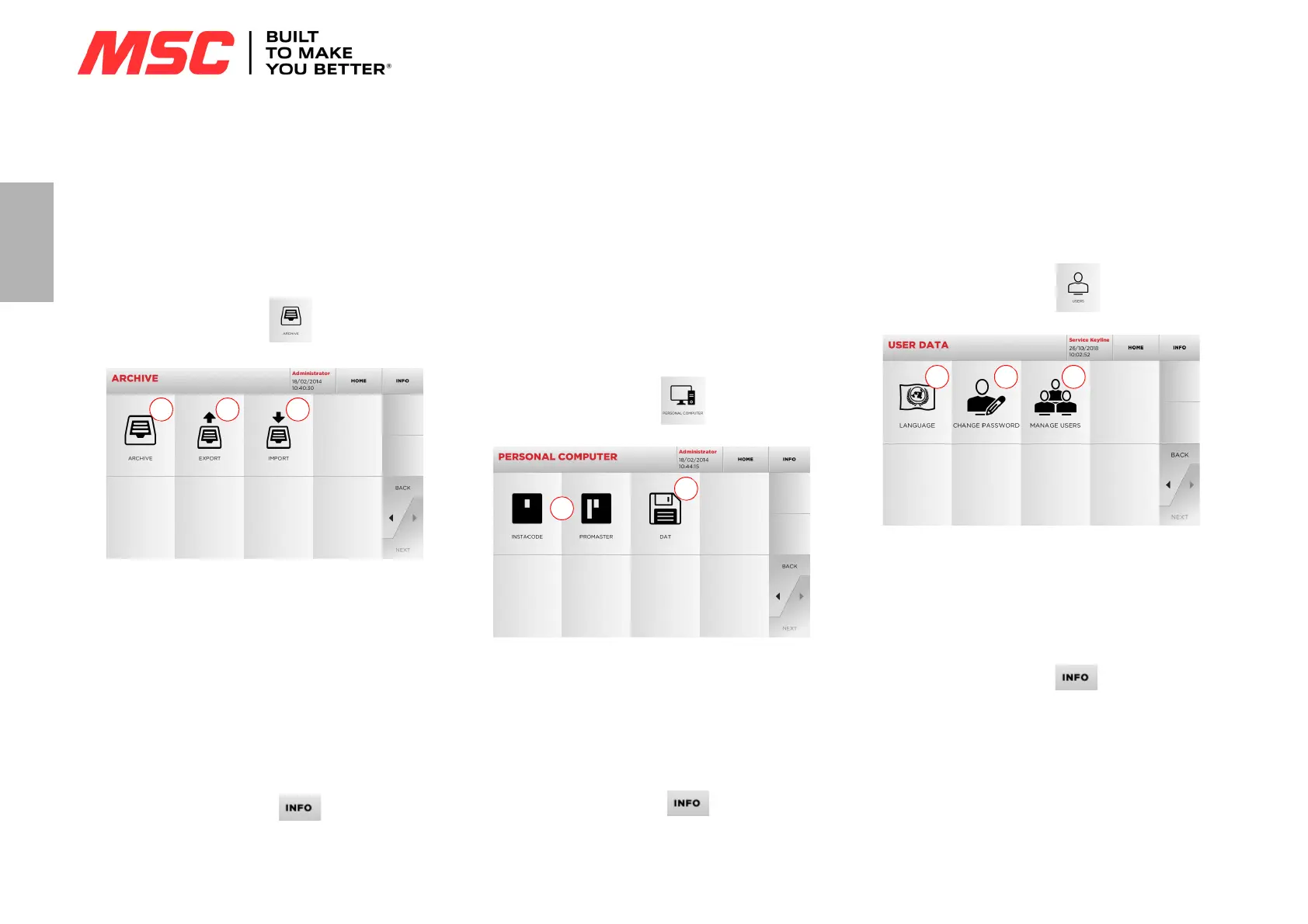
The ARCHIVE menu makes it possible to manage the user data
and the database saved by the user during the key reading, de-
coding and modification phases. It is also possible to access the
import and export functions from and to external supports (USB
flash drive).
How to access the page:
• From the MAIN menu, select:
Options displayed:
1. This function makes it possible to access the archive con-
taining the keys identified during the search and decoding
processes, so that they can be retrieved quickly every time
the user needs them.
2. This function makes it possible to export a file from the ma-
chine's database to a USB flash drive. The export and import
functions allow the customer to exchange customised data
between machines or create backup copies of the exported
archive.
3. This function makes it possible to import a file from a USB
flash drive to the machine's database. Data imported from
the USB flash drive shall be saved in the archive.
• For further information select “ ” from the display.
8.2.0 Personal Computer Menu
Through this menu it is possible to access the functions to inter-
face Pro-Source with queuing software that might reside in a re-
mote PC or USB flash drive.
It is possible to import job queues containing several processes
(JOBS).The JOBS, in turn, contain information for each key to be
cut, such as: type of key, type of bitting, and number of copies to
be cut.
The programme makes it possible to select and execute only one
JOB at a time, until the queue is exhausted.
How to access the page:
• From the MAIN menu, select:
Options displayed:
1. These menus manage and process job queues created with
Instacode and Promaster key processing software and sent
to the machine.
2. This menu makes it possible to import, manage and process
job queues saved in DAT format files.
• For further information select “ ” from the display.
8.3.0 User Menu
The USER menu makes it possible to manage the user data and
the database saved by the user during the key reading, decoding
and modification phases.
How to access the page:
• From the SETUP menu, select:
Options displayed:
1. This allows you to change displayed language (refer to para-
graph4.3.0 on page8).
2. This allows you to change password to existing users.
3. This allows you to manage users, add a new user, remove ex-
isting users and change information.
• For further information select “ ” from the display.


 To Next Page