2-7
Chapter 2 - Mainboard Hardware
MSI Reminds You...
1.Check the information in BIOS Chapter for the CPU temperature.
2. Whenever CPU is not installed, always protect your CPU socket pin
with the plastic cap covered to avoid damaging.
3. Please note that the mating/unmating durability of the CPU is 20
cycles. Therefore we suggest you do not plug/unplug the CPU too
often.
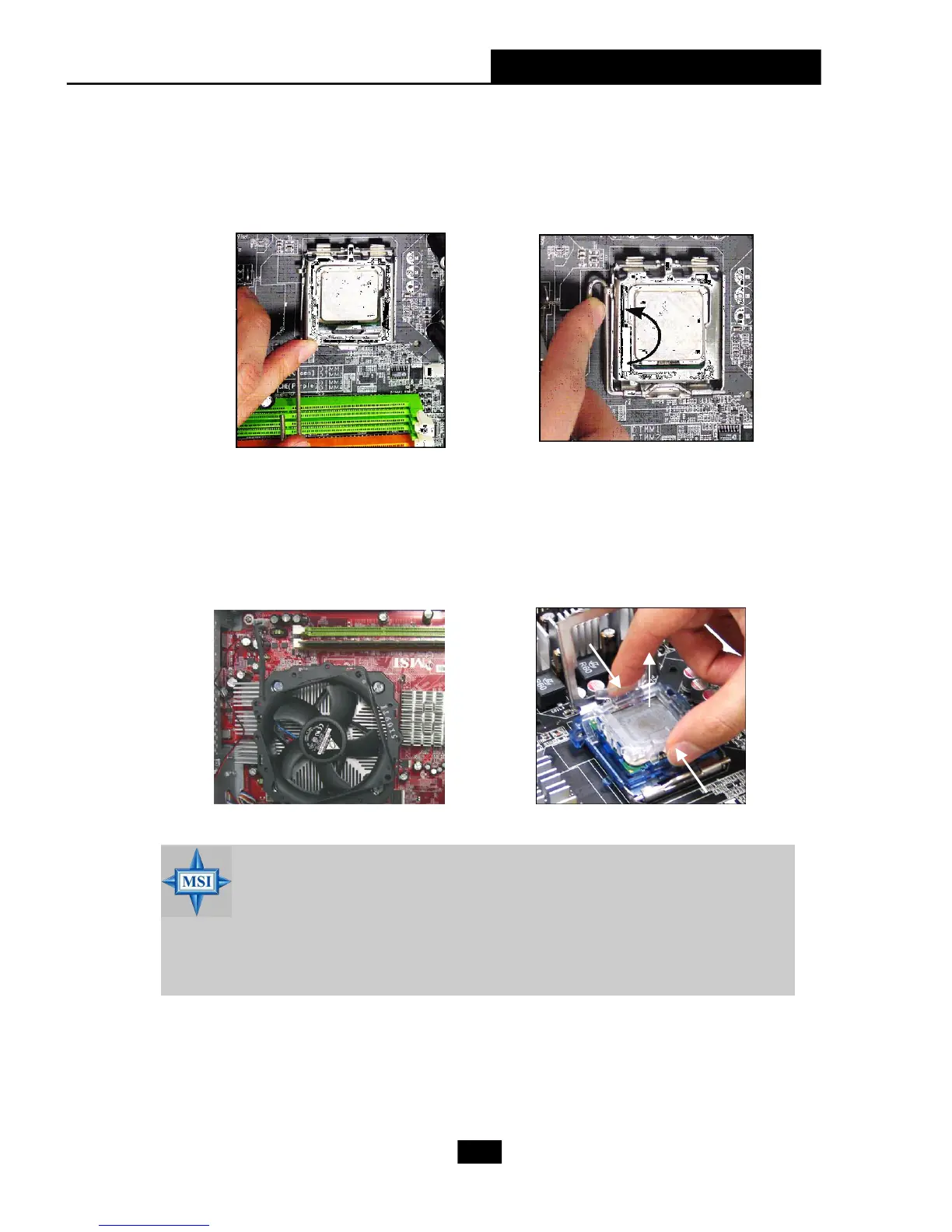
12. Press down the load lever
lightly onto the load plate, and
then secure the lever with the
hook under retention tab.
11.Visually inspect if the CPU is seated
well into the socket, then remove the
CPU Clip with 2 fingers. Then cover
the load plate onto the package.
Note:If you want to uninstall the
CPU, align the 4 points (see
Point 8 for details) again and
push the clip to lift up the CPU.
13. Align the holes on the mainboard
with the heatsink. Lock the
cooler until its four screws fixed
on the mainboard.











 To Next Page