120
Ultima S / SL Flex & Pro
3/2019
114060421
Hooklift Multilift Ultima S / SL Flex & Pro
Service Manual
1 2 3
4 5 6
ON OFF
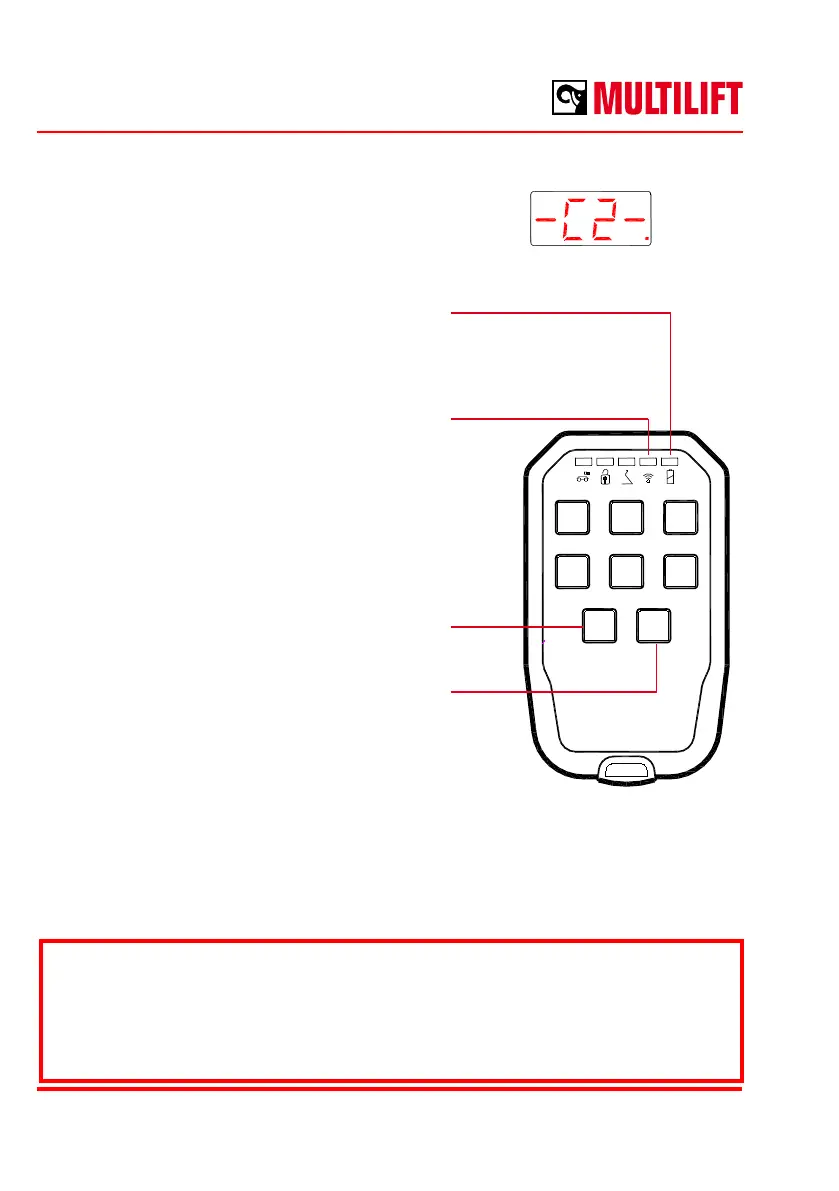
When the Mini-Radio mode is active, the display
of the Ultima device’s actual control unit will show
the text ”-C2-”.
The Mini-Radio uses 3 AAA (LR3) alkaline batteries as a powers source.
*) Ultima equipment functions: see the USE section of this manual.
LED: battery charge status
Not on = OK
On = battery charge low
LED: connection
Not on = power o
Blinking = no connection
On = connection OK
Activate the Mini-Radio by pressing the Mini-Radio
ON switch for 2 seconds.
Turn the Mini-Radio o by pressing the Mini-Radio
OFF switch for 2 seconds or switch it o using the
Ultima device’s actual controller.
The Ultima equipment function*) is activated by simultaneously pressing the ON switch and
the button for the function to be activated (ON+1, ON+2, ON+3, ON+4, ON+5 ja ON+6).
You do not need to press the ON switch if the funtion to be activated on the Mini Radio
requires pressing two switches simultaneously.



 To Next Page