129
Ultima S / SL Flex & Pro
3/2019
Hooklift Multilift Ultima S / SL Flex & Pro
User Manual
114060421
>>>
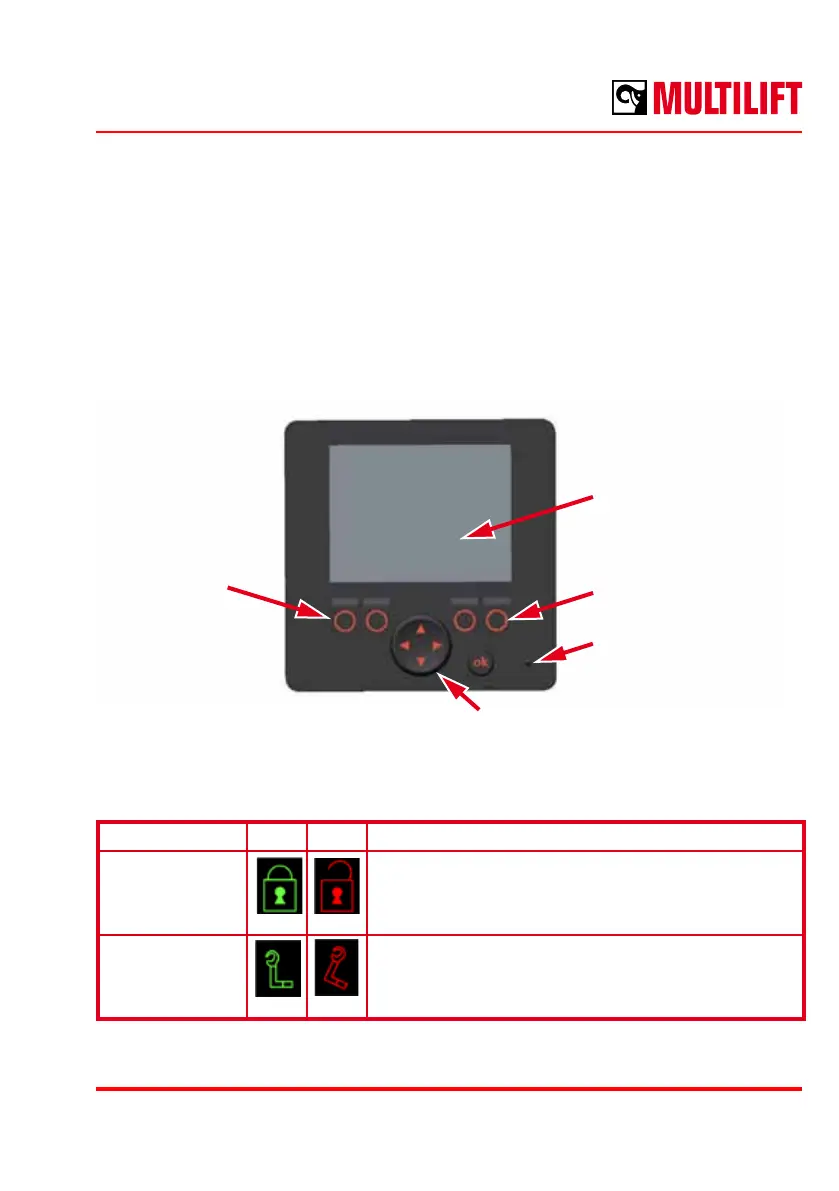
FutureTouch™ Basic Display
The system is optional in Flex and standard in Pro.
Multilift FutureTouch™ Basic Display System is an independent add-on feature to Flex &
Pro hooklifts control system. Status and control information between the display and the
control system is exchanged in hooklift CAN bus (CAN1). The Main Control Module takes
care of controlling the hooklift and serves as a gateway to the truck’s body builder CAN
interface (CAN2).
Function buttons
F1, F2
2,8” Display
Function buttons
F3, F4
Status LED
Name ON OFF Description
Locks open
/ closed
General indication for lock status. Indicates status of
all available safety related locks combined. If locks
are indicated open, the truck shall not be driven.
Hook up / down Indicates the hook down/not down position. When
the hook is not down, the truck shall not be driven.
Green Red
Green Red
D-pad
Indicators



 To Next Page