Chapter 3 – Using the Web Management Software
MultiModem rCell User Guide 73
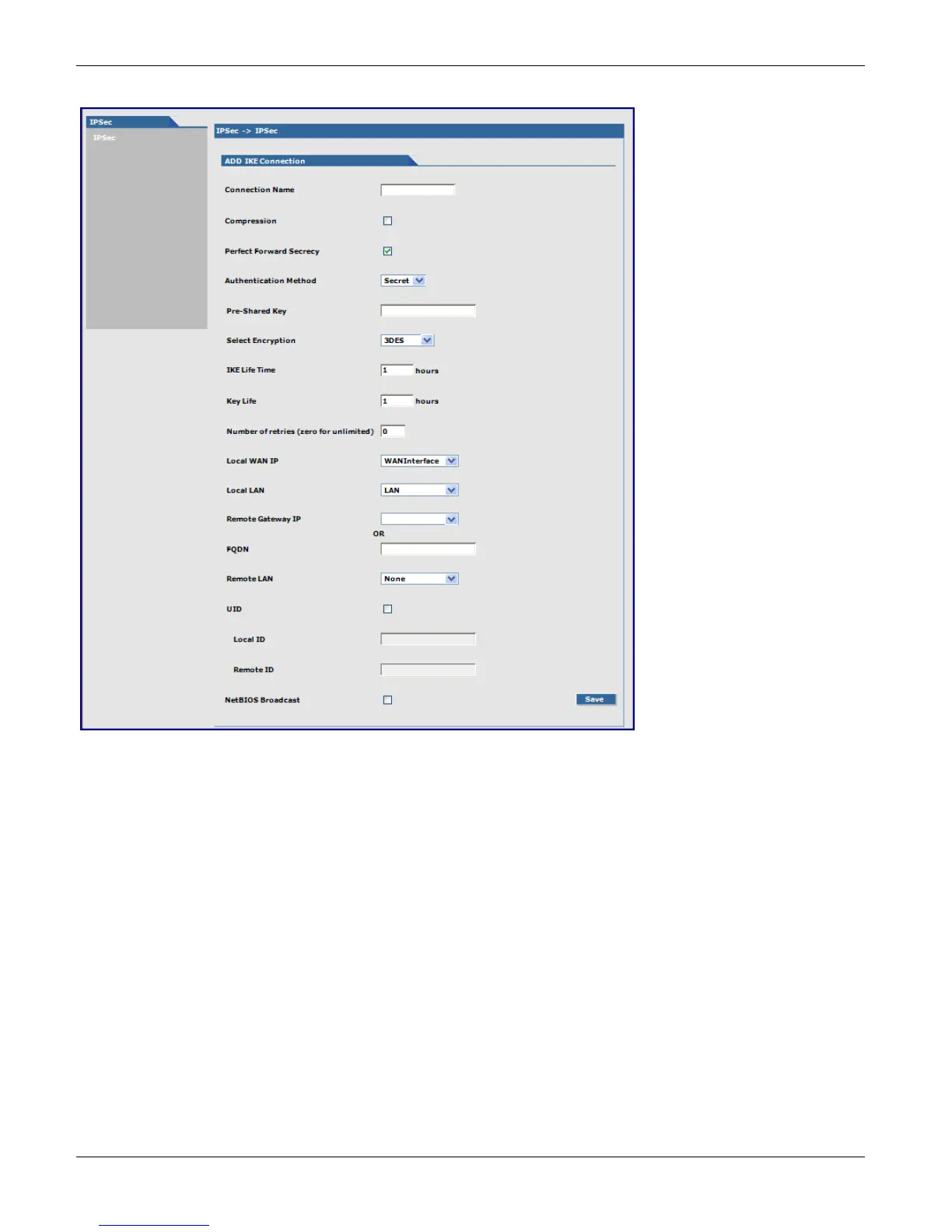
Add IKE Connection
Add an IKE Connection
Connection Name: Type a name for the connection.
Compression: Check the compression checkbox to enable IPCOMP, the compression algorithm.
Perfect Forward Secrecy (PFS): Check the PFS checkbox to enable PFS, a concept in which the newly generated
keys are unrelated to the older keys). This is enabled by default.
Authentication Method: Authentication can be done using Pre-Shared Secrets.
Pre-Shared Key: The Pre-Shared Key must be agreed upon and shared by the VPN endpoints. Configured it at both
endpoints of the tunnel.
Select Encryption: Select the encryption method. 3DES is recommended. Options include 3DES, AES-128, AES-192,
AES-256
IKE Life Time: The duration for which the ISAKMP SA lasts, from successful negotiation to expiration. The default
value is one hour and the maximum is 8 hours.
Key Life: The duration for which the IPSec SA lasts, from successful negotiation to expiration. The default value is
one hour and the maximum is 24 hours.
Number of Retries: Specify the number of retries for the IPSec tunnel. Enter zero for unlimited retries.
Local WAN IP: This is the interface initiating the IPSec tunnel.



 To Next Page