Chapter 3 – Using the Web Management Software
80 MultiModem rCell User Guide
Escape Sequence: Set the escape sequence characters at which the connection terminates.
Inactivity timeout: Set the inactivity timeout at which the connection terminates.
Others: Use to set the other terminating sequences: DTR-toggle or Always-On.
DTR-toggle: If DTR status goes low, the connection terminates.
Always-On: Sets the terminate sequence as Always-on.
Submit Button: Click Submit to save these settings.
Serial Port, Server Settings Parameters
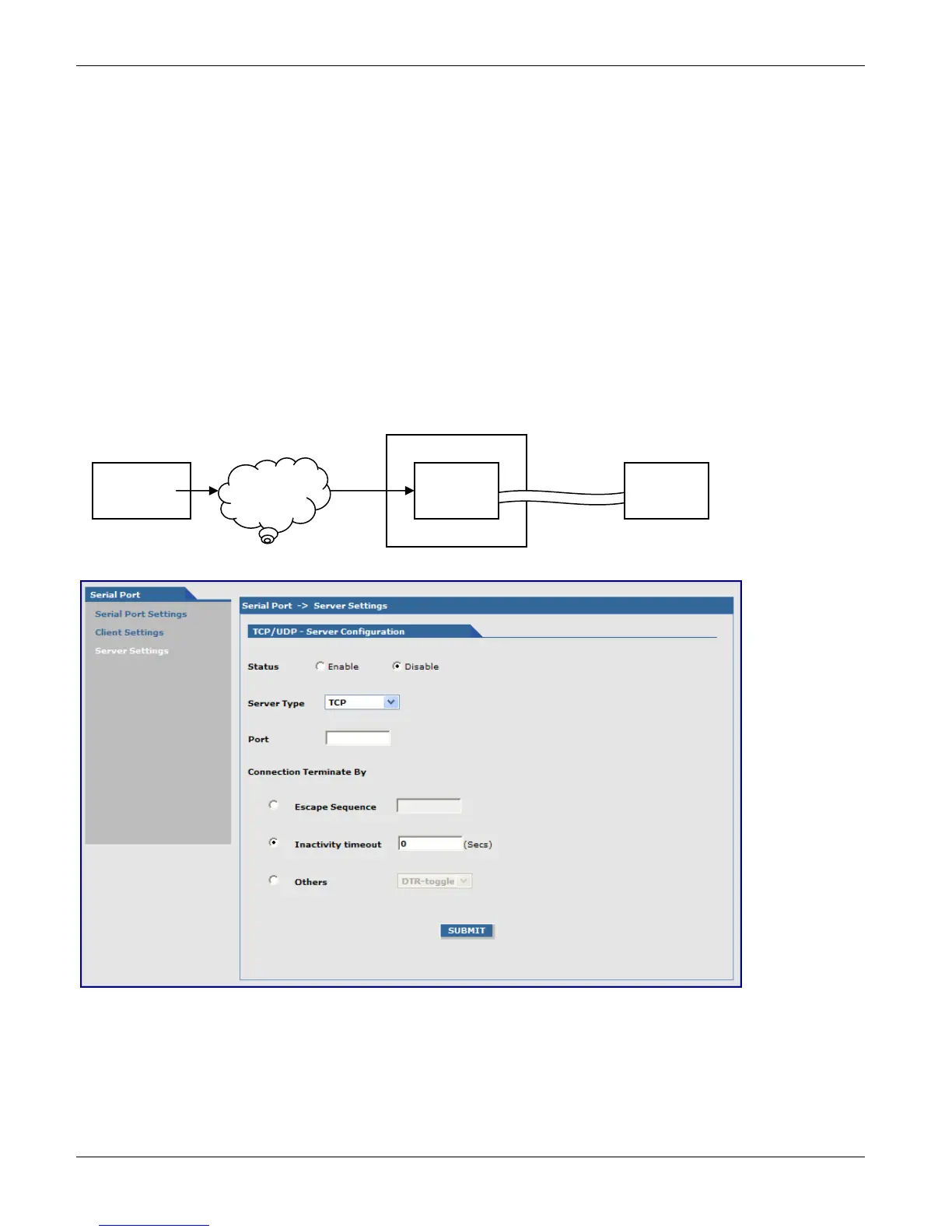
This feature enables a TCP/UDP client on the Ethernet network to connect to the remote serial terminal
connected to the DE9, RS232 port on the router. The router acts as a TCP/UDP server which allows two way traffic
between the TCP/UDP client and the remote terminal on the serial port.
The initial connection setup for the TCP/UDP server is shown in the figure that follows.
TCP/UDP – Server Configuration Group
Configures TCP/UDP Server through which the serial terminal connected to the RS-232 connector, DE9 on the
back of the unit listens for the remote TCP/UDP client to communicate on the LAN/WAN.
Status: Sets the client status to either Enable or Disable. The default is Disable
Server Type: Sets the client to either TCP or UDP. The default is TCP.
Router hardware
TCP/UDP
Server
Serial
Device
DE9
Connector
LAN
WAN
TCP/UDP
Client
HyperTerminal /
Minicom



 To Next Page