15
Support: +1 650 206 2250
16
Support: +1 650 206 2250
5.1.4. Function Setting
5.1.4.1 KEY BEEP
To enter the Function Setting interface by press the key, as shown in
the following figure.
Use the cursor to select with sub-menu you want to turn on/off, and press
MENU button to confirm, and press ESC button to quit.
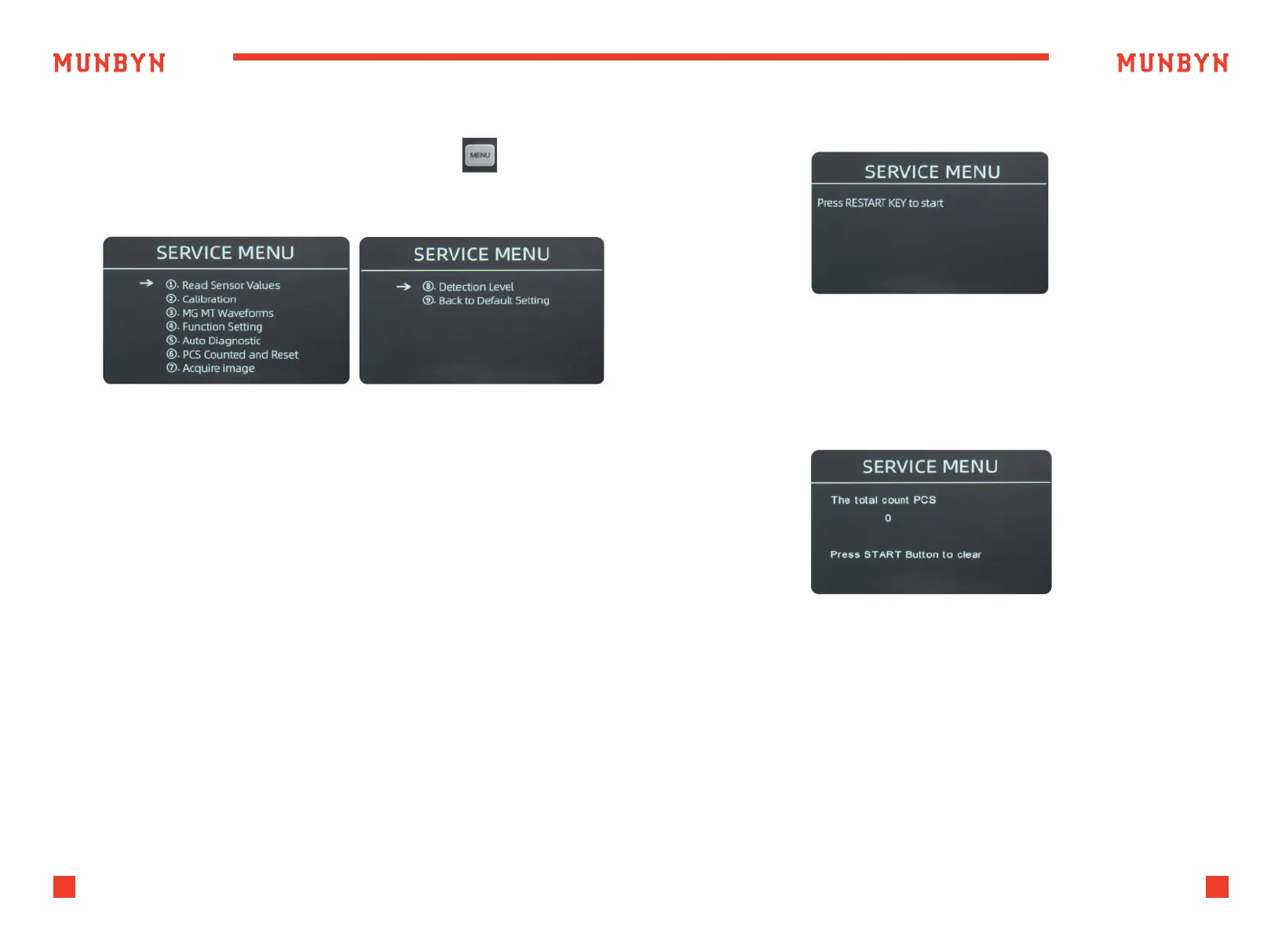
5.1.5. Auto Diagnostic
5.1.6. PCS Counted and Reset
This is for production and professional servicing purpose.
Move the cursor to the KEY BEEP option, press the MENU button to
turn on or off the key beep.
5.1.4.2 WARNING BEEP
Move the cursor to the WARNING BEEP option, press the MENU button
to turn on or off the warnning beep.
5.1.4.3 BATCH NO CLEAR
After turning on this setting, the data of the previous batch will not be
clear, and will be accumulated to the next batch.
5.1.4.4 PRINTER BAUD RATE
Switch the baud rate of the IMC09 serial port to 9600 or 115200.
Figure 5-7 MG/MT Waveforms
Figure 5-8 Auto Diagnostic
This is to tell you the total quantity of counted bills in this counter since
last time clearing to zero.
Figure 5-9 PCS Counted and Reset



 To Next Page