1
Support: +1 650 206 2250
2
Support: +1 650 206 2250
1.0. Machine Overview 2.0. Unpack and Installation
2.1. What's in the Box?
When you receive the package, open and check the packing list
in the package.
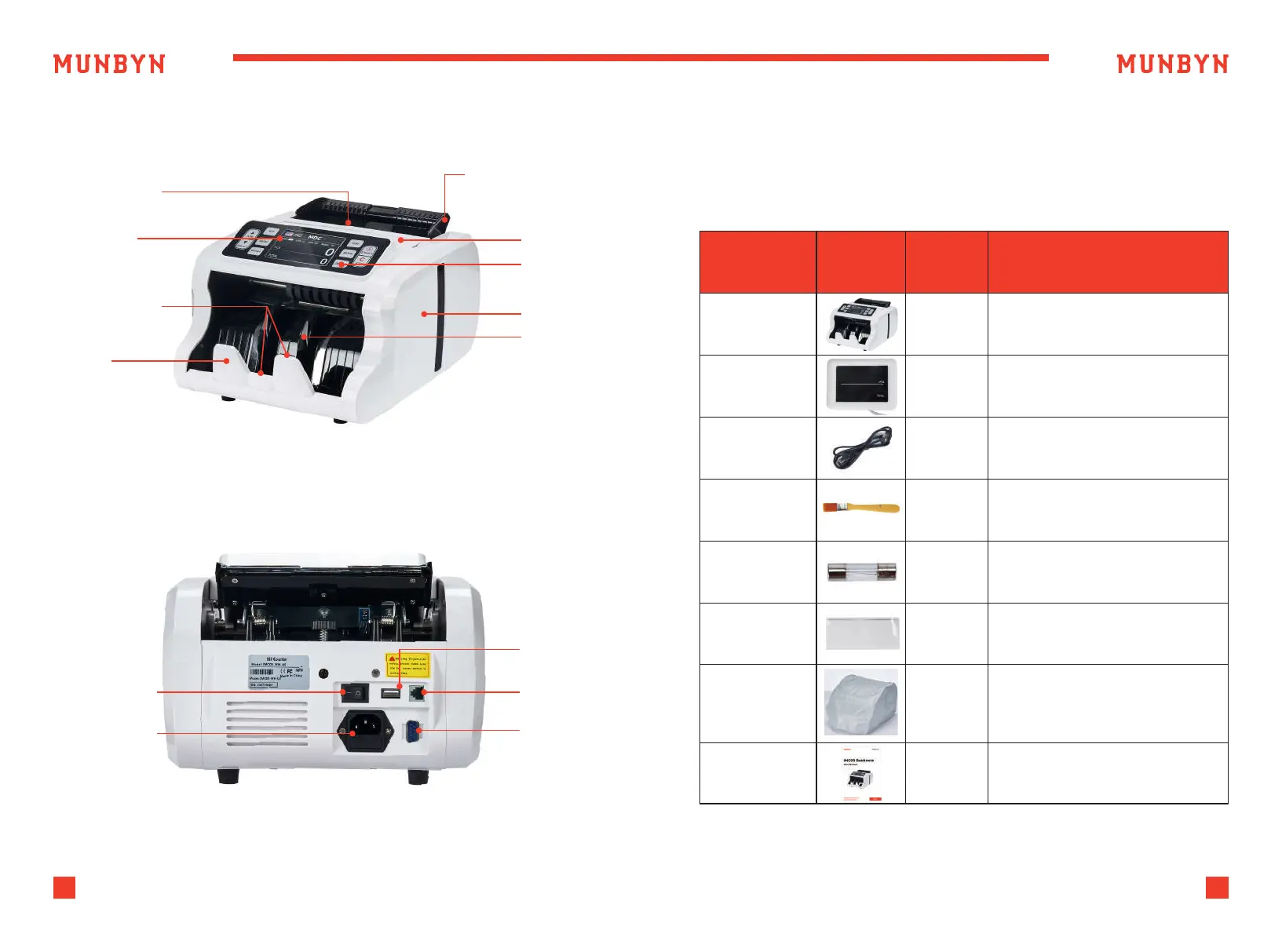
Figure 1-1 IMC09 Front Diagram
Table 2-1 What's in the Box?
Figure 1-2 IMC09 Back Diagram
Hopper Sensor
Adjustable Banknote
Guider
Handle
Panel
Side Cover
Power Switch
Power Socket
USB Port
External
Display Port
Printer Port
Impeller
TFT Display
Stacker Sensor
Stacker
Item Name
Banknote
Counter
Banknote Counter
External LED display screen
with RJ12 cable
Power supply cable of
American standard
Clean the machine
The backup fuse for the
power protection
Used for the IR calibration
Cover on the surface of the
machine to prevent dust
accumulation and machine
failure
1
1
1
1
1
1
1
External
Display
Power Cable
Nylon Brush
Fuse
IR Calibration
Paper
Dust Cover
User Manual
Picture Quantity
(pcs)
Description



 To Next Page