3
Support: +1 650 206 2250
4
Support: +1 650 206 2250
2.2. Installation
2.2.1. Installation Warnings
2.2.2. Power Supply Connection
1) This machine is specially designed for indoor use. Please do not
install or use it outdoors.
2) Please do not install it in place that cannot bear the weight of
this product or in places that are inclined or uneven.
3) Do not use or please combustible materials, inflammables and
volatile items such as thinners around/inside this product.
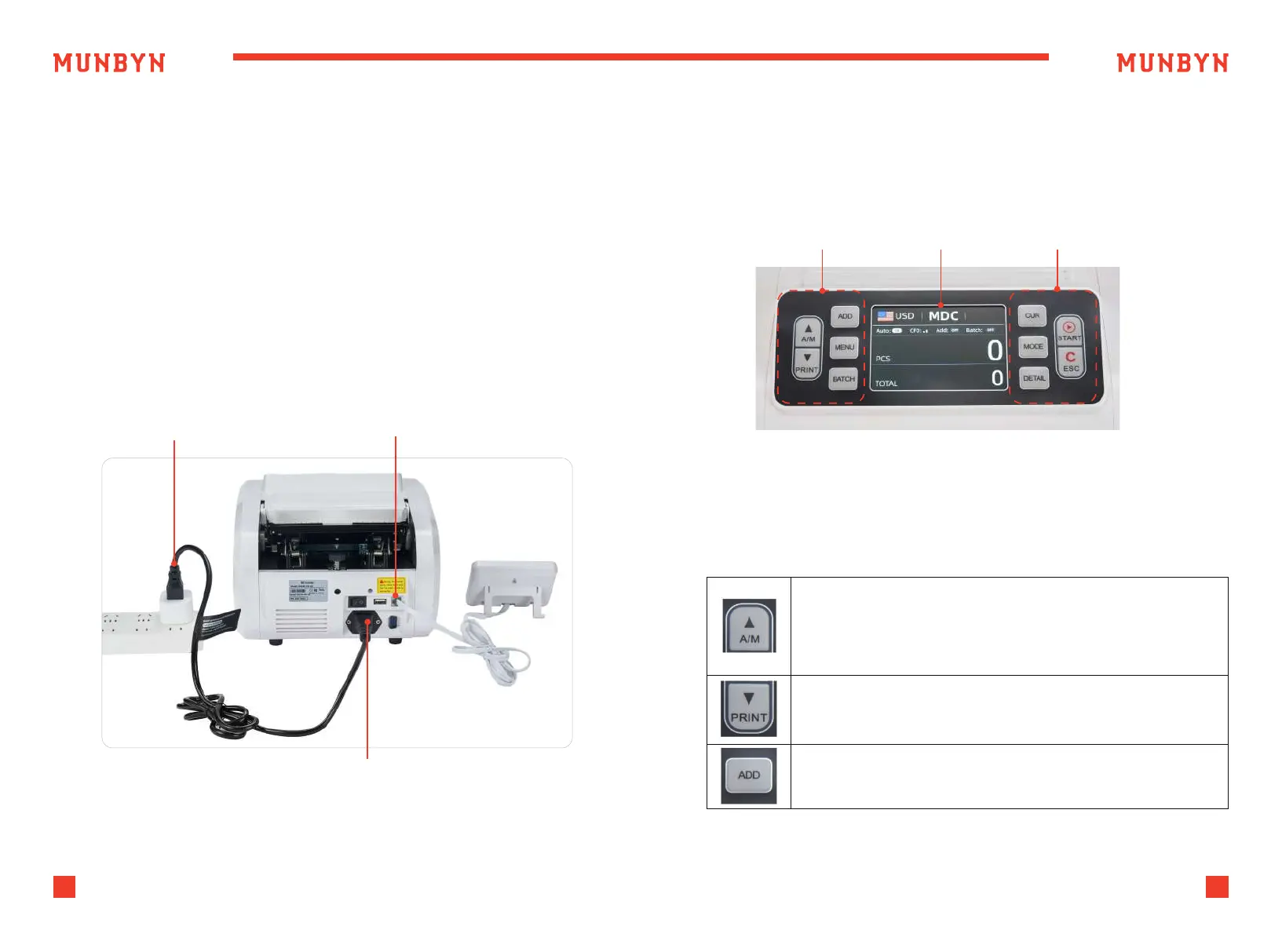
“A/M” button, press to choose MANUAL or AUTO counting mode.
In AUTO mode, counting will begin as soon as bills are placed
in the hopper.
In MANUAL mode, counting begins when the user presses
the “SATRT” button.
“PRINT” button, after connecting the printer, press this button to
print the information about cash counting.
“ADD” button, press to turn on/off the ADD function.
Figure 2-1 Power and External Display Connection
Figure 3-1 Display Appearance
Power Supply
Power Cord Connector
External Display
Connector
Operational Keys Display Area Operational Keys
3.0. Display and Operational Interface
3.1. Display Appearance
3.2. Operational Instructions for Function Keys



 To Next Page