11
Support: +1 650 206 2250
12
Support: +1 650 206 2250
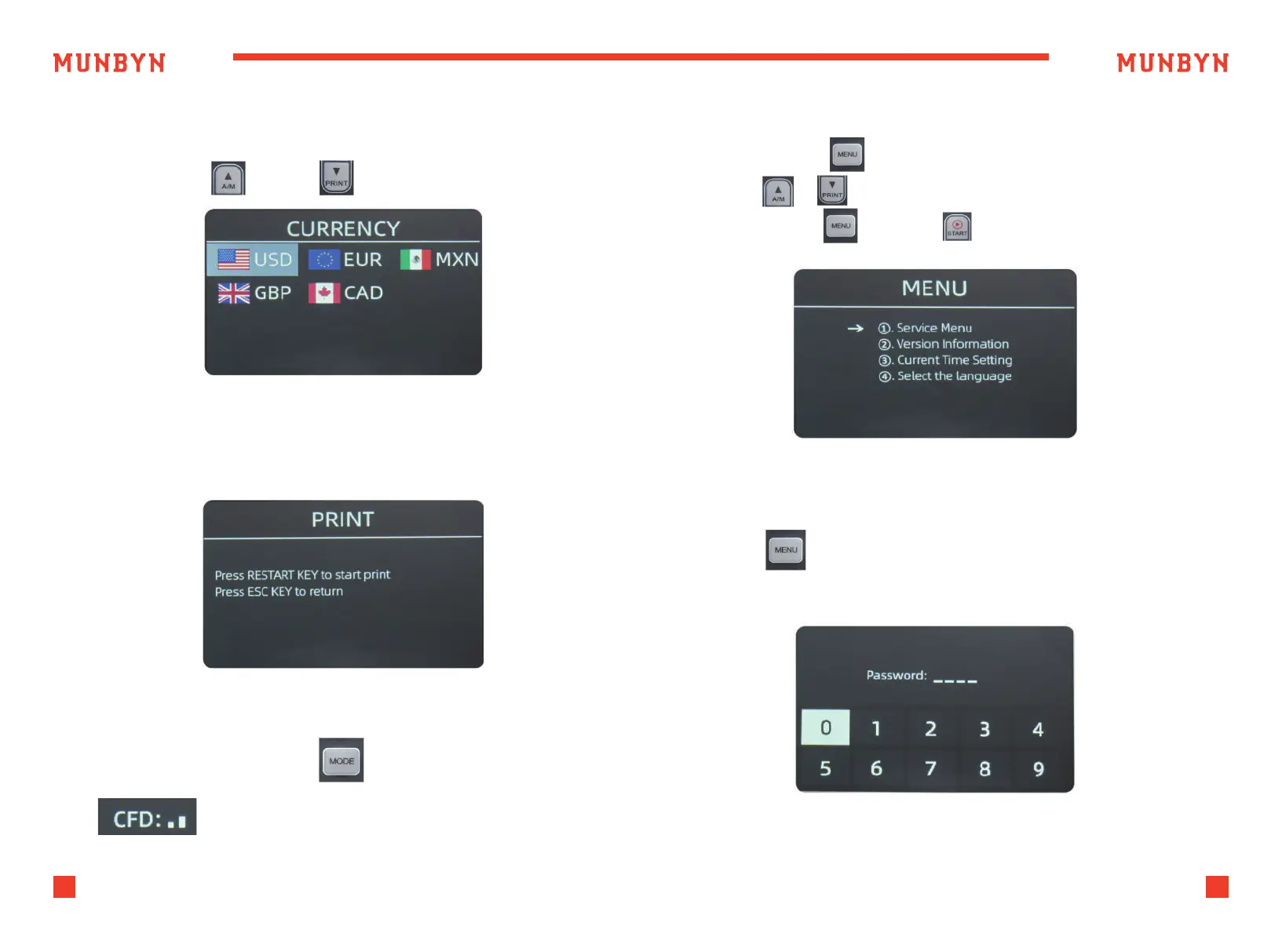
4.3.7. Currency Mode Selection
Press “CUR” button to enter Currency interface,
press the "A/M" / "PRINT" to select currency.
4.3.8. Print Data
After connecting the printer, press PRINT button to print the information
about counting data.
4.3.9. Authentication level
Long press the MODE button to adjust the sensitivity of
counterfeit detection.
Press the “MENU” to enter the user menu interface.
Use the & button to select an option,
press the “MENU” or “START” key to confirm the selection.
5.0. Settings
5.1. Service Menu
Press the key to enter service menu, you will be requested to input a
password with the following interface. The default password is 9999.
Figure 5-1 Menu Interface
Figure 4-8 Currency Setting
Figure 4-9 Print Setting
Figure 5-2 Password Interface



 To Next Page