®Munters
:MX.
2
Plus Dehumidification system
5.3
HMI
connection
The
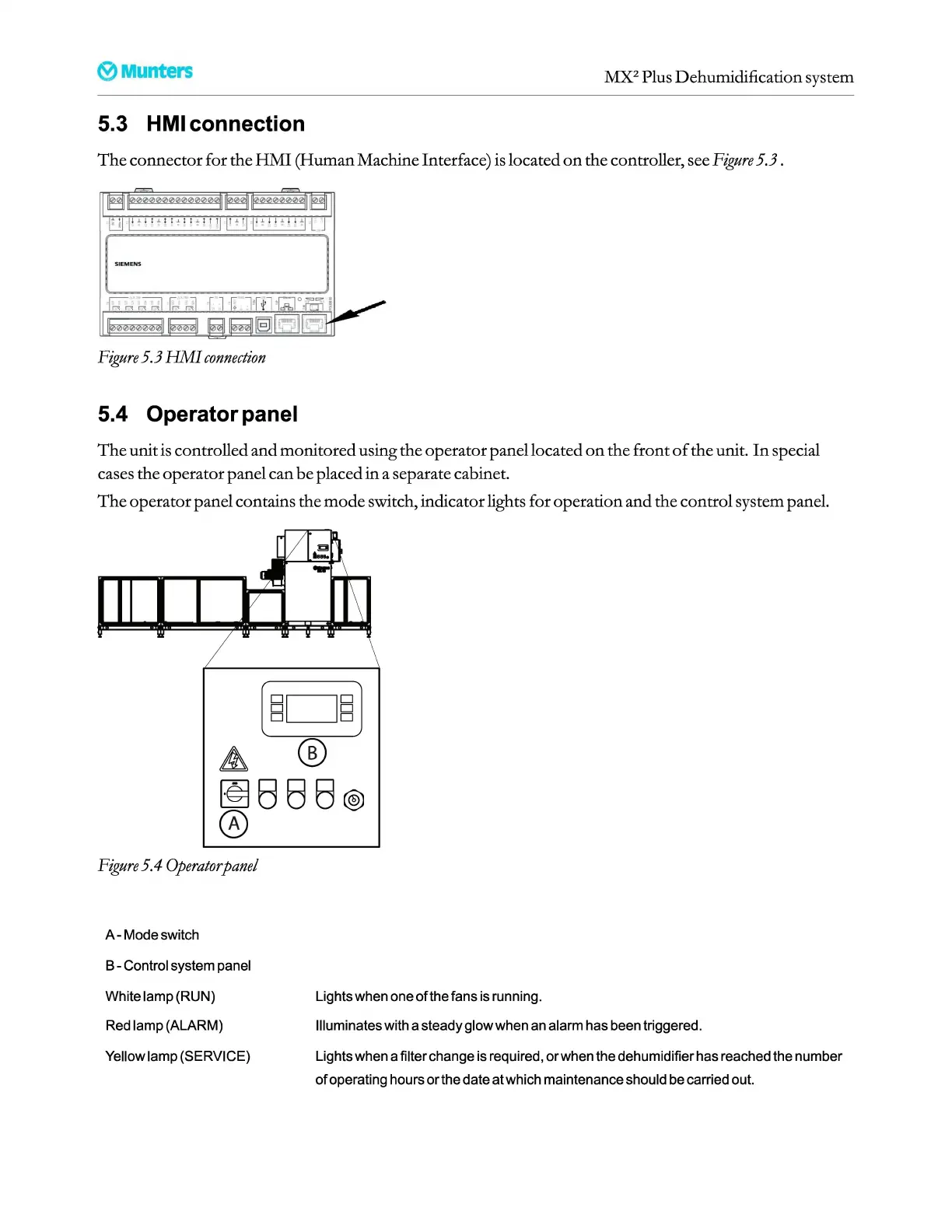
connector for the
HMI
(Human Machine Interface) is located
on
the controller, see
Figure
5.3.
Figure
5.3
HMI
connection
5.4 Operator panel
The
unit is controlled and monitored using the operator panel located
on
the front
of
the unit.
In
special
cases the operator panel can
be
placed
in
a separate cabinet.
The
operator panel contains the
mode
switch, indicator lights for operation and the control system panel.
Figure
5.4
Operator
panel
A-
Mode
switch
B-
Control
system
panel
White lamp
(RUN)
Red
lamp (ALARM)
Yellow
lamp (SERVICE)
Lights
when
one
of
the
fans
is
running.
Illuminates with a steady glow
when
an
alarm has
been
triggered.
Lights
when
a filter change
is
required, or
when
the dehumidifier has reached the number
of operating hours or
the
date at which maintenance should
be
carried
out.


 To Next Page