7
3.
INSTALLATION ON THE HELMET
Important
: Prior to installing the N-Com system, it is recommended to write down the identification
code affixed to the product (see chapter 20.4).
The installation video can be seen at www.n-com.it / Support section.
• Before you install the B902 system on the helmet, make sure it turns on properly. Press the “
ON
”
key for about 2 seconds, until the blue LED on the key pad lights up and you hear a beep in the
headset. Proceed with the installation.
• Remove the cheek padding (see helmet instructions).
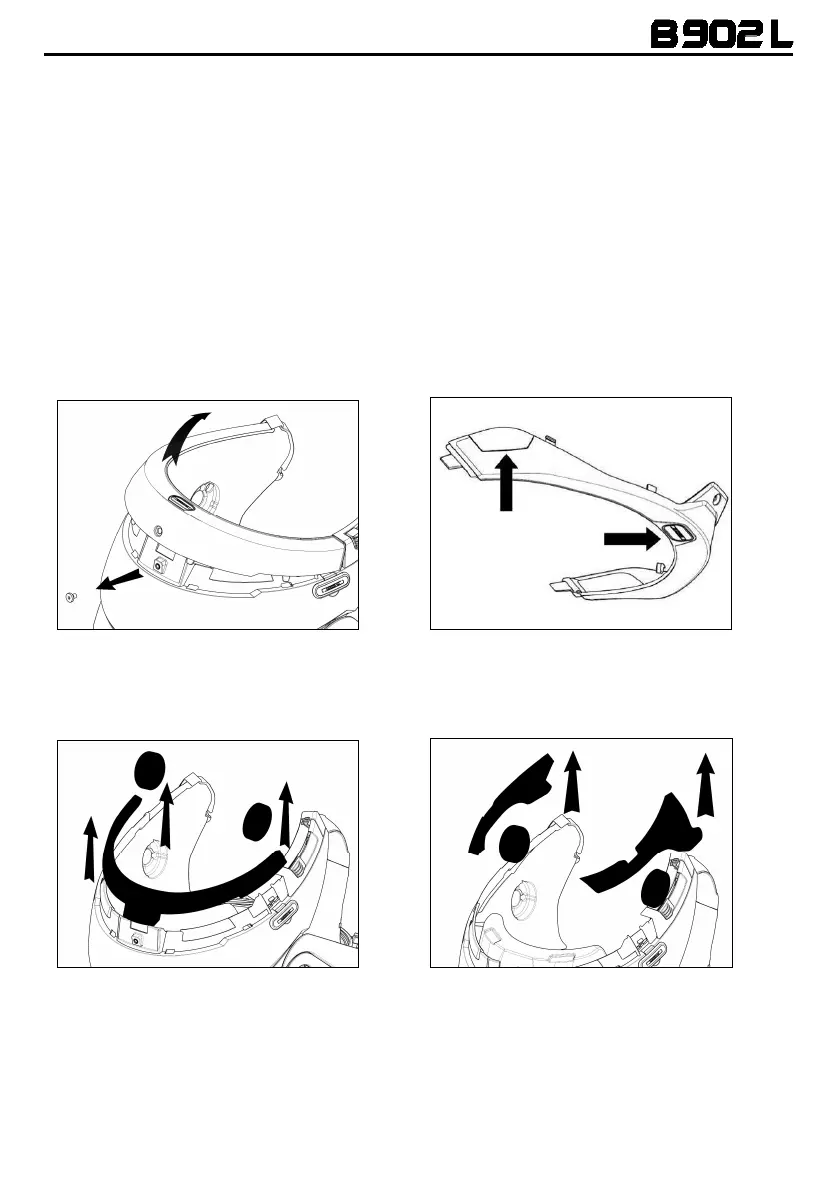
• Remove the helmet edge gasket using the special tool (Fig. 1).
• Completely remove the gasket as shown in Fig. 1; by doing so you also remove the padding.
• Remove the “N-Com” plugs found at the back of the shell gasket and on the left side of the
helmet.
Fig. 1
Fig. 1 – ONLY FOR N87 – N100-5 HELMET
• Prior to installing the N-Com system, remove any filling foam material, if present, from the helmet
(refer to the user manual for your specific helmet).
Option 1
Option 2
N.B.
: Keep the filling material in case you wish to use the helmet without the N-Com system in the
future.



 To Next Page