EN
8
3.1.
Installing the B902 system on the helmet
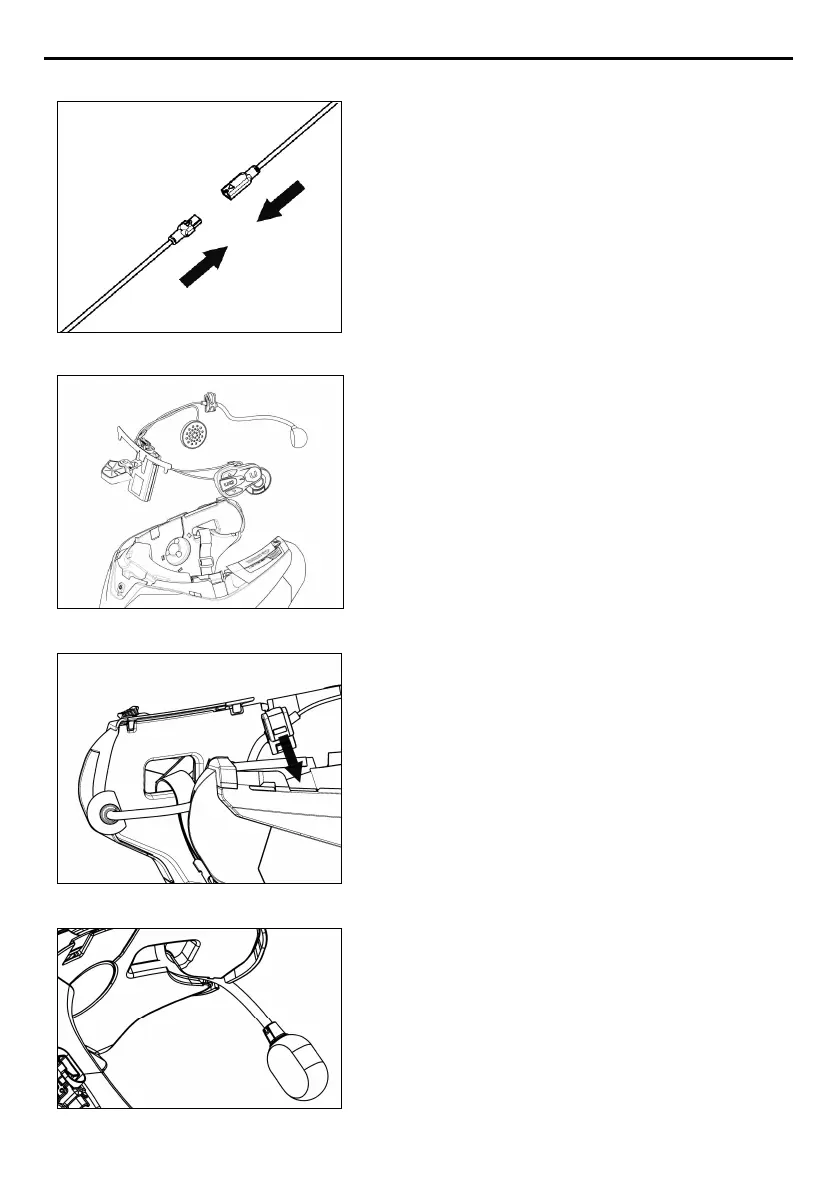
Fig. 2
• Hook up the microphone connector to the
other end, following the directions of the
arrows (Fig. 2).
N.B.
: You can adjust the position of the
microphone. For instructions on how to do this,
please see chapter. 3.2.
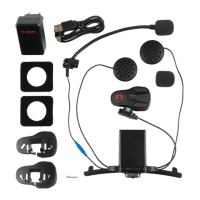
Fig. 3
• Place the system in the special housing in the
back of the helmet, pushing it all the way
into the groove (Fig. 3).
• Fold the antenna back inside the shell.
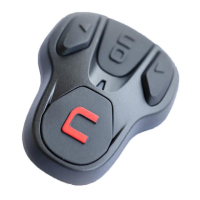
Fig. 4
N.B.: For positioning of the wiring and of the
microphone in the N100-5 helmet, follow the
instructions provided in the dedicated box.
• Fix the cable inside the helmet and make
sure the right fixing clip snaps into its
housing (Fig. 4).
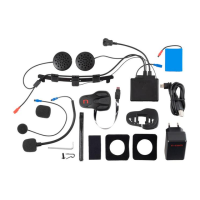
Fig. 5
• Position the microphone in the housing on
the right of the helmet, inserting the metal
boom in the groove found in the chin guard
coupling frame (Fig. 5).
Caution
: make sure that the side of the
microphone support with the writing “
n
” is
facing inward.



 To Next Page