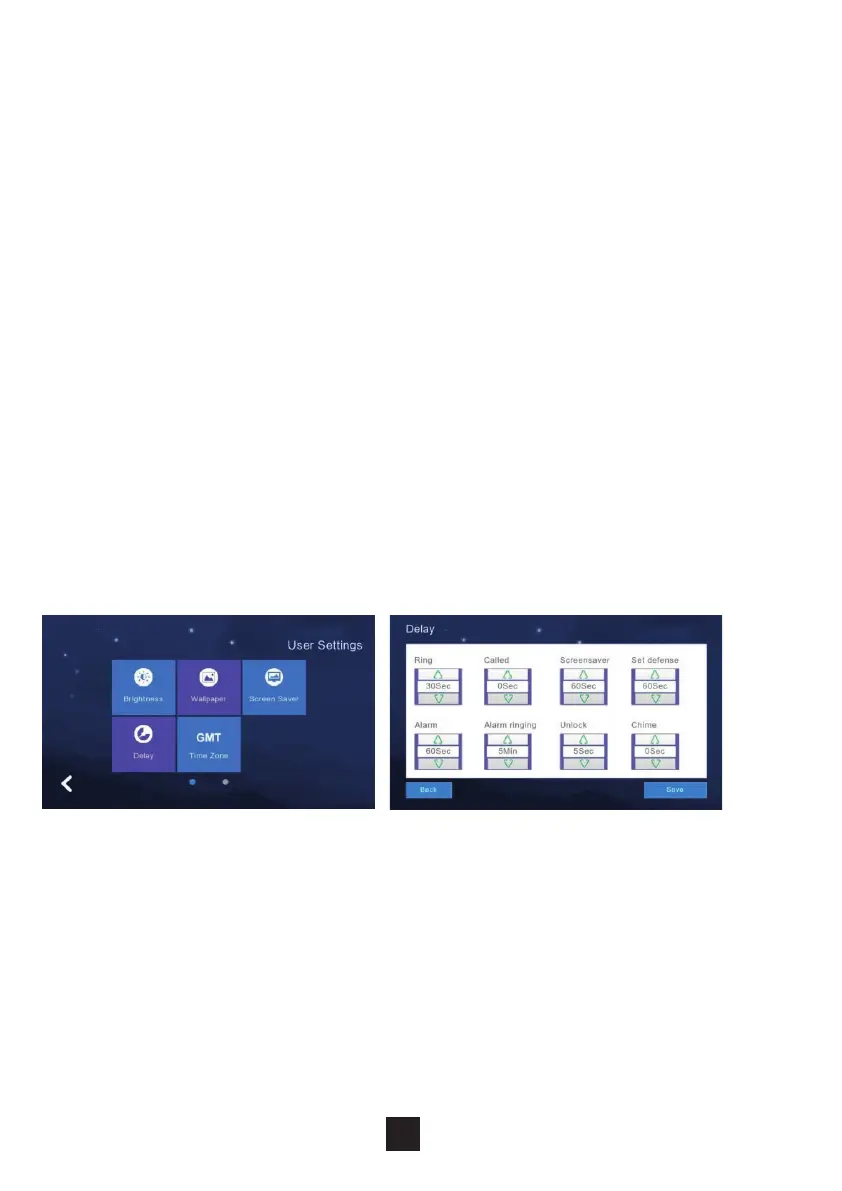
The monitor contains 8 ‘delay settings’:
1. Ringing time: (Can be set between 5-90 seconds, default is 30 seconds)
Ringing time is the duration of the monitor ringing once called from the panel.
2. No ringing time: (Can be set between 0-60 seconds, default is 0 seconds)
During this time the monitor will not ring but users can still answer and end
calls normally.
3. Screensaver time: (Can be set to 30, 60, 90 seconds, default is 60 seconds)
The duration of no operation on the monitor to activate the screen saver.
4. Arming delay: (Can be set to 30, 60, 90 seconds, default is 60 seconds)
5. Alarm delay: (Can be set to 0, 30, 60, seconds, default is 60 seconds) Set
the duration from when the alarm is triggered to the sound of the alarm.
6. Alarm sound duration: (Can be set to 3, 5, 10 minutes, default is 5 minutes)
Set the duration of the alarm when its triggered by one of the inputs.
7. Unlock: (Can be set between 5-60 seconds, default is 5 seconds) Set the
relay activation time connected to the monitor.
8. Doorbell ringtone: : (Can be set between 0-60 seconds, default is 0 seconds)
Set the duration of the ringtone.
After conguration click ‘save’ to apply the settings.
2.6.10 Delay settings
26



 To Next Page