EasyManua.ls Logo

NAD C 446 - Network Connection Setup

NAD C 446
27 pages
Print Icon
To Next Page IconTo Next Page
To Previous Page IconTo Previous Page
Loading...
I
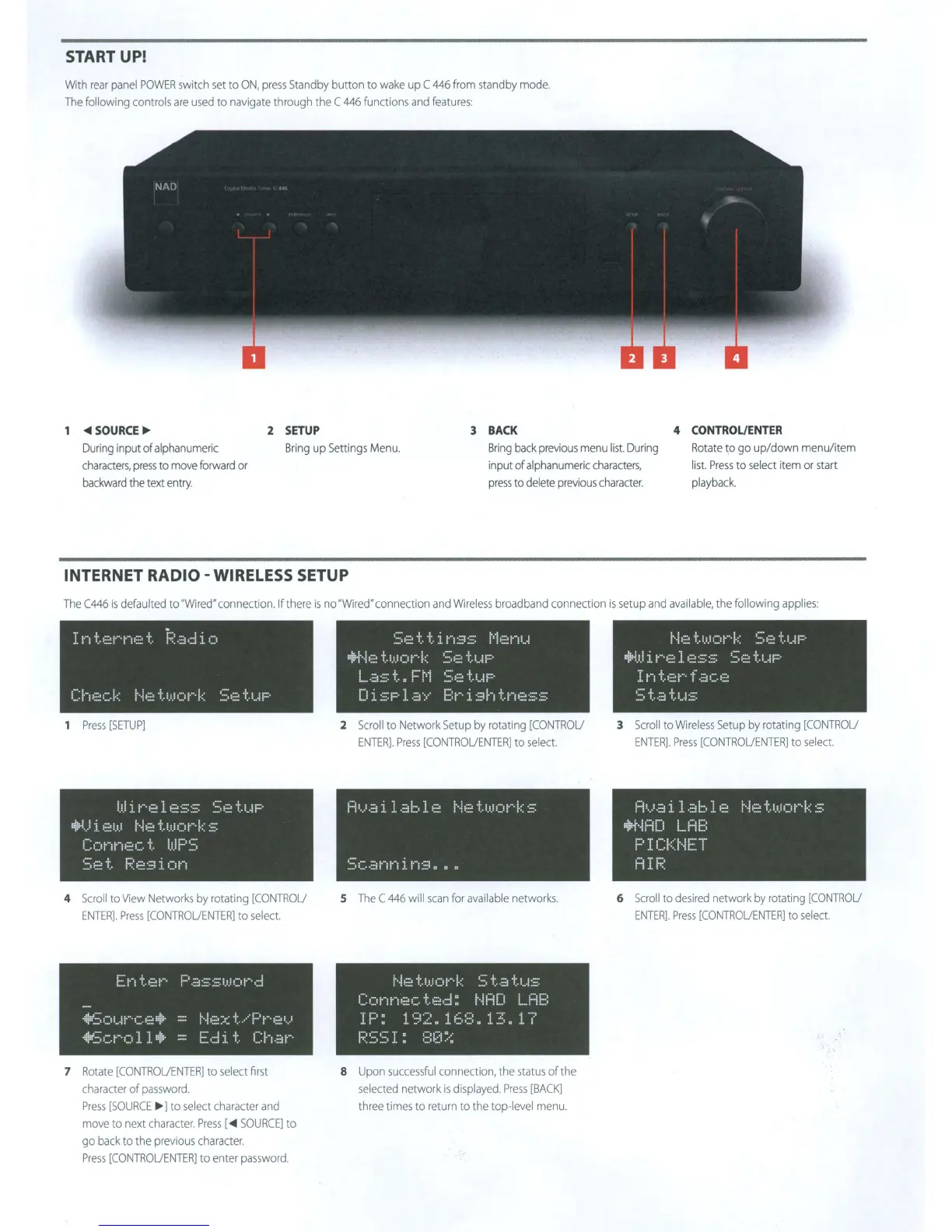
START UP!
With
rea
r
panel
POWER
swi
t
ch
set
to
ON,
press
Standby
button
to
wake
up C
446
from sta
nd
by
mode.
The
following
cont
rols
are
used
to
navigate
through
the
C
446
functions
and
features:
~SOURCE
Ill>
2
SETUP
3
BACK
4 CONTROL/ENTER
Du
ri
ng input of
alphanum
eric
c
haracters
,
pre
ss
to
m
ov
e forward or
bac
kward
the
tex
t e
ntry
.
Bring
up
Settings
Menu
.
Bring
ba
ck prev
iou
s
menu
list.
During
Rot
a
te
to
go
up
/down
menu
/
item
input of
alphanumeri
c c
hara
c
ter
s,
pr
ess
to
del
ete
pr
ev
ious c
hara
cte
r.
list.
Press
to
s
ele
ct i
tem
or
start
pla
y
ba
c
k.
INTERNET
RADIO-
WIRELESS SETUP
The
C446
is
defaul
t
ed
to
'Wired' connection.lf th
ere
is
no'Wired' connection
and
Wi
reless
broadband
connection
is
setup
a
nd
ava
i
lab
l
e,
the
following
app
li
es:
I
1···~
i:.
t-:
,.-.
,.-,e.
t
1~:~
.::J
.::1
i
()
c::
!·
··:
~=:~
(.
k
j··.f
:::::
t
!,!_!
()
j·-·
k
1 Pr
ess
[SETUP]
!JJ
i
!•
'
'•
!=!
l~=~
~::
::::
I'
uj::-i.)
i
!::.::
!,!J
1···1
:::
: t
1,1.!
(I
k
::::
c:
C)
j···~
r-·1
1:::
c.
t
i.1J
F'
:~:;
~==::::
t
F~:=::s
i
C)!·-,
4
Scroll
to
View
Networks
by
rotating
[CONTROU
ENTER].
Press
[CONTROUENTER]
to
select.
E::~--~t~:::r··
r-::r.:1::::::
·i~;.~;
()
i
..
·i
c-~~
~·:J~·
==
1···1
~:::
·!~:~:)(.!""'·()
llr~i
=
l::(:·
7
Rotate
[CONTROUENTER]
to
select
first
character
of
password.
Press
[SOURCE
Ill>
]
to
select
character
and
move
to
next
character
.
Press
[
~
SOURCE]
to
go
back
to
the
previous
character.
Press
[CONTROU
E
NTER]
to
enter
password.
I
I
~=:~:=-!:.-!:.
:i.;···,::::::::
!·=·ii:::r1i...i
:~H··Ii:::
"i:.l.i.i()i·
··
·k
::;::~
-!:.t-!i=:·
1...
..
::J
::::
t
ll
1=·
1·=·1
:::;
1:2
t
i...i
i:::-
DisPlaY
Brishtness
2
Scro
ll
to
Netwo
rk
Set
up
by
rotating
[CONTROU
EN
T
ER].
Press
[CON
T
ROUENTER]
to
selec
t.
Available
Networks
::~c.·=~
r1
i·-!
i
ri
::::
==
~~
1:
5
The
C
446
wi
ll
scan
fo
r
ava
i
lab
le
networks.
i··
·
h=~
·i
:
.1
..
.1
()
r··
k
~::;
i:
..
:;,
"1:.1...1
::::
Connected:
NAD
LAB
T
r··,
n ·I,-,
....
,
.;
..
··,···,
·I-:=·
.;
'":'
.1.1-
~~
.1.
::'.,::.:::
J.
c~a:::
11
.t
~::=
=•
.1.
1
f:~: ~~:;
~~~
I
~
:::;:
!2!
~:.;;
8
Upon
successfu
l connecti
on,
the
status
of
the
se
l
ected
network
is
displayed.
Press
[BACK]
three
times
to
return
to
the
top-l
evel
menu.
l···i,:::t:.i.:()J""··k
S::::t!.
"):iJ.!
:i
. !·
~::•
l
E~
:::: ::::
~=;
•::::
"1:.1...!
P
In
"t.·:~i""··
f.::,c.::~
,····
.1
.
••
.
1.
··-
.:,
l ••• ;:j ! .. 1
.-!::::·
3
Sc
ro
ll
to
Wireless
Setup
by
ro
t
at
i
ng
[CONTROU
ENTER].
Press
[CONTROUENTER]
to
select.
Fi
'·..'
.;:j
i
l.::i
1:~
l~-~~
1···1
;::
t
1.1.:
c
·::+.i:=m
u=:E:
PICf=J·.IET
fi
I
i~:
6
Scroll
to
des
i
red
network
by
rotating
[CONTROU
ENTER].
Press
[CONTROUENTER]
to
se
lect

Other manuals for NAD C 446

Related product manuals