EasyManua.ls Logo

NAD C 446 - Page 24

NAD C 446
27 pages
Print Icon
To Next Page IconTo Next Page
To Previous Page IconTo Previous Page
Loading...
INTERNET
RADIO-
WIRED SETUP
Default
display
for
Internet
Radio
starts
here
if
wireless
connection
is
successful
or
if"Wired"
connection is
available
and
se
le
cted
as
the
default
network interf
ace
:
r=·
i ·:· ·
F·:
.=:!
=...=
c=
i
.
..i
:-··.
:i.
·
!:
!:
:
::
.::::
!....
C:
c:
..
::::
].
i
..
:
-~
:i
r"'
!
.:
::!
:::.i
.:
::
!
==~!=·~:::;
t
.:
;:
!
t
:i
::)
i""
!
:::
:
;:::=
c),
_:
jc
.::
:;
:
:::
i:.
:=
=:
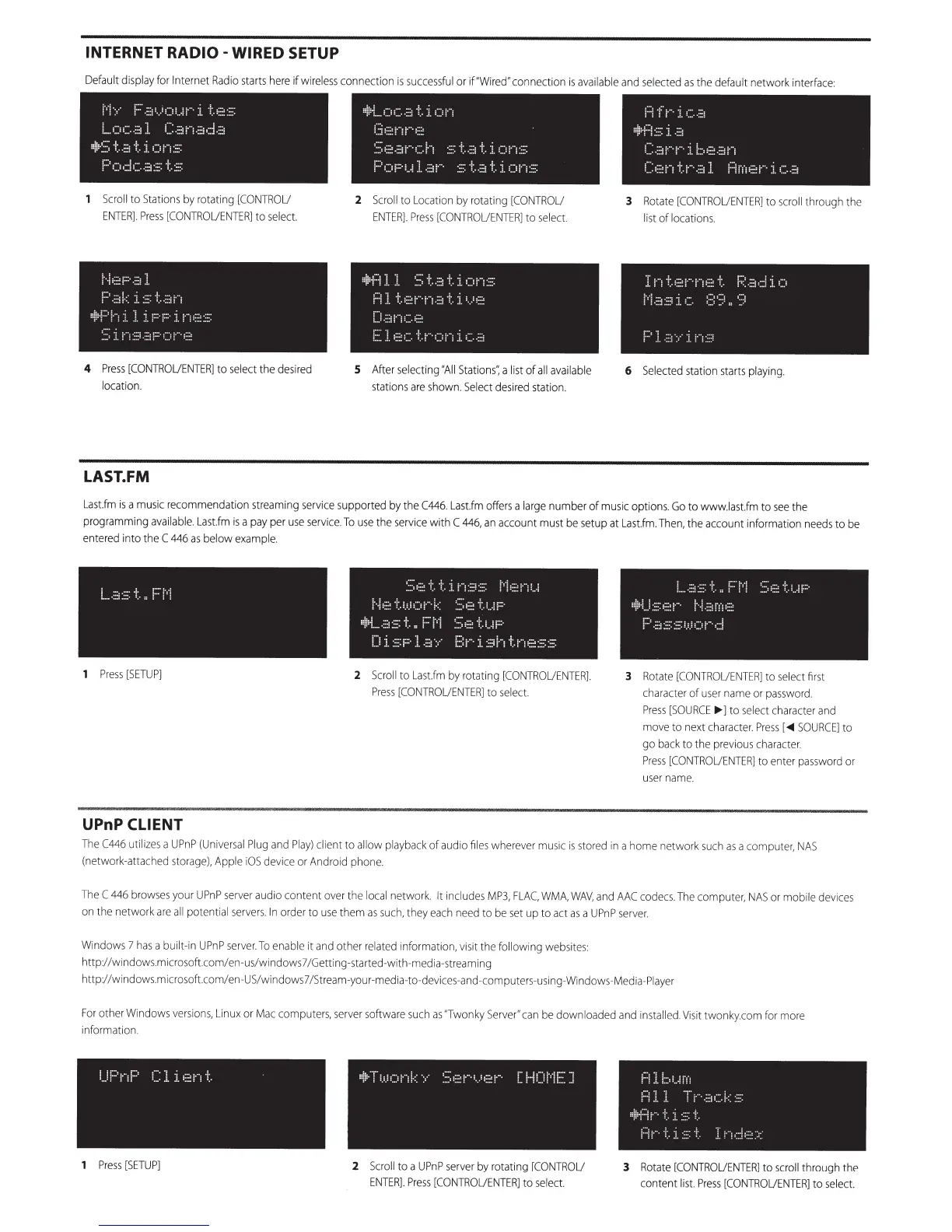
Scroll
to
Stations
by
rotating
[CONTROU
ENTER].
Press
[CONTROUENTER]
to
se
le
ct.
i
.
-~
=:::
: !
::
·
..
:.:
-~-
::
:::i
k
::
:::
··
.
..
::
:;(·
:;
!
~r
· ;
:
:;_
t
-
~-
:.·
1·=
·
·:.
!··=·==
=
::·::
~:::.
:i
;···:
·:·::
::.:
. . : : .
-
..
:
4
Press
[CONTROUENTER]
to
select
the
desired
location.
LAST.FM
=
=!
i
=i
__
(_;
:
~
...
:
··
:
·;
·,
·i
(,:
j•'i
i.::i:::::(ii""
::
:
~
::;;(;;.:::Ji··
·
,_:.l
··;
:.:::
·::
.
.;--!
·~:.
:i.
:::
:=
v·i~::
P(:::
-.:
·
!_
Jl
:~(·
::
=:
·~:
..
::1
·!
..
:i
:'
)!
··
i:
::
:
2
Scroll
to Location
by
rotating
[CONTRO
U
ENTER].
Press
[CONTROUENTER]
to
selec
t.
=~
1
:=
f
::
;
J
L
:·:
:;
~
-
-
.
::
:!
=.
·;.
:
..!
!"'"
;
:::::
~ . ~
·~
-;
_. ::
:::
i•'
:
··.
:;
:; ·:
..
:i.
:)
::;
..
t~
;.;;:!{'i:::
..
::
::
;:::::!.·::~c
.
r .
..
·
·=
..
:=
(,
:;_
=-::
..
::::
5
After
selecting "A
ll
Stations·:
a
li
st
of
all
ava
i
lab
le
stations
are
sh
own.
Select
desired
station.
f;
-~
··.
:
i.
=:
::
.:
::1
!!;!:·:::.
:
::~·
:
-~=
!
c:
.:::···
:···
:1
.
L:
.i::.:.:.::;···i
c:
!:::i
·:
t.r
··.
:=:
;
::
!::
:!!'.'!
:
:::
?"
.i
(
.
..
:
:
3
Rotate
[
CONTROUENTER]
to
scro
ll
t
hro
ugh the
list
of
loca
ti
ons
.
i
l ;
t.::.
:!"·~·=
...
::
l_
~:
.
~~
-:::!
:
.
:~
L ( .:
=·
.
:.
~
:;:i
·
:.
::.
;
:_
; ·
:·
.
·
:~;
:·:
.
:
i
...
·
~
:·
"i
::;!
6
Selected
stat
i
on
starts
playing.
La
st.fm
is a
music
recommendation streaming
service
supported
by
the
C446.
Last.fm
offers
a
larg
e
number
of
music
options.
Go
to
www.last.fm
to
see
the
programming
avai
lable.
Last.fm
is a
pay
per u
se
service
.
To
use
the
se
rvi
ce
with
C
446,
an
account
mus
t
be
se
tup at
Last.fm.
Th
en
, the account informati
on
nee
ds
to
be
ente
r
ed
in
to the
C
446
as
bel
ow
examp
l
e.
1
Pre
ss
[S
ETUP]
UPnP CLIENT
::
~c:
·
..
·:
..
·j
i"1:::.1::::
r··
,
=::.:(:=~·
=
.:
:
:··
~--
i,
:,i
.:
:·i :·"
i
::
~
~-
=:::
.:
.
:
..
.
; ;::
l:j!:·
:
....
.
::
:!
~.:
:
i
:.
.
~-:
!'=
!
~::
.
;
:
:::
·
i:.
:
...
:
i::.·
LJ
:i.
::
.:p.!.
.:
::·/·
!:::t·"
·
J..:::
~
h
t!·
"i·:
::
::::
:::
::
:
2
Sc
roll
to Lastfm
by
ro
tat
in
g [
CO
NTR
OUEN
TER]
P
re
ss
[CONTROUENT
ER]t
o
se
le
c
t.
I
L
..
:::i
·=::.
~:
..
i::·
i
·;
~;;,
::
.:
~:
.
1.
i
;:
...
i:
..
.
...i::::i.M
::
"o
j :
.!
;(::::::
F
::.
::
::·.:
:=
:
l.:.=
·.:
:!
·
·.:·!
3
Rota
te
[CO
NTROUENT
ERJ
to
se
l
ec
t fir
st
c
hara
cter
of
us
er
name
or
pa
ssword.
P
re
ss
[
SOURCE
~
J to
select
character
and
move to
nex
t
character.
Press
[
<Ill
SOURCE]
to
go
back
to the
previous
c
haracter
.
Pr
ess
[C
ON
T
ROUEN
TER] to enter
passw
ord
or
u
ser
n
ame.
The
C446
utilizes
a
U
PnP
(Universal
Plug
and
Pl
ay)
cl
ien
t
to
allow pl
ayback
of
audio
files
whe
reve
r
mu
sic
is
stored
in
a
ho
me
network such
as
a computer,
NAS
(n
etwork-att
ached
st
orage)
,
Appl
e i
OS
devi
ce
or
And
roid phone
The
C
4
46
brow
ses
yo
ur
UPnP
se
rv
er audio
co
n
te
nt
ove
r the
l
oca
l
network.
It
in
cl
ud
es
M
P3,
FLAC.
WMA
,
WAV,
a
nd
AA
C
co
de
cs.
The
co
mput
er,
N
AS
or
mobile
de
vi
ces
on
th
e network are
all pote
ntia
l
se
r
ver
s.
In
order to
use
th
em
as su
ch,
th
ey
eac
h n
ee
d to be
set
up to
act
as
a
UPnP
se
rv
er.
Wi
nd
ows
7
ha
s a
built
-in
UPnP
se
r
ve
r.
To
enable
it
and
oth
er
rel
ated
in
for
ma
tio
n,
visit
th
e
fo
l
lo
wing
webs
i
tes:
http:/ /wind
ows
.m i
croso
ft.
co
m/
en
-us/wind
ows
7
/G
etting
-s
tarted
-wi
th
-m
edia-streaming
http://windows
.microso
ft
co
m/en-U
S/w
indows7/Str
ea
m-your-
media
-to-
devices
-and-comp
uters
-
us
ing-Windows-
Med
ia-Pi
ayer
For
other
Wind
ows
vers
ion
s,
Linu
x
or
M
ac
computers,
se
r
ver
sof
tw
are su
ch
as
"Twonky
Ser
ve
r"
c
an
be
downl
oa
ded
and
in
s
tal
led.
Visit twonky
.co
m for more
information.
1
Pr
ess
[
SE
TUP]
2
S
cro
ll
to a
UPn
P
se
rv
er
by
rotat
in
g [
CO
NT
R
OU
E
NTER].
Press
[CO
NTR
OU
ENTER]
to
se
l
ec
t.
1"
1'1
I
''
r:
1
r::
!_
;;:!
;.
:;
:.
'i
·:·
·,
·
·.
:::
!:
.
::.::··:"
·!
;
-~
:
l
.
!:
.i.
::
'L
!'
·:
.
. '
:
~ .
.:: :
,;,
; .
i :
..
:.
.. . :,
3
Rota
te [
CON
TR
OU
ENT
ER
] to
scroll
through the
content
lis
t.
Pr
ess
[
CO
NTROUENT
ER]
to
s
ele
c
t.

Other manuals for NAD C 446

Related product manuals