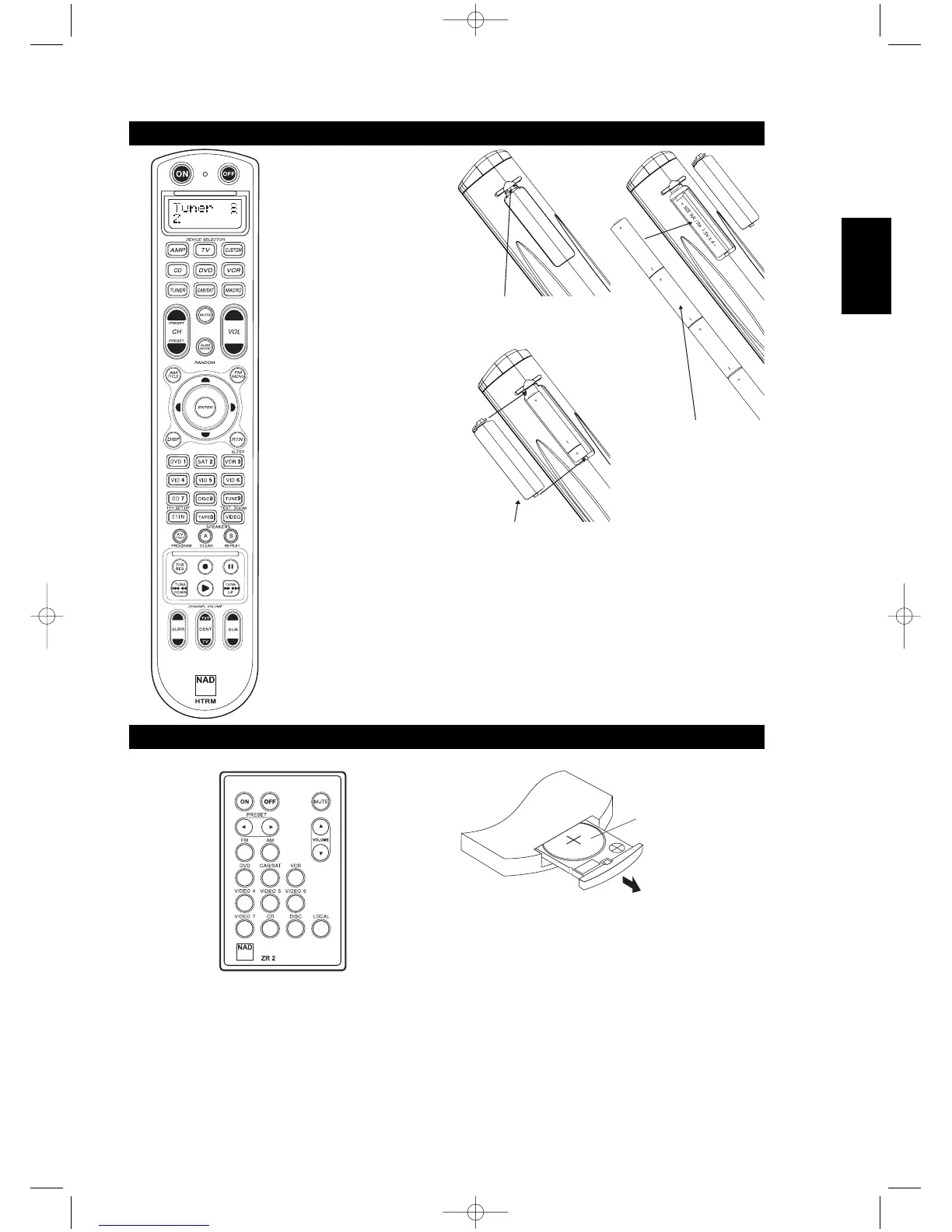
PRESS IN AND LIFT TAB TO REMOVE
BATTERY COVER OUT FROM RECESS
PLACE BATTERIES INTO OPENING.
ENSURE THE CORRECT POLARITY IS
OBSERVED
PRESS BATTERY COVER INTO PLACE
UNTIL IT 'CLICKS' CLOSED
ZR2 REMOTE CONTROL (FIGURE 6)
• Top section features ON/OFF
buttons and back-light LCD display.
• Upper section has eight DEVICE
SELECTOR keys including one
programmable CUSTOM DEVICE
SELECTOR, one MACRO buttons.
• The upper middle section with
channel, volume, MUTE, surround-
mode buttons
• Middle section has DVD, CD and
OSD navigation buttons
• Lower middle section has number
buttons 0 to 9, A/V PSET,
SPEAKER, function, DVD SETUP,
and receiver’s Surround Mode TEST
buttons
• Lower section has DVD/CD/TAPE
Transport buttons
• Bottom section with CHANNEL
VOLUME trimming buttons



 To Next Page