W415-1285 / A / 11.03.14
43
EN
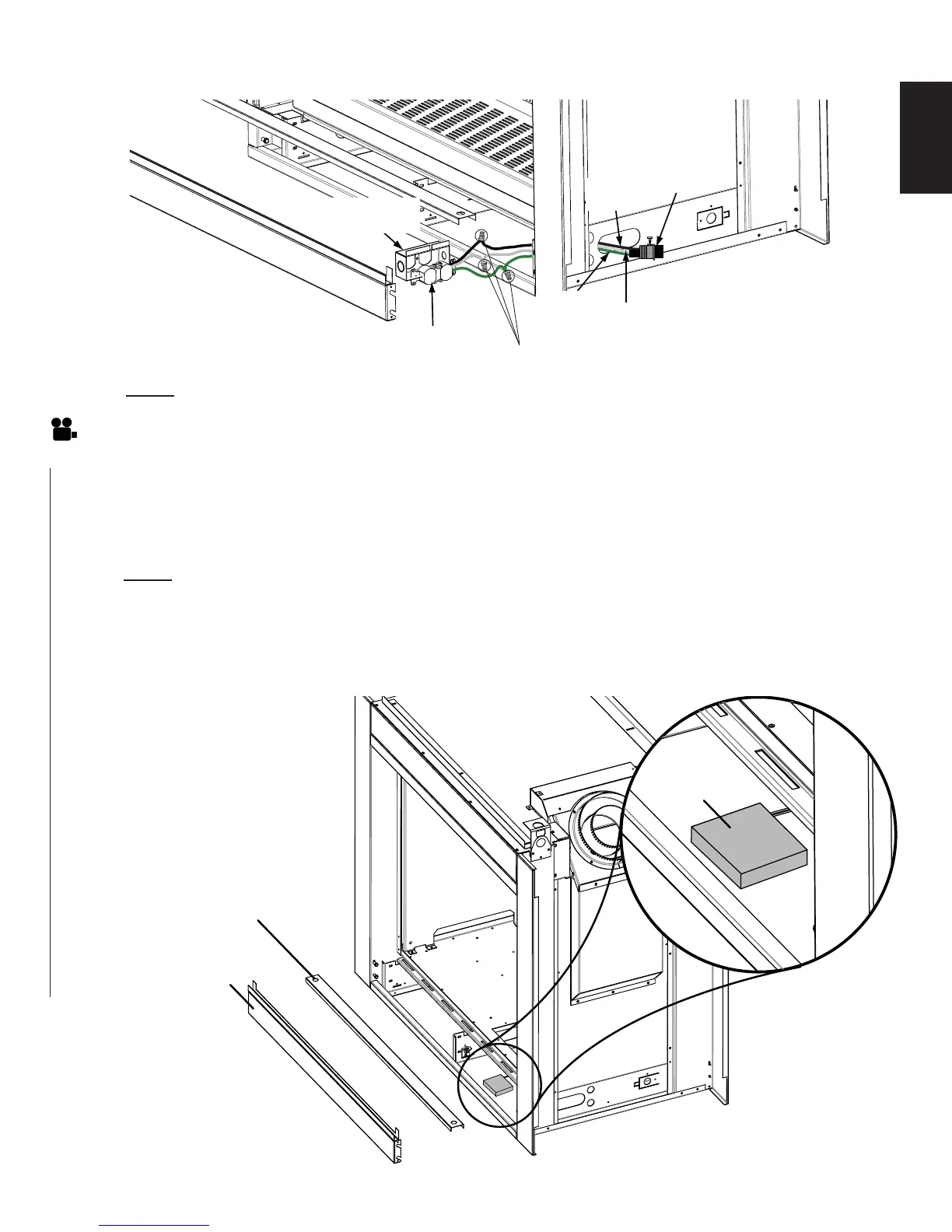
A. In case of a power outage locate your battery housing (located in the control compartment).
B. Install the 4 "AA" batteries, if not already installed.
C. Connect the battery housing to the battery connector located in the control compartment of the
appliance (refer to the illustration below).
NOTE: It is recommended that you change the battery at the start of the heating season.
WIRE
NUTS
3 PRONG
RECEPTACLE
GROUND
(GREEN)
L2
(WHITE)
L1
(BLACK)
ELECTRICAL
BOX
CABLE
CONNECTOR
7.2 RECEPTACLE WIRING DIAGRAM
7.3 BATTERY BACK-UP INSTALLATION
BATTERY
HOUSING
PANEL COVER
CONTROL
PANEL COVER
NOTE: Ensure that the transformer is plugged into the receptacle.


 To Next Page