EHP-50G Stand alone mode 5-5
5.2.2 Use EHP-50G
Logger
When the communication between the PC and the analyzer has been
established, push the button Download to transfer all data from the
analyzer to the PC.
To use such data you must save them into a file.
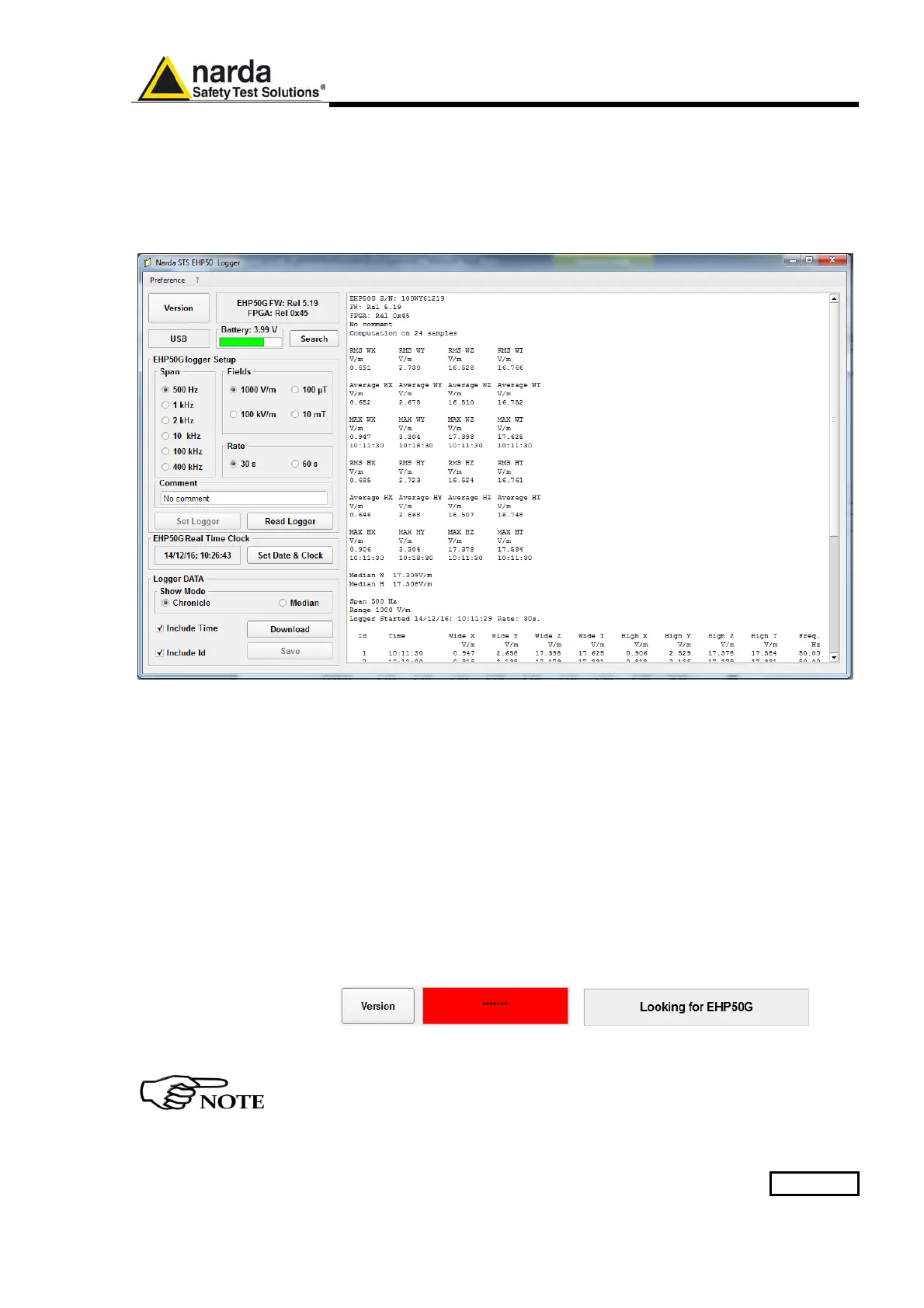
A typical display will be:
On the right side of the display, the software shows:
- Serial number of EHP-50G
- Firmware and FPGA release of EHP-50G
- The comment that you wrote inside the memory of EHP-50G typing
few words in the Comment window
- Number of samples stored
- RMS, Average, MAX and Median values in Highest and Wide
mode
- Span used during the acquisition
- Range
- Starting date and time
- All values collected
5.2.3 EHP-50G battery
charging
If the battery charger is plugged to the EHP-50G while the software is
running, the analyzer will be disconnected and the software will display:
and the led is flashing quickly.
During the charging process, always remove the bridge connector
from the EHP-50G



 To Next Page