5. 10-pin IDC to 9-pin DSUB Cable
6. Power Cable Assembly
7.
Standos and Screws
8. NI 9694 Digital I/O Breakout RMC Board
Note The provided power supply is only intended for the getting started
experience. NI recommends the use of a power supply that meets the
specifications listed in the NI sbRIO-9607 Specifications for system
deployment.
Installing Soware on the Host Computer
Before using the sbRIO-9607, you must install the following application soware
and device drivers on the host computer.
1.
LabVIEW 2015 or later
2.
LabVIEW Real-Time Module 2015 or later
3.
LabVIEW FPGA Module 2015 or later
4. NI CompactRIO Device Drivers August 2015 or later
For minimum soware support information, visit ni.com/info and enter the Info
Code sowareversion.
Connecting the sbRIO-9607
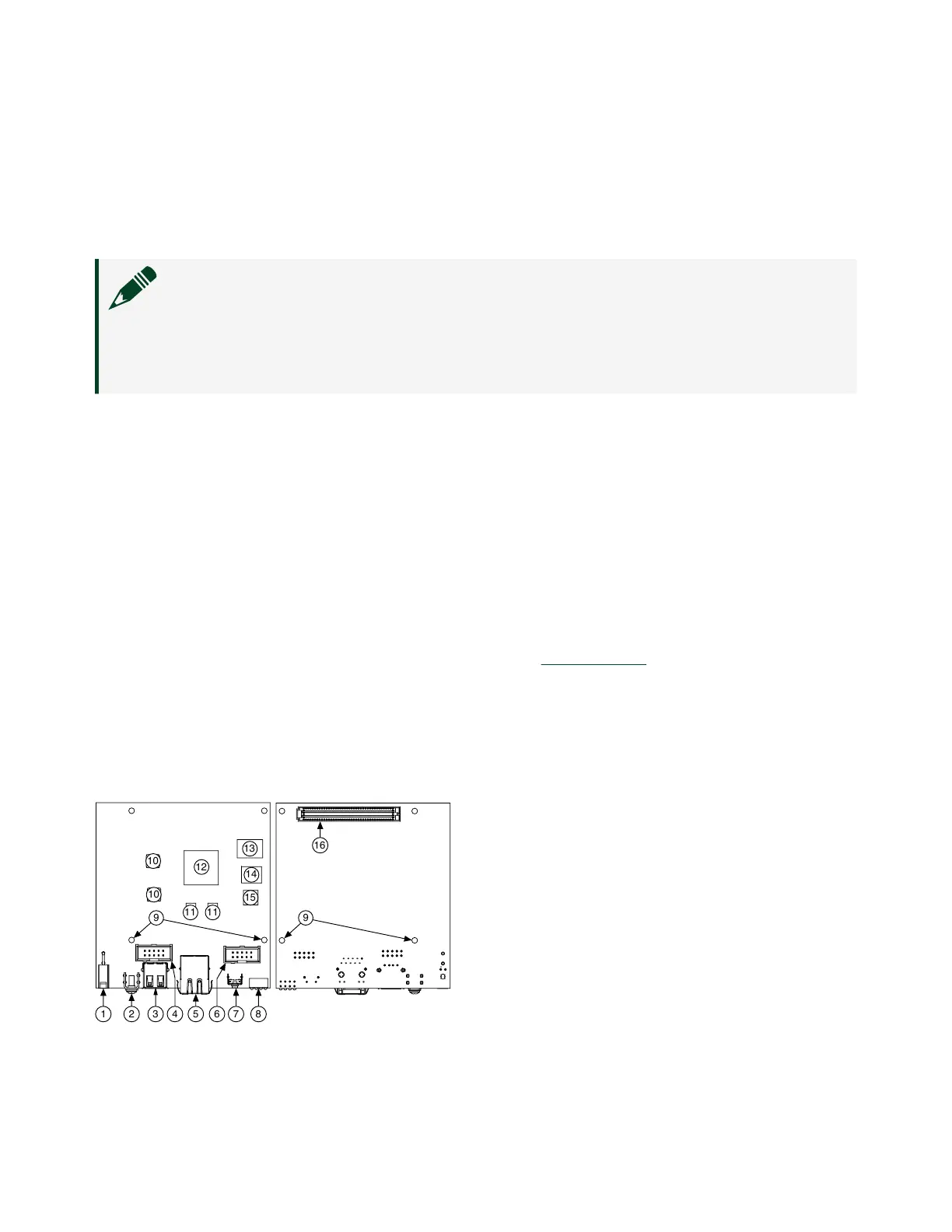
The sbRIO-9607 has the following components.
Figure 2. sbRIO-9607 Components
3
12
11
15
13
10
10
11
14
8
5 7421
9
9
16
6
1.
J9, Power Connector
ni.com
6
sbRIO-9607 Getting Started



 To Next Page
 Loading...