www.naxa.com Page 7
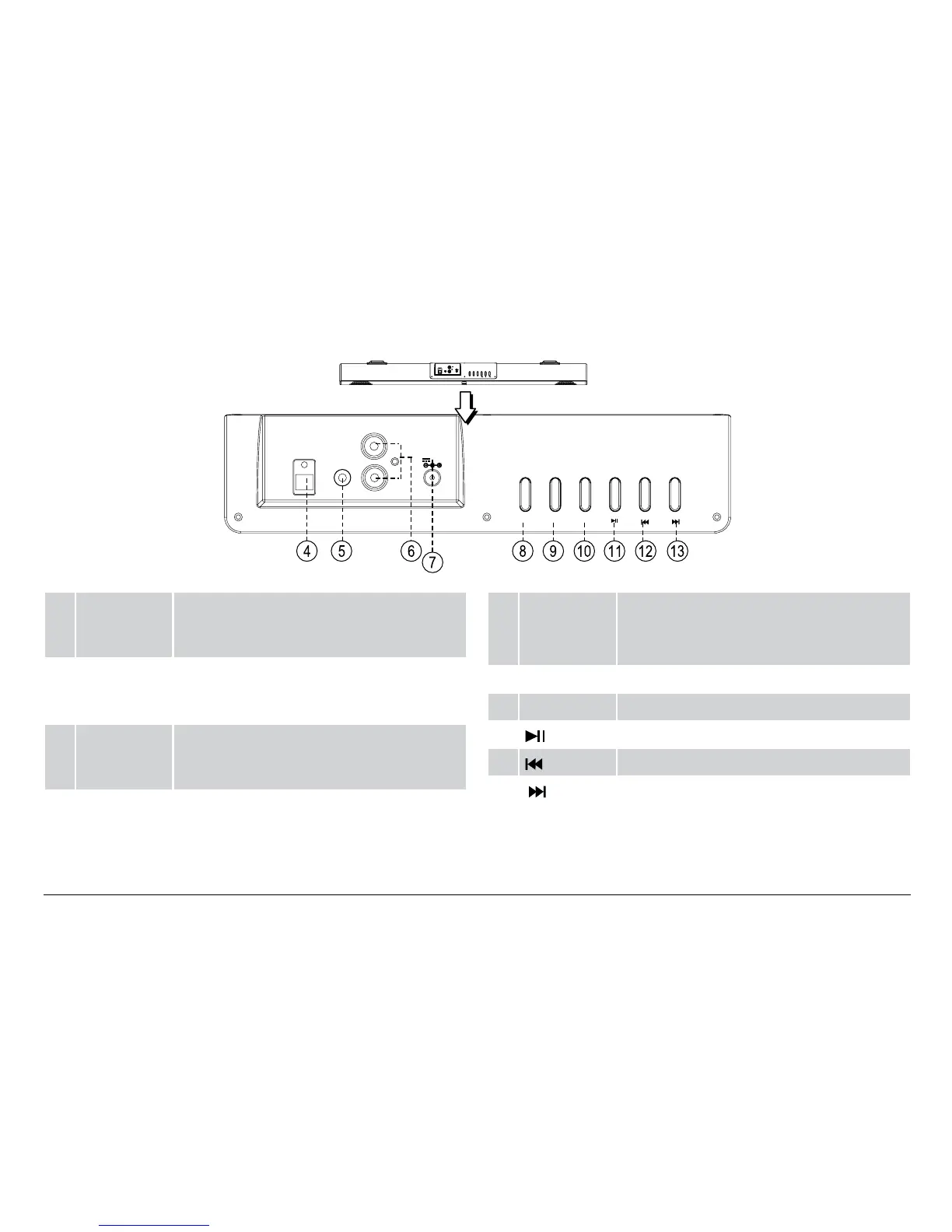
Top View
POWER/
SOURCE
VOL-
VOL+
AUX IN 1
AUX IN 2
L
R
OPTICAL IN
DC IN
DC 9V, 1.5A
POWER/
SOURCE
VOL- VOL+
AUX IN 1
AUX IN 2
L
R
OPTICAL IN
DC IN
DC 9V, 1.5A
4 OPTICAL IN
connector
Optical In mode. Digital optical audio
connection for devices with optical audio
output.
5 AUX IN 1
connector
AUX IN 1 mode. 3.5mm stereo connection for
devices with 3.5mm line-out or headphone
output.
6 AUX IN 2
connector
AUX IN 2 mode. RCA stereo connection for
devices with red and white RCA left/right
audio output.
7 Power
socket
Connector for the included power adapter.
8 POWER/
SOURCE
button
Press and hold to turn the unit on and off.
Press to change the active connection mode
(Bluetooth, Optical In, AUX IN 1, AUX IN 2).
9 VOL– button Press to decrease the volume.
10 VOL+ button Press to increase the volume.
11
button Press to start, pause, or resume playback.
12 button Press to skip to the previous track.
13
button Press to skip to the next track.


 To Next Page