Page 8 Naxa Electronics
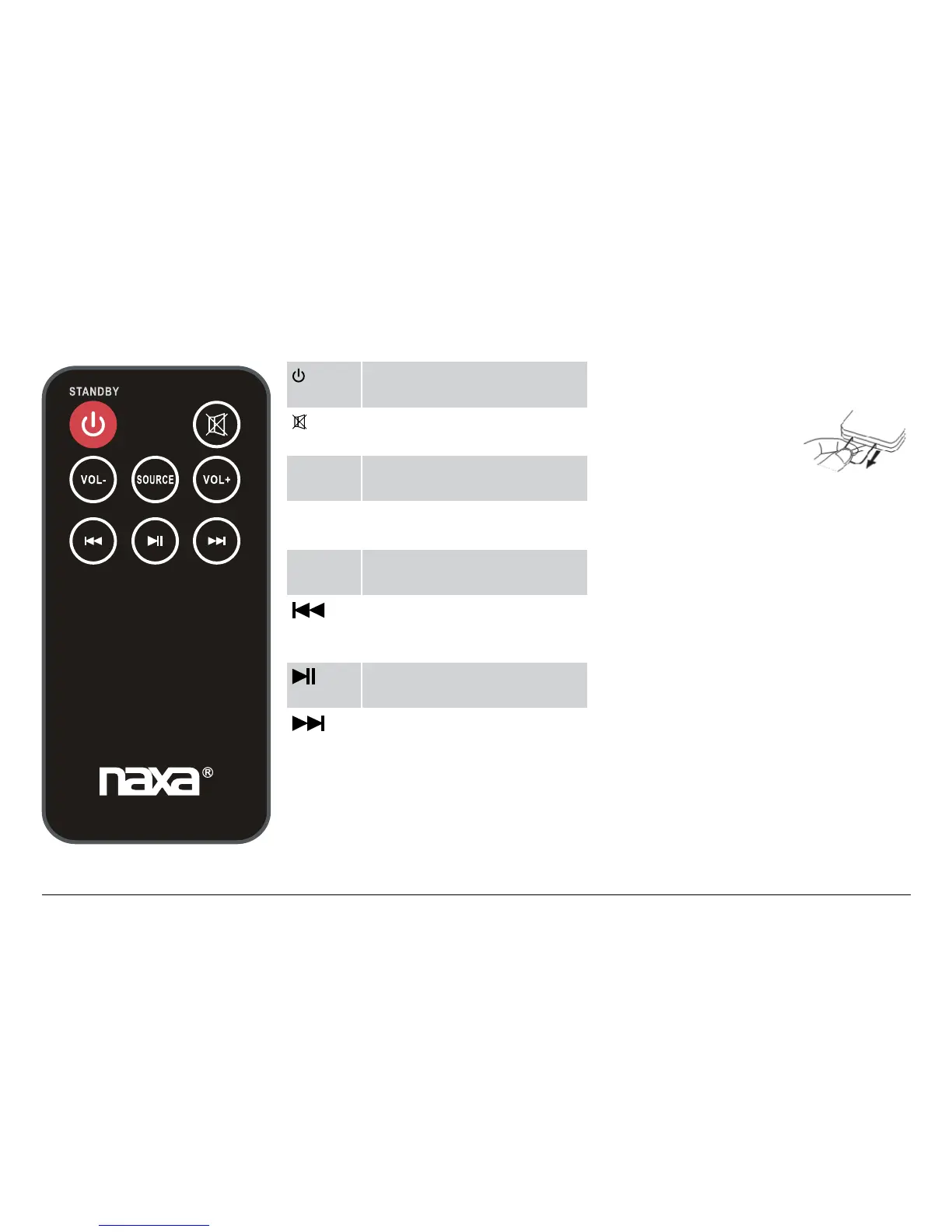
Remote Control
/
STANDBY
Power/standby. Press to turn the
unit on or off (standby).
Mute. Press to temporarily dis-
able or to restore the sound.
VOL– Volume down. Press to decrease
the volume level.
SOURCE Source. Press to change the ac-
tive source mode.
VOL+ Volume up. Press to increase the
volume level.
Previous. Press to skip to the
previous track (Bluetooth
mode).
Pause or resume playback
(Bluetooth mode).
Next. Press to skip to the next
track (Bluetooth mode).
Using the Remote Control
Before using the re-
mote for the rst
time, remove and dis-
card the plastic lm
protector.
Aim the remote control at the front of
the sound bar and then press a key.
⚠L
Obstacles between the unit
and transmitter may pre-
vent the remote control from
working. Direct sunlight, in-
candescent or uorescent
lamps, or any other strong
light shining on the remote
sensor of the unit may pre-
vent the remote control from
working properly.
NHS-2011



 To Next Page