9
Note:
MP3andWMA(WindowsMediaAudio)music
lesaredigitalaudiolesthatarecompressed
to allow more files to be stored. This unit
canplay MP3/WMAand video directlyfrom
files contained on a CD-R/RW, DVD-ROM,
DVD+RW, DVD-RW, DVD+R, DVD-R and
DVD-VIDEO, oranSD cardor USB Device.
Manytypesofsoftware areavailablefor con-
verting audio files into MP3/WMAformats.
Nero or Roxio Easy CD Creator are recom-
mended.ThisunitcanplayMP3(MPEG1,2,
2.5AudioLayer3).However,theMP3record-
ingmediaandacceptedformatsarelimited.
Entering ID3 Tag
ThisunitsupportsID3tagversion2.0.
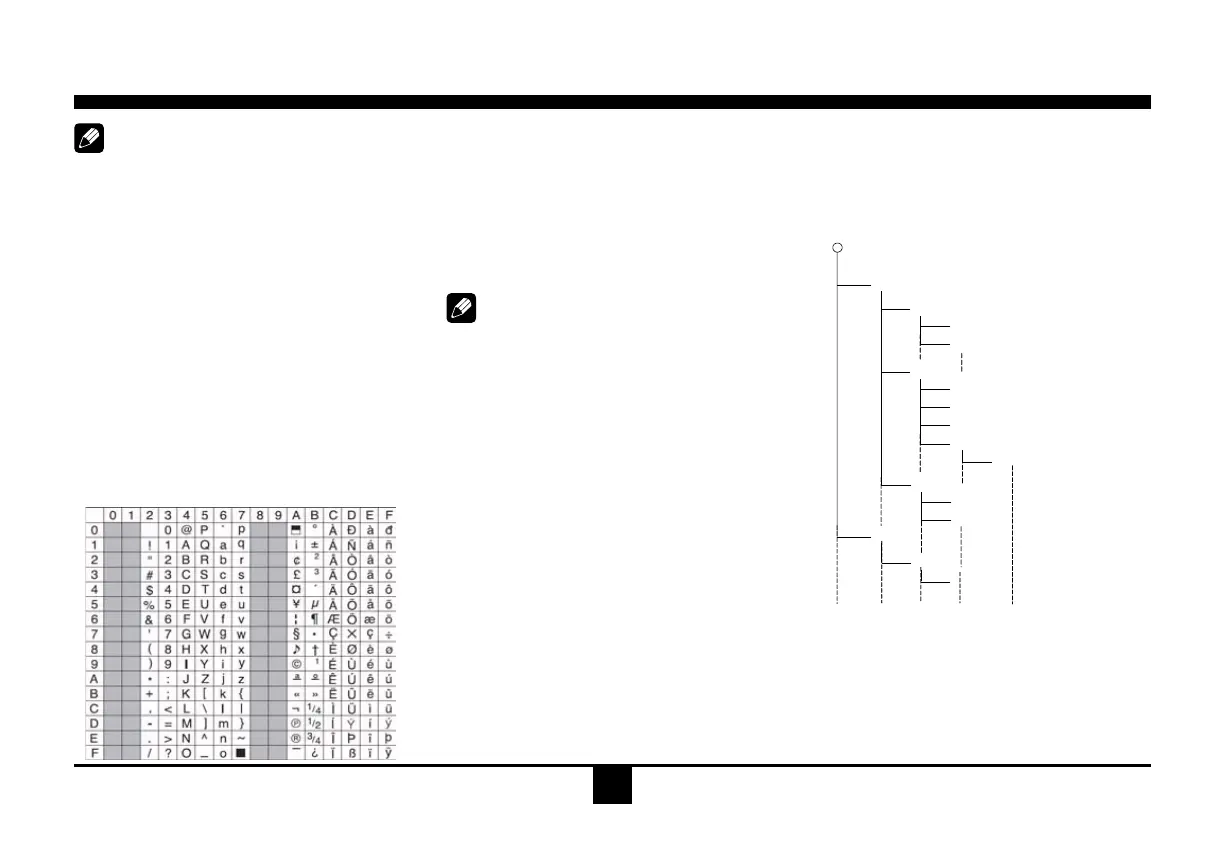
For charactercodes, refertothe tableto the
below.
Entering File and Folder Names
Namesusingthe codelistcharactersarethe
only file names and folder names that can
be entered and displayed. Using any other
character will cause the le andfolder names
tobedisplayedincorrectly.Theunitrecognizes
and plays only files with the MP3/WMA
extension.
Note:
Alenameenteredwithcharactersnotonthe
codelistmaynotplaycorrectly.
Electronic Shock Protection
•10secondsforCD-DA(CDA)
•>45secondsforMP3 recordedat 44.1kHz,
128kbps
•>90secondsforWMA recordedat44.1kHz,
128kbps
Bit Rates
Theunitsupportsbitratesfrom32-320kbps.
MP3 Playing Order
When selected for play, files and folders
(FolderSearch, FileSearchorFolder Select)
areaccessed in theorderin whichthey were
written tothemedia.Asaresult, theorderin
which they are expected to be played may
notmatchtheorderinwhichtheyareactually
played.You may be ableto set the order in
which MP3/WMA files are to be played by
assigning file names beginning with play
sequencenumberssuch as"01" to"99".For
example, amediumwith the following folder/
lehierarchyissubjecttoFolder Search,File
SearchorFolderSelectasshownbelow.
()
0
1
2
♪①
♪②
5
♪⑧
♪⑦
6
7
♪⑨
♪③
3
4
♪④
♪⑤
♪⑥
Layer1 Layer 2 Layer 3 Layer 4 Layer5
○ Root Folder
Folder
♪ File
The player will only recognize three folder
levelsanddoesnotdisplayfolderscontaining
onlyotherfolders.Inthe exampleabove, the
unitwilldisplayfolders3,4,6,and8,butnot2
and7sincetheydonotcontainsincetheydo
notcontainany tracksdirectly.Folder5isnot
recognizedatallsinceitisatthefourthlevel.
Disc Mode


 To Next Page