11
PROGRAM
PROGRAM
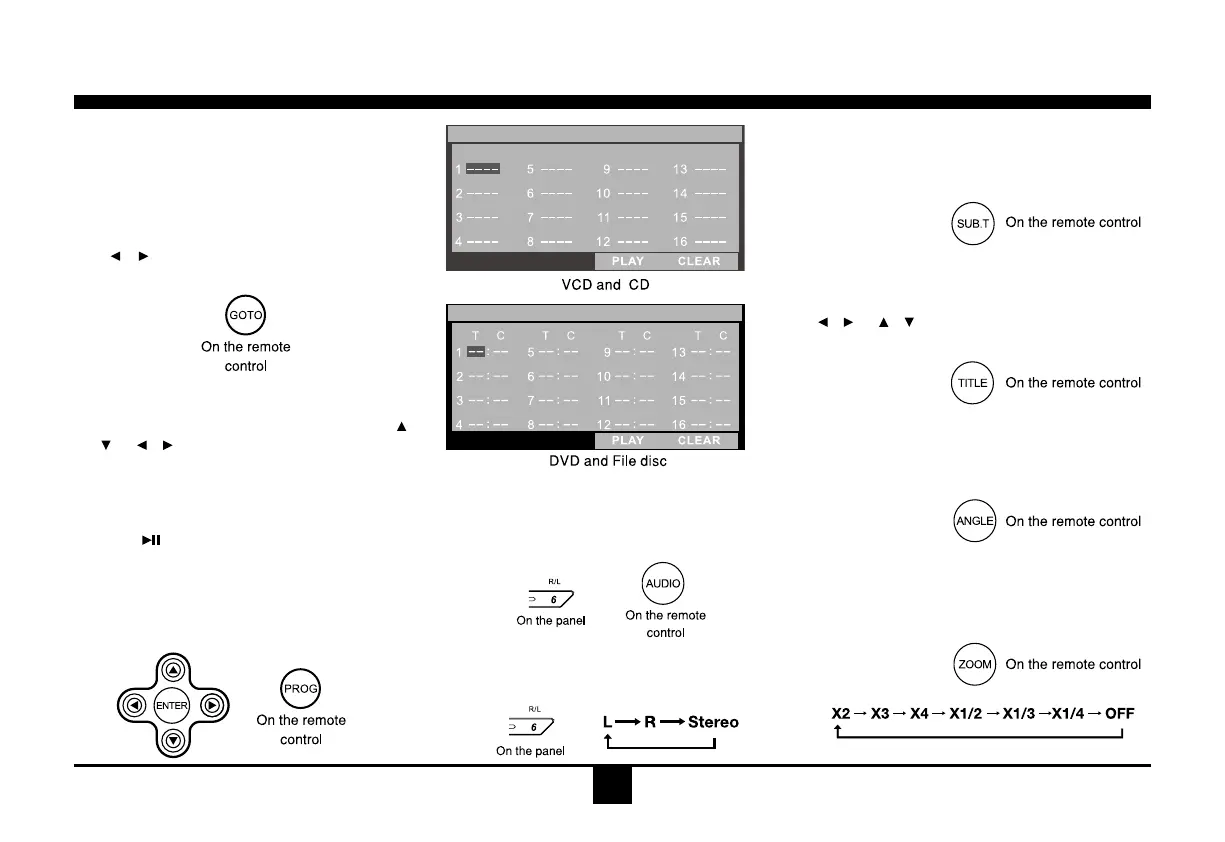
GOTO
Goto desired track/chapter or time point
directly.
Press GOTO button on the remote control,
trackorDVDTitle/Chapterandtimedisplayon
topofthe screen.Currentitemishighlighted.
Use
/ to select desired item. Use digit
button to select number. Press ENTER to
conrm.
Program
- Press PROG toenter program list. Use
/
or / cursor and digitbuttontoenter
number.
For DVD and File disc, select title and
chapternumber.
ForVCDandCD,selecttracknumber.
- Press
to play, or move the cursor to
select"PLAY"andpressENTERtoplay.
- Ifyouwanttodeletethelist,movethecursor
to"CLEAR",pressENTER to deleteallthe
listsetbefore.
- PressPROGagaintoexitprogramplay.
DVD Audio Select
PressAUDIOorR/Ltoselectaudiolanguage
to listen if the DVD has mu ltipl e audio
languages.
VCD Audio Select
PressR/Ltoselectaudiochanneltolisten.
DVD Subtitle Select
PressSUB.T to select the subtitle language
to show if the DVD has multiple language
subtitles.
DVD Title Select
PressTITLEtodisplaytitleorchapterlist,use
/ or / cursorordigitnumbertoselect,
pressENTERtoplay.
DVD Angle Select
PressANGLEtoselectdifferentangletoview
iftheDVDhasmultiple-angleviews.
ZOOM
Press ZOOM button, the picture will be
zoomedaccordingly.
Disc Mode


 To Next Page