Issue 1 NEC America, Inc.
2 - 4 About the Dterm Cordless
S
ECTION
4
H
ANDSET
C
ONTROLS
AND
F
UNCTIONS
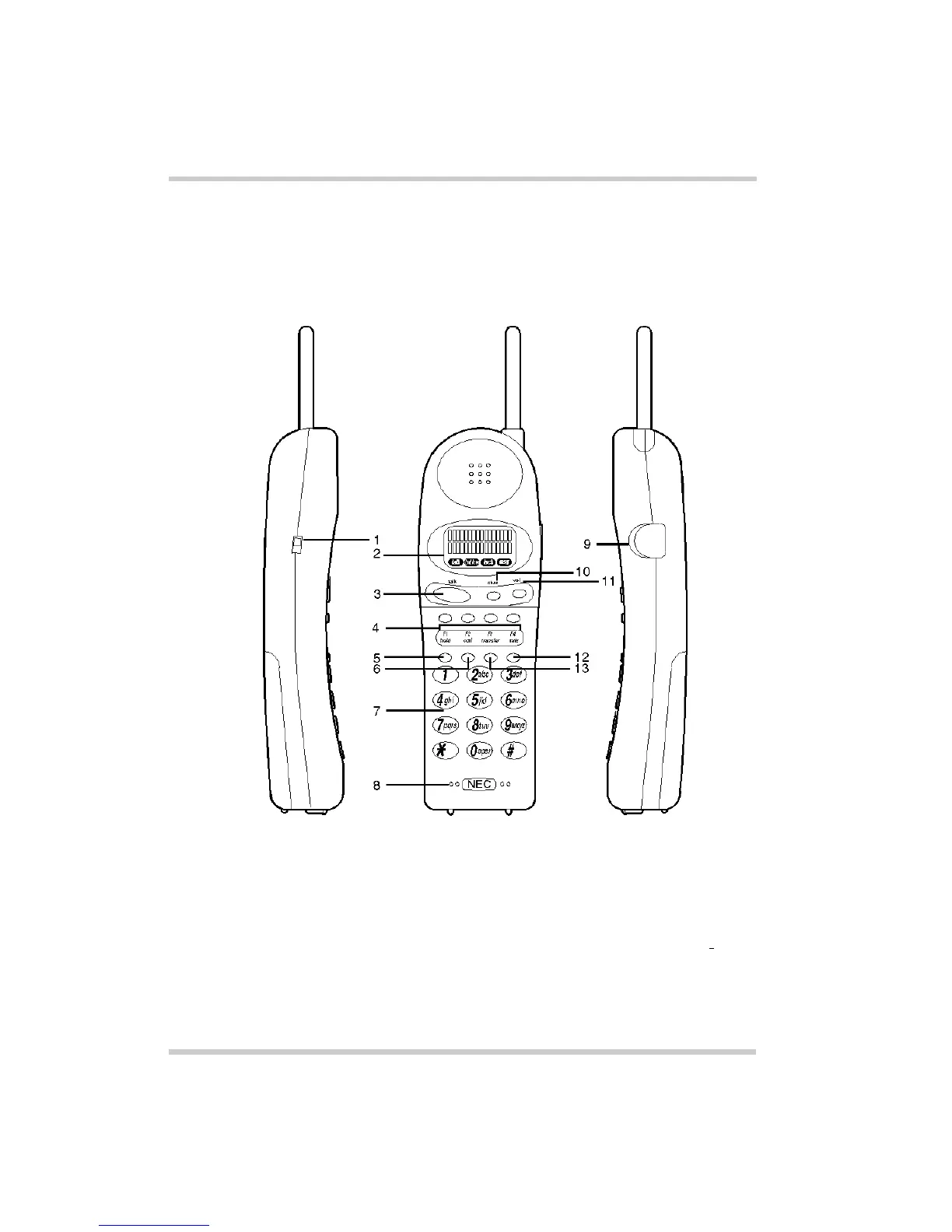
Figure 2-3 Handset Controls and Functions identifies the
functions of the cordless telephone handset.
Figure 2-3 Handset Controls and Functions
1. Ringer ON/OFF Switch 8. Microphone
2. LCD/Icons 9. Handset Jack
3. Talk Key (
talk
) 10. Channel Key (
chan
)
4. Function Keys
F1~F4
11. Volume Key (
vol
)
5. Hold Key (
hold
) 12. Mute Key (
mute
)
6. Conference Key (
conf
) 13. Transfer Key (
transfer
)
7. Dial Pad



 To Next Page