2-11
IN
O
U
T
R
E
M
O
T
E
2
A
C
I
N
A
UD
IO
A
U
D
IO
O
U
T
R
R/
C
r
G/Y
B
/C
b
V
H
/
H
V
R
L
/
M
O
N
O
R
L
/
M
O
N
O
R
L
/
M
O
N
O
L
/
M
O
N
O
D
VI
R
G
B
O
U
T
RG
B 1
RGB
2
V
IDEO
S
-V
ID
EO
A
UD
IO
S
L
O
T
1
S
L
O
T
2
3
IN
O
U
T
RE
M
OT
E 2
A
C
IN
AU
D
IO
AUDIO
O
UT
R
R
/C
r
G
/Y
B
/C
b
V
H
/
H
V
R
L
/
M
O
N
O
R
L
/M
O
N
O
R
L
/M
O
N
O
L
/M
O
N
O
DVI
RG
B
O
U
T
RGB 1
RGB 2
VIDEO
S-VIDEO
AU
DIO
S
LO
T
1
SL
O
T
2
2
1
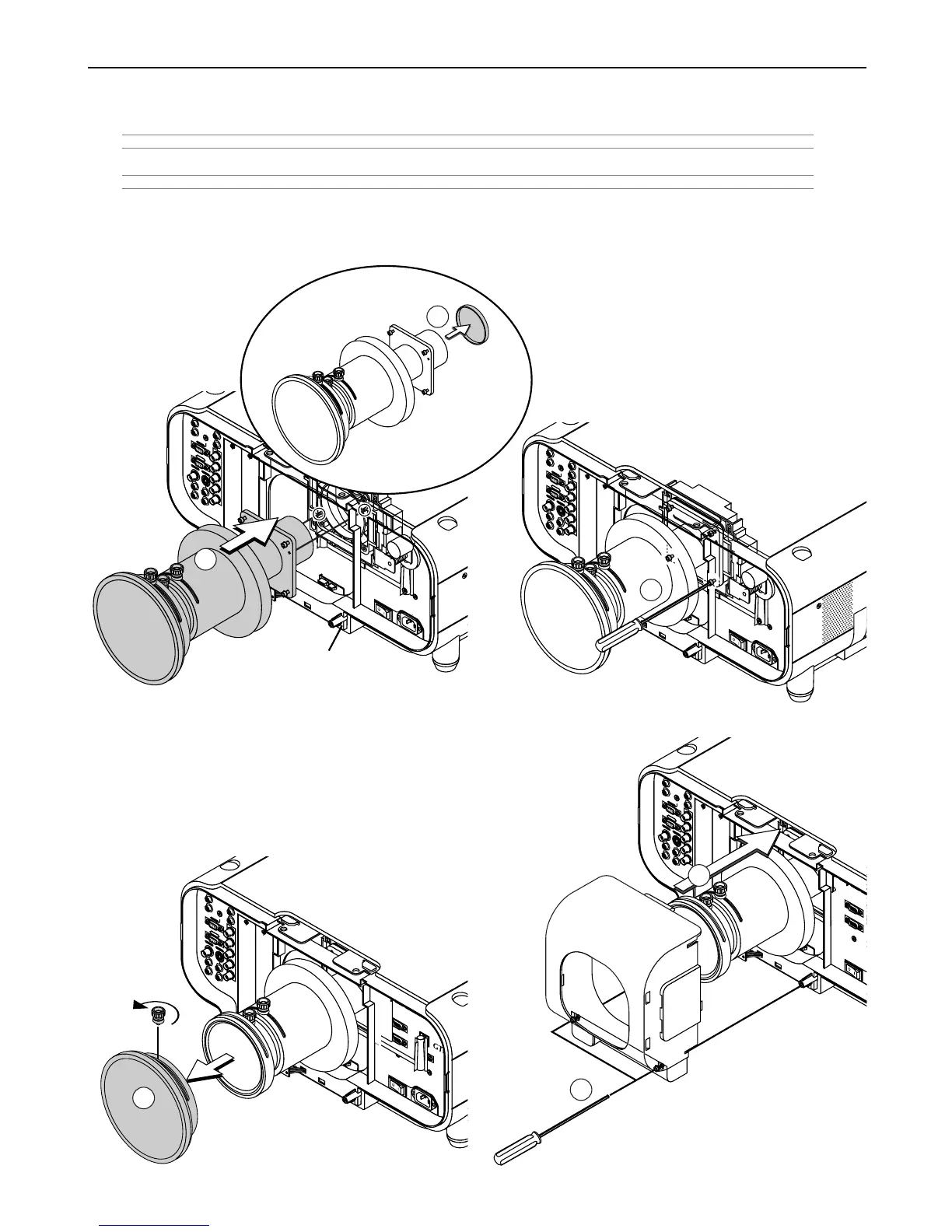
4. Reinstall the lens hood.
q Rotate the knob on the front part of the lens unit in anticlockwise
direction to loosen and remove the front part.
w Insert the lens hood so that the grooves on the 4 corners of the
lens hood are properly lined up with the 4 catches on the projec-
tor.
e Secure the 2 screws using the hexagonal driver.
Lens shift defection switch
2. Installation
3. Mount the lens unit on the projector and connect the extension cable attached to the projector.
q Remove the lens cap from the rear end of the lens unit.
NOTE: Leave the front lens cap for protection while mounting the lens unit.
w Insert the lens unit so that the 4 screws on the lens unit are properly lined up with the 4 holes on the lens mount.
NOTE: Make sure that the lens unit is attached with the knobs facing up.
CAUTION: There is a lens shift detection switch for the moving gears of the lens shift motors used to reduce the risk of pinching fingers.
Do not defeat this feature.
e Secure the 4 screws using the hexagonal driver.
P
C
C
O
N
T
R
O
L
I
N
I
N
O
U
T
O
U
T
S
C
T
R
I
G
G
E
R
R
E
M
O
T
E
2
R
E
M
O
T
E
1
L
A
N
A
C
IN
U
S
B
(
M
OU
S
E/H
UB
)
U
S
B
(
P
C
)
P
C
C
A
R
D
1
2
A
U
D
IO
A
U
D
I
O
O
U
T
R
R/C
r
G
/Y
B/C
b
V
H
/
H
V
R
L
/
M
O
N
O
R
L
/
M
O
N
O
R
L
/M
O
N
O
L
/M
O
N
O
D
VI
R
G
B
O
U
T
R
GB
1
R
GB 2
VID
E
O
S-V
ID
EO
A
UD
IO
S
L
O
T
1
S
L
O
T
2
1
P
C C
ON
TRO
L
IN
O
U
T
SC
T
RIG
GER
US
B
(
MO
USE/HU
B
)
U
S
B
(
PC
)
PC C
A
R



 To Next Page