75
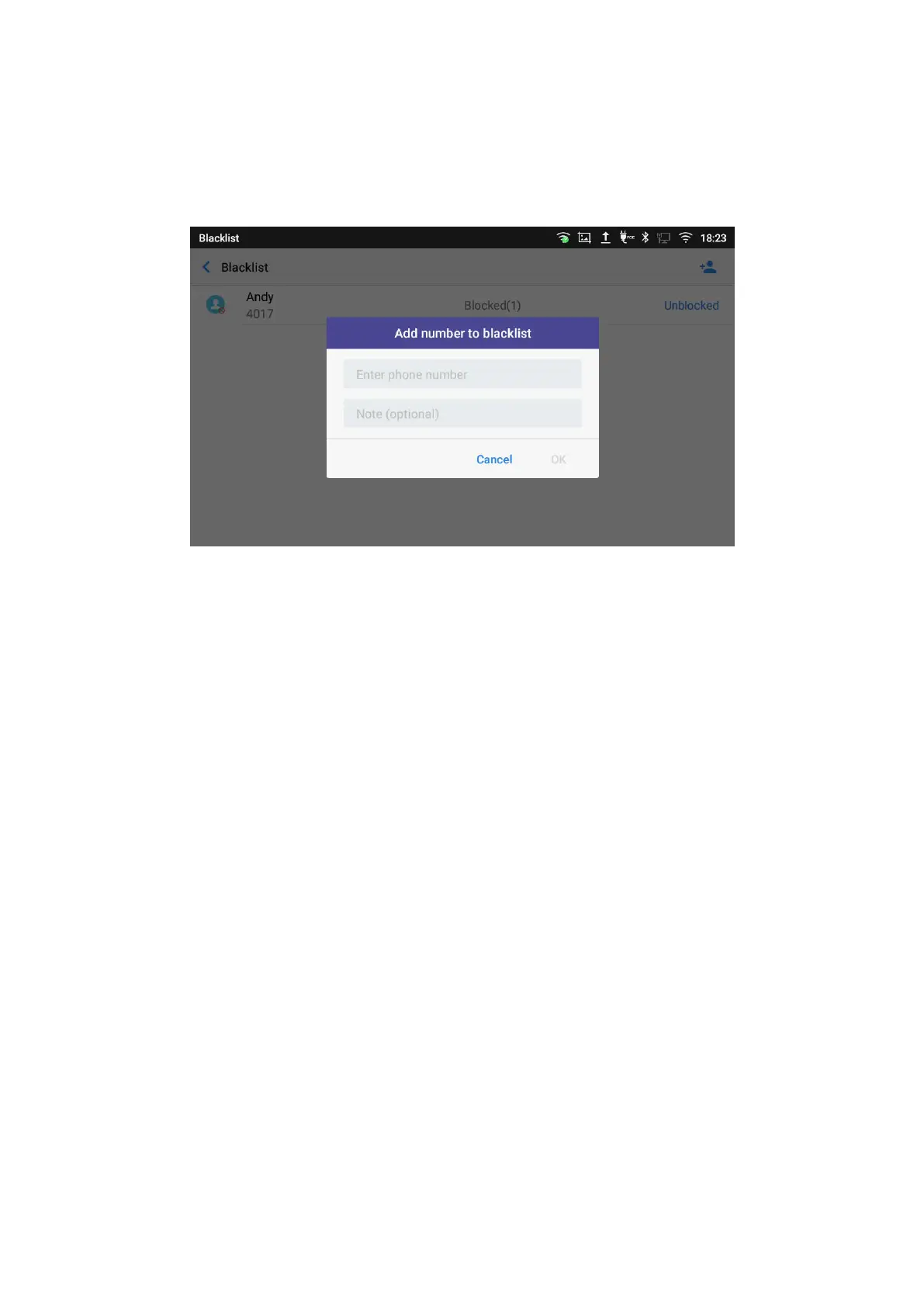
2. The following figure shows manually adding number to blacklist. Once Manually enter the
number option is selected, a window will be prompted for users to enter the phone number in the
first field and name/note in the second field (optional). Tap on OK to finish the adding operation.
Figure 83: Manually Add Number to Blacklist
Edit Blacklist
1. In the blacklist, touch and press the entry for about 2 seconds a prompt allowing changing the note
is displayed
2. Change the note.
3. Tap OK.
Delete Blacklist
Users can Delete/unblock contacts from the black list using two methods:
1. From the black list menu press on “Unblocked” to no longer block the calls from coming from this
contact.
2. From the contacts menu, long press on the contact and press “Remove from Blacklist”.
Intercept anonymous calls
The phone gives the possibility to intercept anonymous calls for each account registered:
1. Enter the harassment interception Menu.
2. Check Intercept anonymous calls as shown on the figure below.
3. Check the account to apply the interception.




 To Next Page