73
5. Installation and Connections
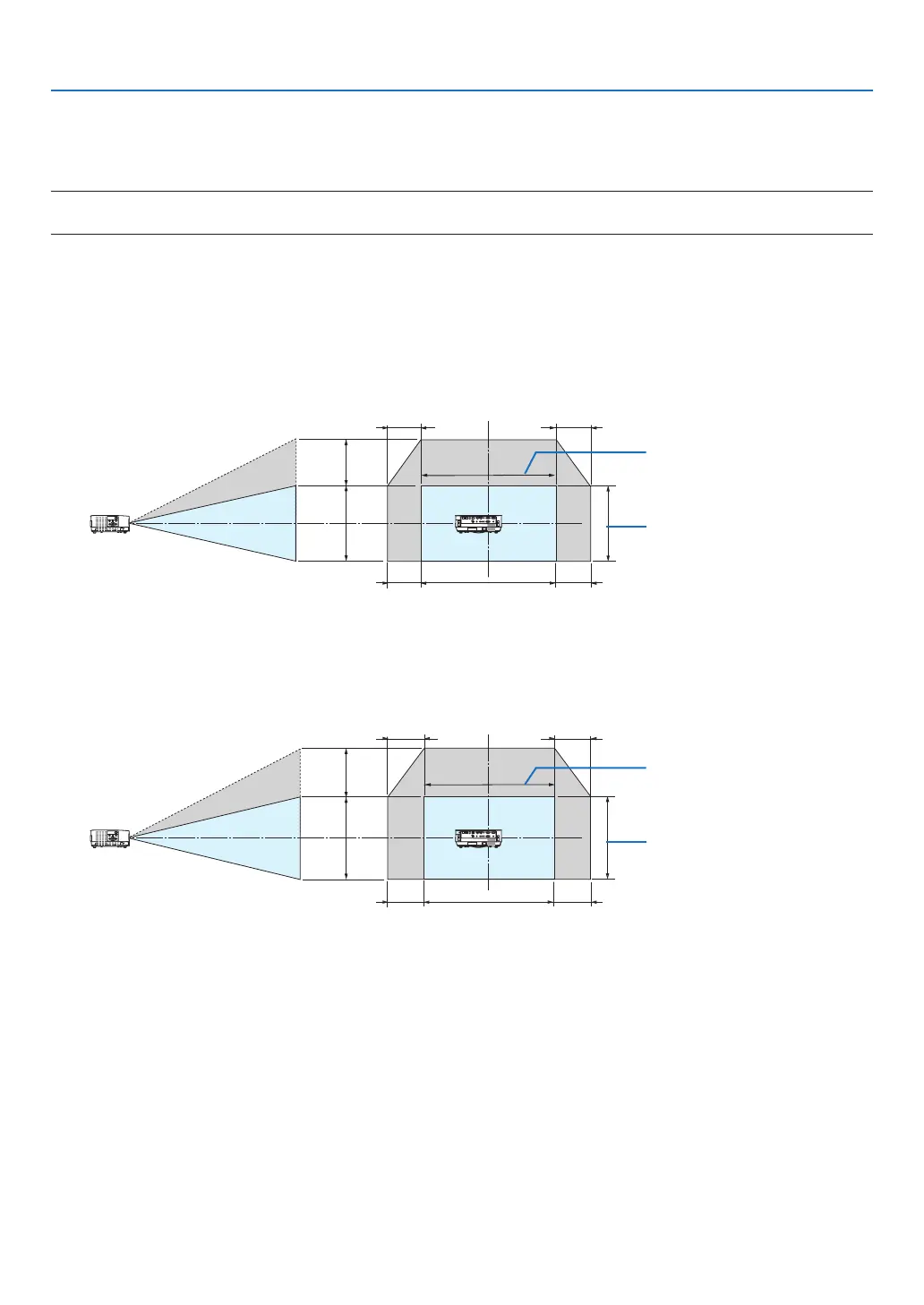
Lens shifting range
Thisprojectorisequippedwithalensshiftfunction(→page17)foradjustingtheimagepositionusingdials.Lens
shiftingispossiblewithintherangeshownbelow.
NOTE:
• Incaselensshiftedvolumeexceedsthebelowillustratedrange,blurandshademayappeararoundendsofprojectedimage.
Legend:V“Vertical”referstothescreenheightandH“Horizontal”referstothescreenwidth.Thelensshiftrangeis
expressedasaratioofheightandwidth,respectively.
[P502H/P452H]
Lensshiftingrange:
Verticaldirection:+62%,−0%
Horizontaldirection:±25%
100%V
62%V
100%H
25%H
25%H
25%H
25%H
Height of projected image
Width of projected image
[P502W/P452W]
Lensshiftingrange:
Verticaldirection:+59%,−0%
Horizontaldirection:±28%
100%V
59%V
100%H
28%H
28%H
28%H
28%H
Height of projected image
Width of projected image
* Thelensshiftrangeisthesameforceilinginstallation.



 To Next Page