7
1. Introduction
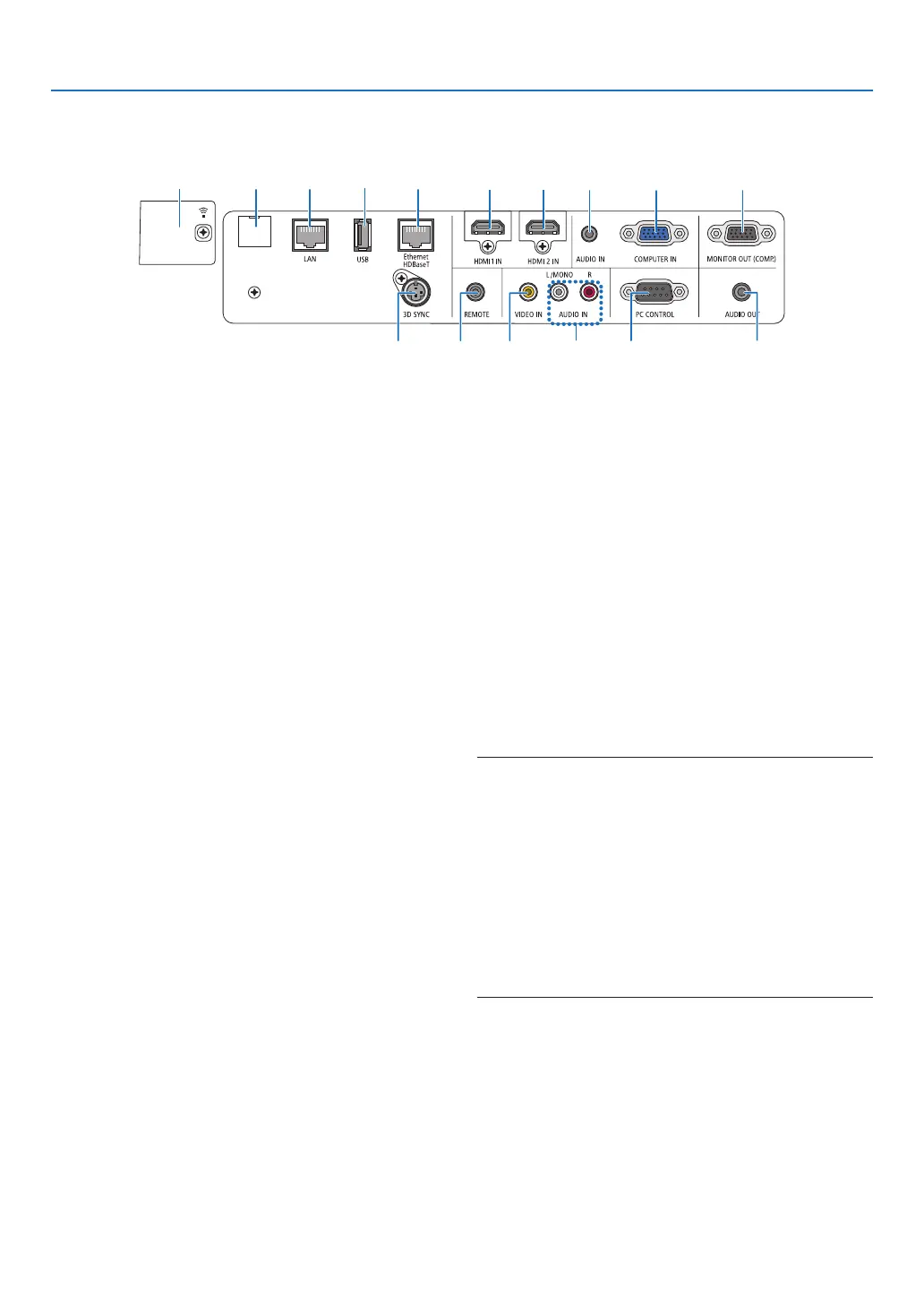
Terminal Panel Features
1. COMPUTERIN/ComponentInputTerminal(Mini
D-Sub15Pin)
(→page75, 79, 81)
2. COMPUTERAUDIOINMiniJack(StereoMini)
(→page75, 79)
3. HDMI1INTerminal(TypeA)
(→page75, 76, 80)
4. HDMI2INTerminal(TypeA)
(→page75, 76, 80)
5. MONITOROUT(COMP.)Terminal(MiniD-Sub15
Pin)
(→page77)
6. AUDIOOUTMiniJack(StereoMini)
(→page77)
7. VIDEOINTerminal(RCA)
(→page78, 81)
8. VIDEOAUDIOINL/MONO,R(RCA)
(→page78)
9. Ethernet/HDBaseTPort(RJ-45)
(→page82, 86)
10.LANPort(RJ-45)
(→page82, 87)
11.USB(WirelessLAN)Port
(→page85)
12.USBPort(TypeA)
(→page89)
13.3DSYNCTerminal(MiniDIN3Pin)
(→page35)
14.PCCONTROL[PCCONTROL]Port(D-Sub9Pin)
(→page137)
Usethis port toconnect a PC or control system.
Thisenablesyoutocontroltheprojectorusingserial
communicationprotocol.Ifyouarewritingyourown
program,typicalPCcontrolcodesareonpage137.
15.SERVICEPort(USBTypeB)
(forservicepurposeonly)
16.REMOTEConnector(StereoMini)
Use this connector for wired remote control of the
projectorusingtheNECremotecontrolforPX750U/
PH1000U/PH1400U/PX602UL/PH1202HLseries.
Connect the projector and optional remote control
usingacommerciallyavailablewiredremotecontrol
cable.
NOTE:
• WhenaremotecontrolcableisconnectedtotheREMOTE
connector,infrared remote control operations cannot be
performed.
• When [HDBaseT] is selected in the [REMOTESENSOR]
andtheprojectorisconnectedtoacommercially-available
transmissiondevicethatsupportsHDBaseT,remotecontrol
operationsininfra-redcannotbecarriedoutiftransmission
ofremotecontrolsignalshasbeensetupinthetransmission
device.However,remotecontrolusinginfraredrayscanbe
carriedoutwhenthepowersupplyofthetransmissiondevice
isswitchedoff.
1 523 4
716 1413
6
9101511
12
8



 To Next Page