87
5. Installation and Connections
TIP:
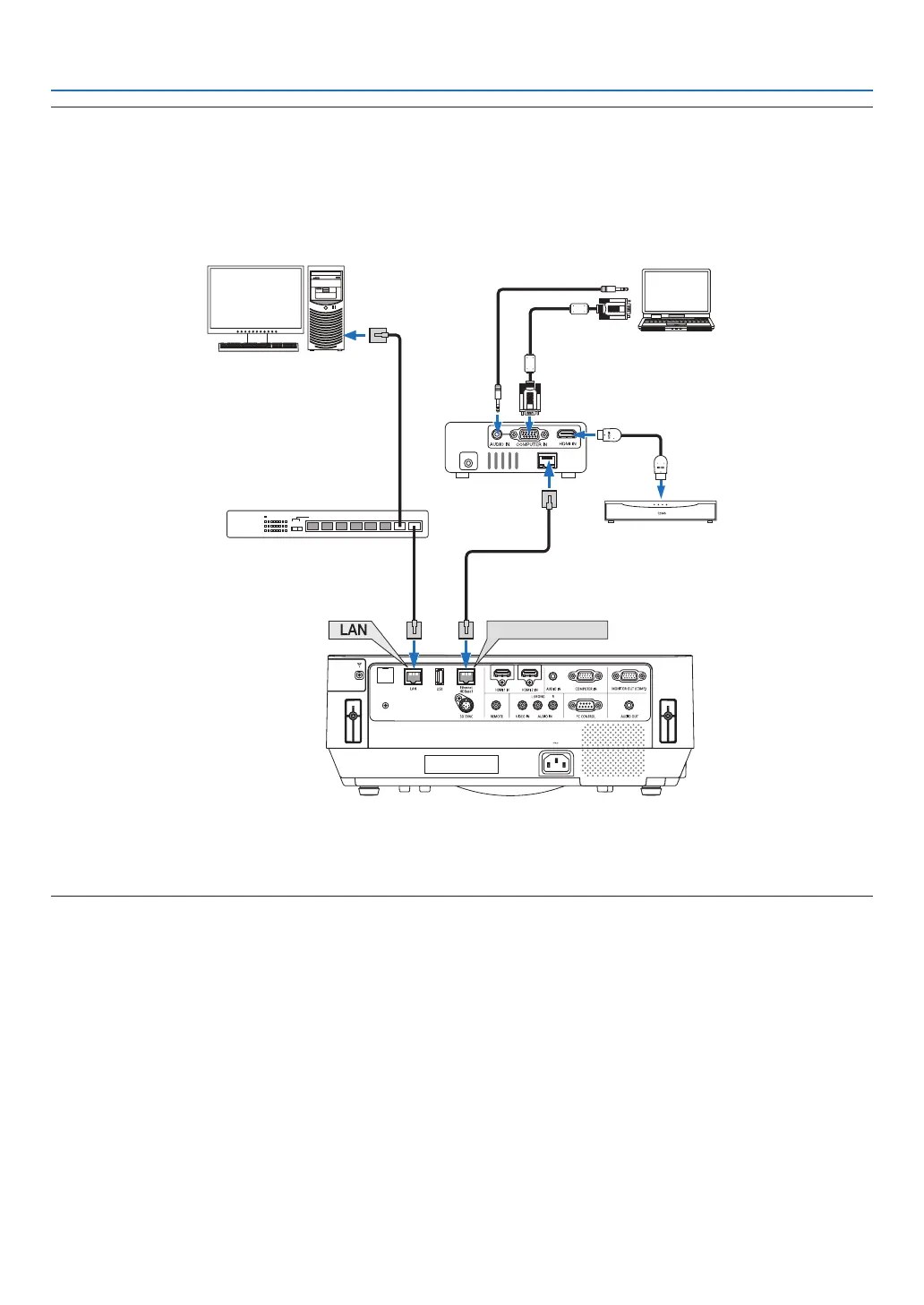
• Withtheprojector’sEthernet/HDBaseTport,remotecontrolisnotavailablewhentheprojectorisinthestandbymode(serial
communicationsisnotavailable).(Remotecontrolbecomesavailablewhentheprojector’spowerison).The2(two)methods
belowcanbeusedtoturnontheprojector’spowerwhenitisinstandbymode.
1.Theprojectorcanbeoperatedbyconnectingthecomputerandprojectortothenetwork(ontheprojector,usingtheLANport
andPCControlUtilityapplicationwith[STANDBYMODE]setto[NETWORKSTANDBY](→page101).
Ethernet/HDBaseT
DC IN
HDBaseT
Computer (for projector control)
Computer (for output)
Example of a transmitter
Switching hub, etc.
VideodevicewithHDMIoutput
2.TheprojectorcanbeoperatedbyRS232Cserialcommunication(Onthisprojector,usethePCCONTROLterminalandthe
applicationsoftware,PC ControlUtility,andselect [PCCONTROL]for the[SERIALPORT])with[STANDBY MODE]setto
[NETWORKSTANDBY].



 To Next Page