AP4.9 Function settings
AP4-18
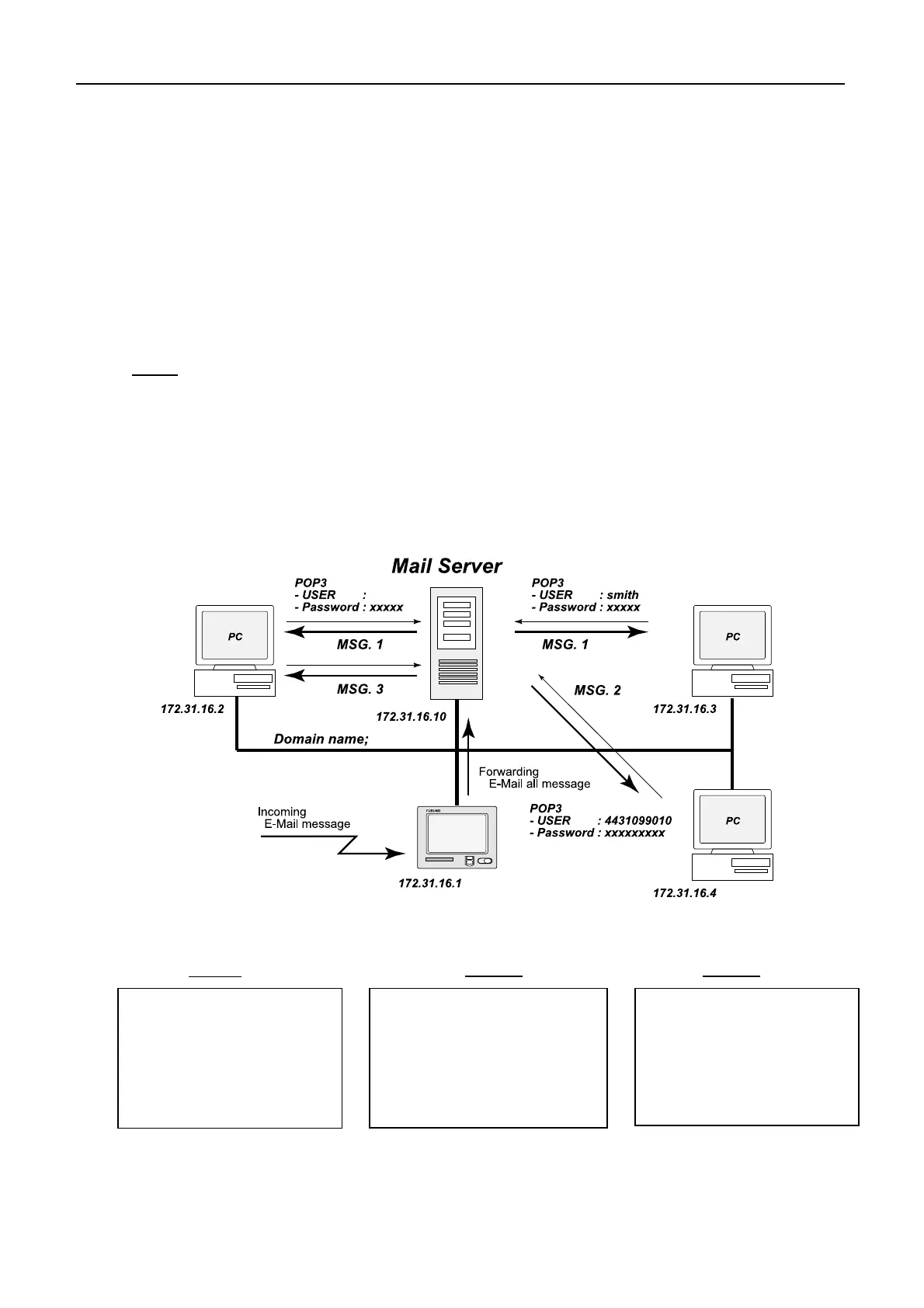
AP4.9.4 Selective forwarding
This function is used by the sender when sending the message. Make sure that
all senders know how to write the keyword and the mail address.
The message can be forwarded to the address which appears just after a keyword.
For example, if the keyword is /+forward+/ and the address is
Note)
1) Do not enter a space between the keyword and the mail address.
2) Up to 10 mail address can be entered.
- Mail server IP address : 172.31.16.10
- LAN domain name
- Mail address to forward to
- Keyword : /+forward+/
To: ****@***.***
Subject:
……
..
Test mail
This is test message
……
To: ****@***.***
Subject:
……
..
Test mail
This is test message
……
To: ****@***.***
Subject:
……
..
Test mail
This is test message
……
MSG.1
MSG. 3
MSG. 2
nera_c@ship.nera.co.jp,
/+forward+/nera_c@ship.nera.no is typed on the top of the message.
: ship.nera.no
: nera_c@ship.nera.no (IP Address: 172.31.16.2)
Nera
ship.nera.no
Nera C
/+forward+/nera_ c@ship.nera.no
/+forward+/smith@ship.nera.no
/+forward+/443109910@ship.nera.no


 To Next Page