AP4.9 Function settings
AP4-14
AP4.9 Function settings
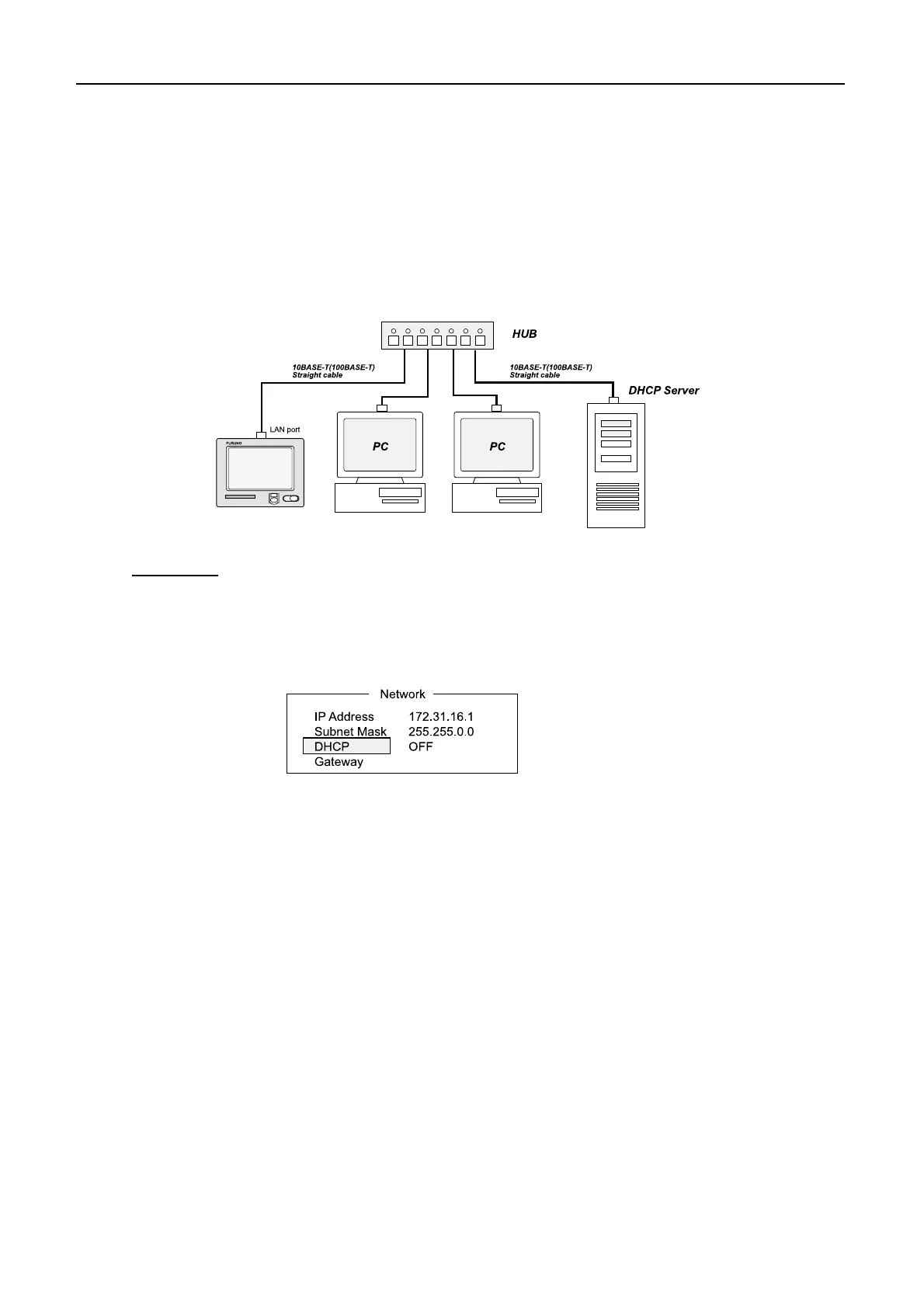
AP4.9.1 DHCP
automatically assigned by following steps below.
Procedure
6. Press [Esc] to show [Update].
8. Press [Esc]. The system automatically restarts and new settings are loaded.
“Ping” command. See page AP4-32.
Nera C
When a DHCP server is connected to the LAN, IP address and subnet mask are
After setting, check the connection between Nera C and PC by using
9. Check IP address allocated to Nera C after setting.
1. Press [F8][2] to open "Sy stem Setup" menu.
3. Select"Network", followed by [Enter].
4. Select"DHCP", followed by [Enter].
2. Select "Network Setup", followed by [Enter].
5. Select "ON", followed by [Enter].
7. Select "Yes", followed by [Enter]. The message "Press ESC key to Restart
Nera C." Appears.


 To Next Page