AP4.12 Connection check
AP4-32
AP4.12 Connection check
below. When the message “Request time out.” appears, check the network connection
This command is only available on the PC.
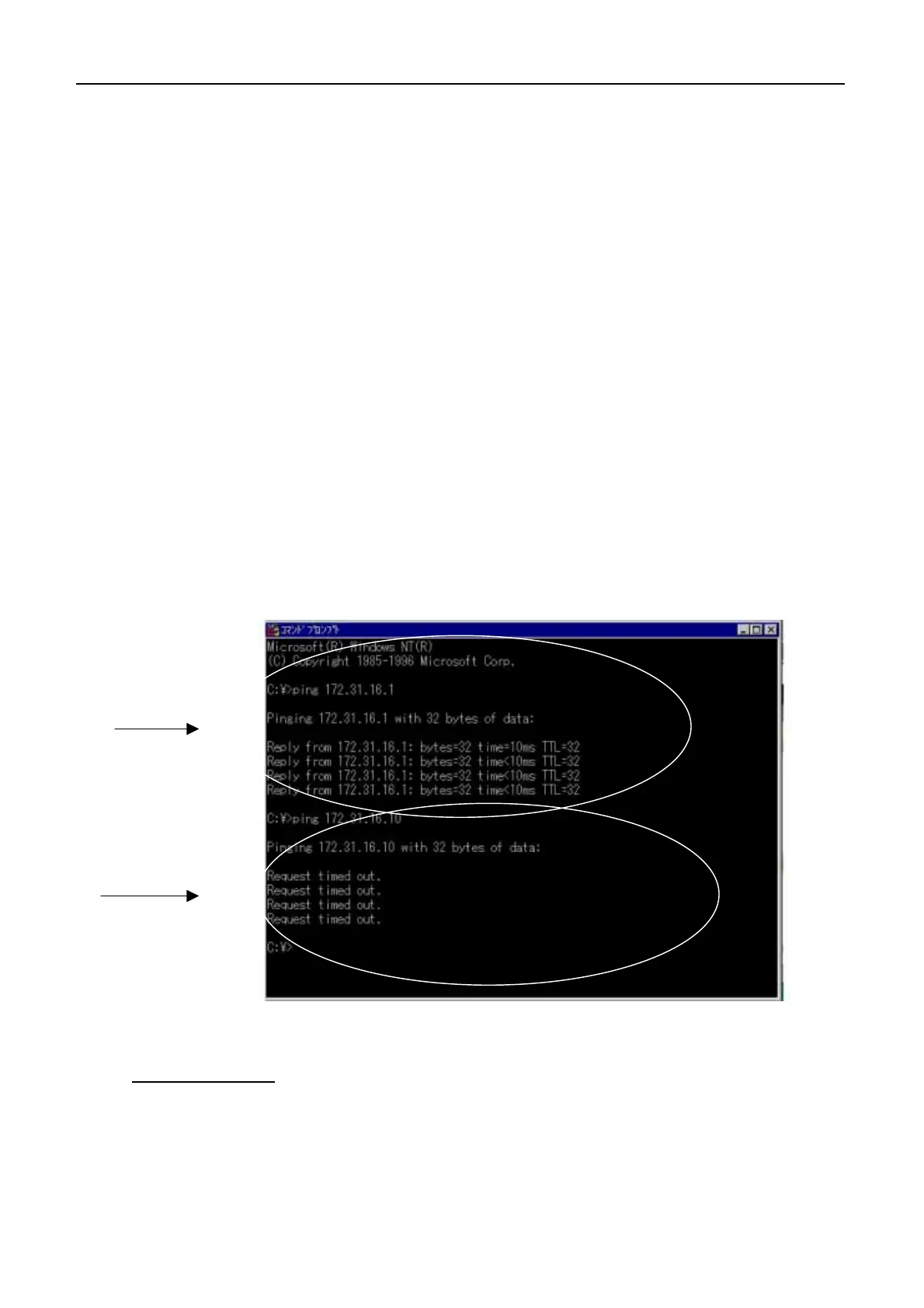
Example of reply message:
Reply from 172.31.16.1: bytes=32 time=10ms TTL=32
Reply from 172.31.16.1: bytes=32 time<10ms TTL=32
No reply message:
Request time out.
Set “Device” to 10 Mbps and Half Duplex when the LAN card is 100 Mbps.
Other commands
- ipconfig /all : Displays all commands about TCP/IP
- netstat –a : Displays all active TCP connections and the TCP and UDP ports on
which the computer is listening.
Replay message
No reply message
Ping command is used for checking the connection between Nera C and the PC.
Type “ping” and IP address of Nera C in “Command prompt” on the PC. For
example, when IP address is “172.31.16.1”, type “ping 172.31.16.1”. When Nera C
is connected to the PC correctly, the replay message (Reply from -) appears as
and IP address of Nera C.
AP4.12.1 Checking by Ping command
The Nera C LAN port specification is 10 Mbps and Half duplex.


 To Next Page