UX2000 SBC XO SIP Trunk Lync Server 2010 Configuration Guide
15
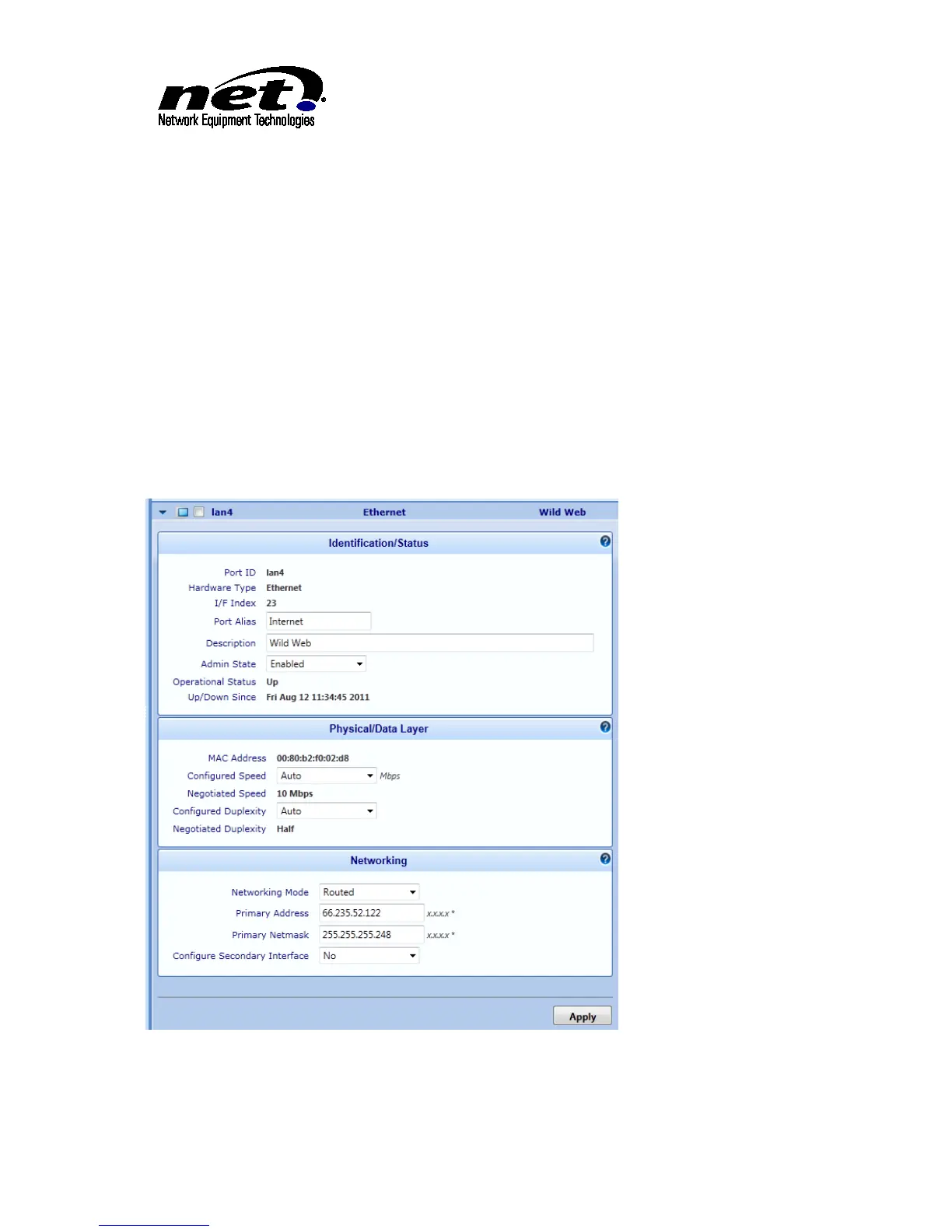
Port Alias: Name for the Ethernet Port
Description: Provide a description of the Ethernet Port
Configured Speed: Leave this at ‘Auto’ unless the Ethernet port will be connected to a device that
can not automatically negotiate the highest speed
Configured Duplexity: Leave this at ‘Auto’ unless the Ethernet port will be connected to a device
that can not automatically negotiate the port duplex settings
Networking Mode: Select ‘Routed’ from the drop down
Primary Address: Supply the IP Address assigned to the UX2000 SBC
Primary Netmask: Supply the Netmask associated with the IP Address of the UX2000 SBC
Configure Secondary Address: Ensure this is set to ‘No’
Click ‘Apply’ to complete the configuration dialog.
Figure 8 Ethernet Port Configuration



 To Next Page