30
1073OPX and Dante Controller 1
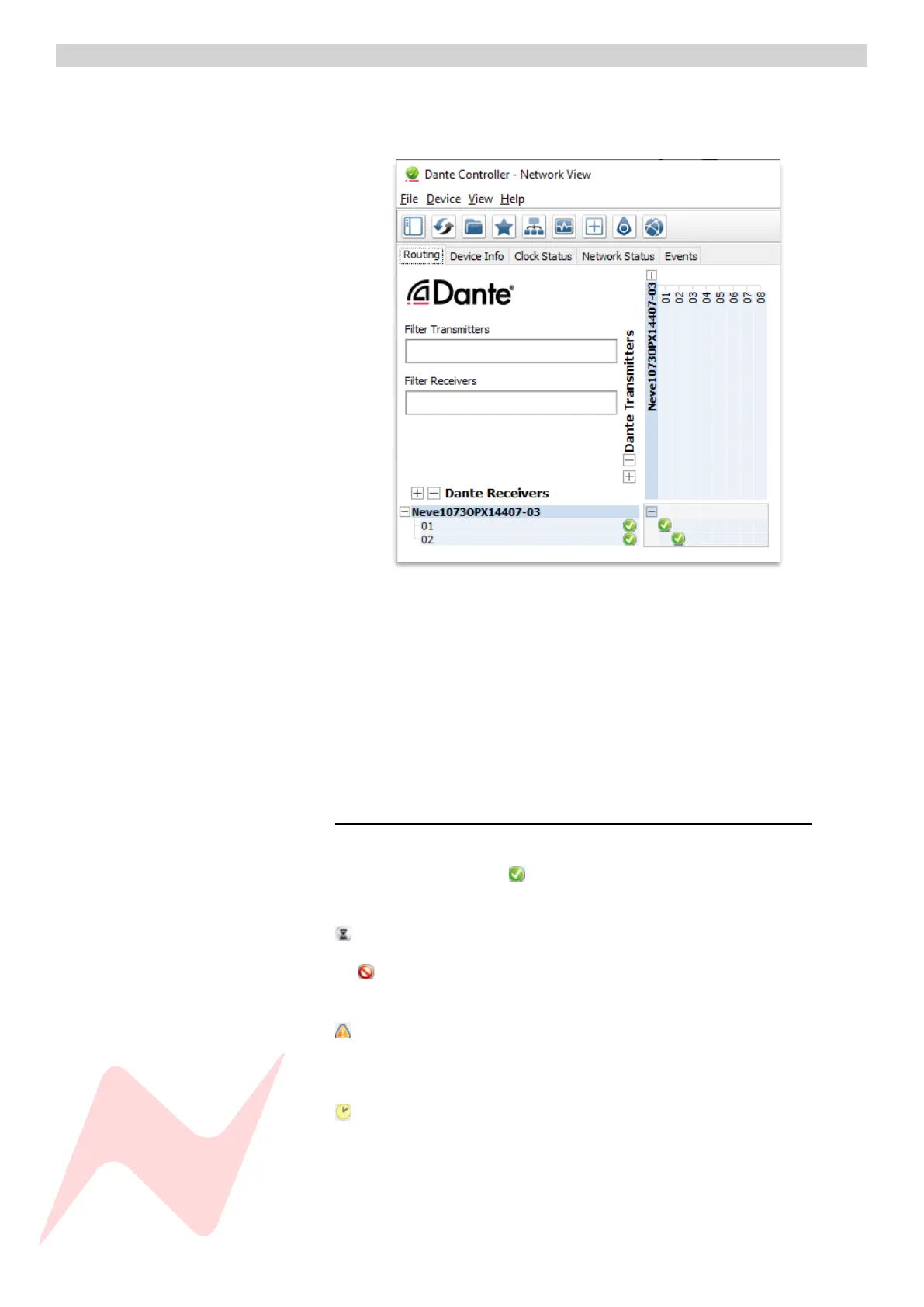
The Dante controller software allows users to route any of the 1073OPX
audio paths to any available network audio device via the simple routing
matrix on the main screen.
This window uses a matrix with horizontal and vertical tabs to connect units
together, active connections are called subscriptions.
The horizontal tab shows transmitters, these are digital outputs from your
unit, The 1073OPX has 8 available transmitters, one for each preamp
output.
The vertical tab shows receivers, these are digital inputs into your unit, the
1073OPX has 2 available receivers DMON Left and DMON Right.
Making Connections 1
Connections (subscriptions) are made by clicking the matrix boxes and are
active when a green tick (subscribed) appears in the connection box.
Audio to and from the 1073OPX will now pass through to its routed location.
(In Progress) indicates a subscription in progress.
An (Error) symbol indicates a failed connection. This could be for a
number of reasons. See Troubleshooting page.
(Warning) Indicates an unresolved subscription. Typically, because the
transmitting device is not visible on the network (or because the
transmitting device is switched off or removed from the network).
(Pending) Indicates that the device is part-way through setting up a
subscription.


 To Next Page