Page 25
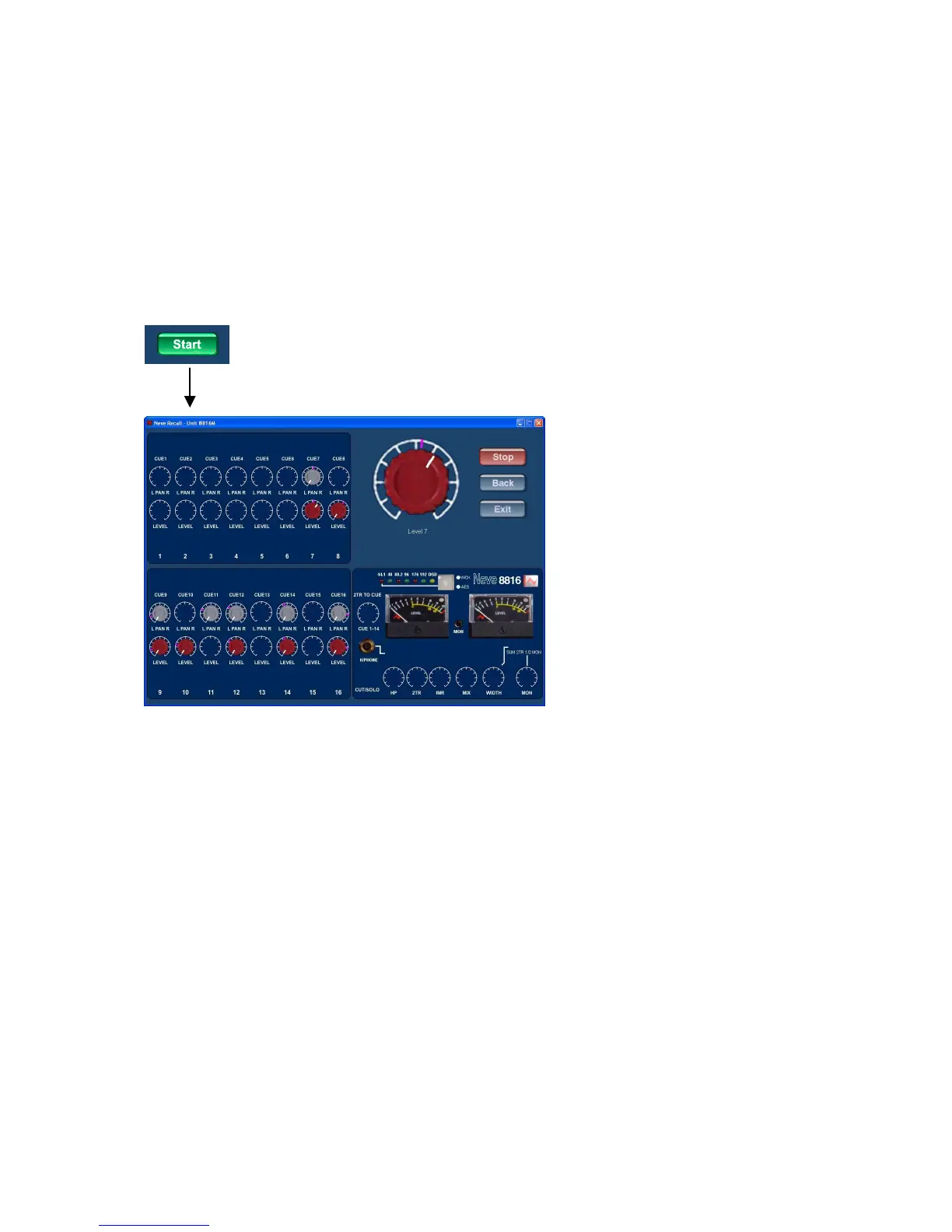
loaded onto the Recall screen. Selecting the green start button will activate Recall.
Switch settings will be loaded automatically, pan and level controls will need to be
reset manually.
If there is more than one unit within the Recall file then the first one loaded will be the
first one shown on the 'tool tip'.
Resetting pans and levels
Active Recall Screen
Select Start. Once activated the Recall screen is intuitive, resetting the controls is
made as easy as possible for the user, by automatically going to the first control to be
reset and ignoring controls that do not need resetting.
The control to be reset is enlarged and named in the top right corner of the screen. A
purple line on the rosette shows the required reset position, a white line on the knob
indicates the current position. Rotate the knob unit the white pointer lines up with the
purple line to reset the control.
When the positions match the level or pan control that has been reset will go blank
and the screen will automatically display the next control. When the last control has
been reset, confirmation is displayed to the user with the message "Unit Reset".


 To Next Page