EasyManua.ls Logo

Nexigo Aurora Pro - Adjusting the Angle Slightly; Keystone Correction

Nexigo Aurora Pro
52 pages
Print Icon
To Next Page IconTo Next Page
To Previous Page IconTo Previous Page
Loading...
EN 19
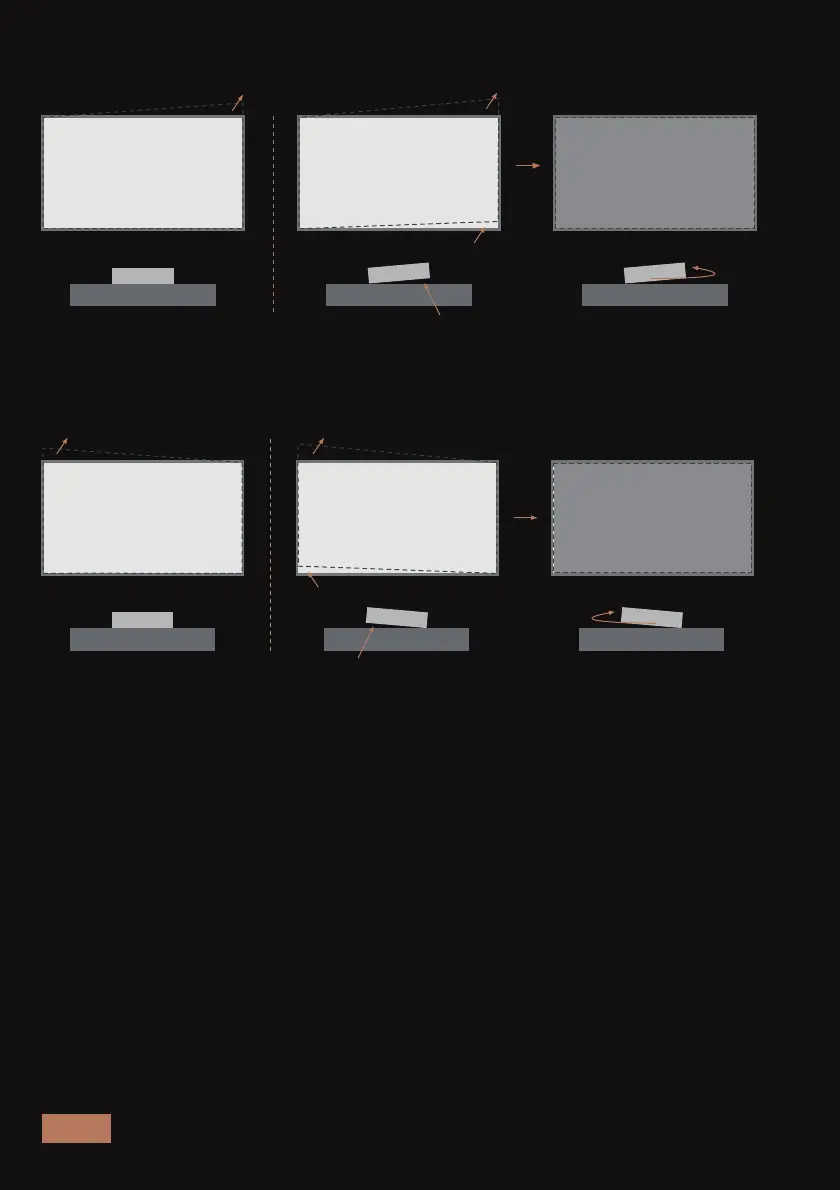
KEYSTONE CORRECTION
If the projection shape is still not right after using the above methods,
you can use the keystone correction function to adjust it. Press the Menu
button on the remote control and navigate to Display > Keystone
Correction to enter the correction mode.
Problem / Issue:
The image is angled at
the upper left corner.
1. Raise the left side
of the projector.
2. Rotate the
projector clockwise.
ADJUST THE ANGLE SLIGHTLY
Problem / Issue:
The angle is at the
upper right corner.
2. Rotate the projector
counterclockwise.
1. Raise the right foot
of the projector.

Other manuals for Nexigo Aurora Pro

Related product manuals